


 視頻轉換大師
 屏幕錄影大師
 影片修復
影片修復
 安全下載
安全下載你能用影片製作鈴聲嗎以及如何應用它
為智慧型手機使用者設定自己喜愛的鈴聲,一直以來都是非常熱門的操作。每當你聽到自己喜歡的音樂,與手機之間的連結也會變得更愉悅。隨著科技的發展,人們可選擇的鈴聲範圍大幅擴大。現在,我們不僅可以自行錄音、下載喜愛的歌曲,甚至還能將影片中的音訊擷取出來,當作來電鈴聲使用。這個操作相當簡單,而且有許多工具可以幫忙完成。那麼,我們該如何在眾多工具中做選擇呢?接下來,我們會為你提供一份詳盡的<strong>將影片製作成鈴聲</strong>教學。不論你是 Android 還是 Apple 使用者,都能在其中找到適合自己的方法。

第 1 部分。
在開始之前,我們先考慮一下將影片設定為鈴聲的可行性。答案當然是肯定的。一般來說,您需要從影片中提取音訊並將其轉換為手機支援的鈴聲格式才能開始。您也可以將此行為的本質視為將檔案從視訊格式轉換為音訊格式。專業的音訊和視訊編輯軟體和格式轉換器可以幫助您免費將影片轉換為鈴聲。需要注意的是,不同系統的手機支援的鈴聲格式也不同,在開始操作之前,您需要確保已經查詢過您的裝置支援的音訊格式資訊。
第 2 部分:用影片製作鈴聲
在知道可以把影片做成鈴聲之後,我們需要挑選合適的工具來完成這項工作。我們強烈建議你試試 FVC 精選的<a href='/video-converter-ultimate/'>Video Converter Ultimate</a>。這是一款功能完善的音訊與影片轉檔軟體,可以讓你單獨編輯影片中的音訊,調整音樂音量、音效、音軌等。如果音訊有延遲,也可以藉由它來調整。目前它支援上百種格式,代表它可以將你的影片轉成適用於任何智慧型手機的格式,你不會遇到相容性問題。透過硬體加速技術,它能以高達 30 倍的速度轉檔任何檔案。在處理過程中,不會造成音質損失,你的隱私也不會受到侵犯。
在了解 FVC Video Converter Ultimate 的整體概念後,我們需要了解如何實際應用它來將影片變成鈴聲。接下來我們將從iPhone和Android手機的角度為您剖析詳細步驟。
將影片製作為 iPhone 鈴聲
首先,我們先來說明如何<a href='/video-audio-converting/make-ringtone-for-iphone/'>為 iPhone 製作鈴聲</a>。我們需要先了解的是,目前 iPhone 支援的鈴聲格式為 M4R。了解之後,就可以開始操作。
<span>步驟 1</span>.先在電腦上下載你想轉換的影片,同時在裝置上安裝 FVC Video Converter Ultimate。
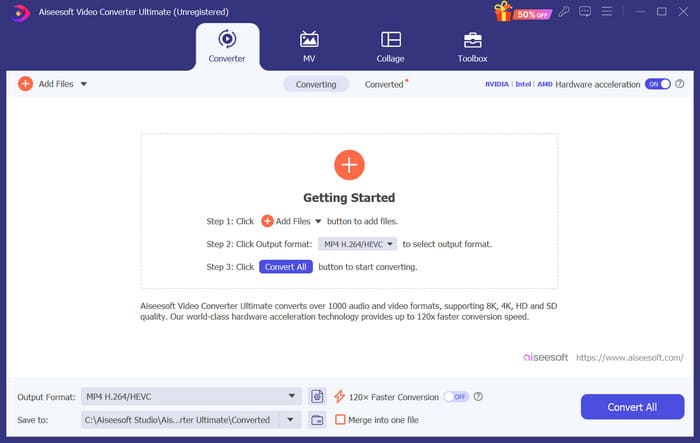
<span>步驟 2</span>.將影片轉換為 M4R 格式。要執行這個操作,請先點擊<span>新增檔案(Add Files)</span>上傳你的影片。
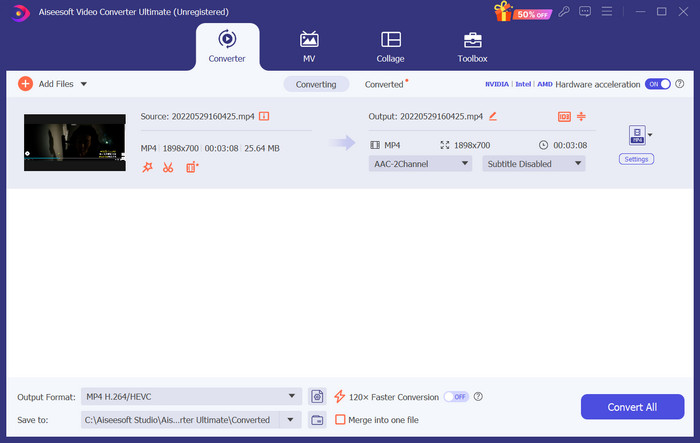
<span>步驟 3</span>.展開<span>輸出格式(Output Format)</span>旁邊的選單。在這裡你可以找到所需的格式。
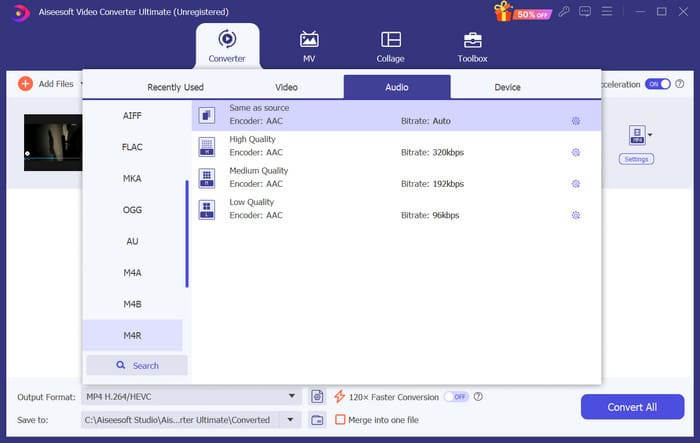
<span>步驟 4</span>.點擊<span>音訊(Audio)</span>,在所有選項中選擇<span>M4R</span>。
<span>步驟 5</span>.接著,點擊<span>全部轉換(Convert All)</span>匯出 M4R 音訊。
<span>步驟 6</span>.接下來,將已轉換好的影片再次上傳到程式中。如果你想裁剪音訊檔,在介面中點擊<span>剪輯(Cut)</span>。若想調整音軌或音量,請點擊<span>編輯(Edit)</span>。
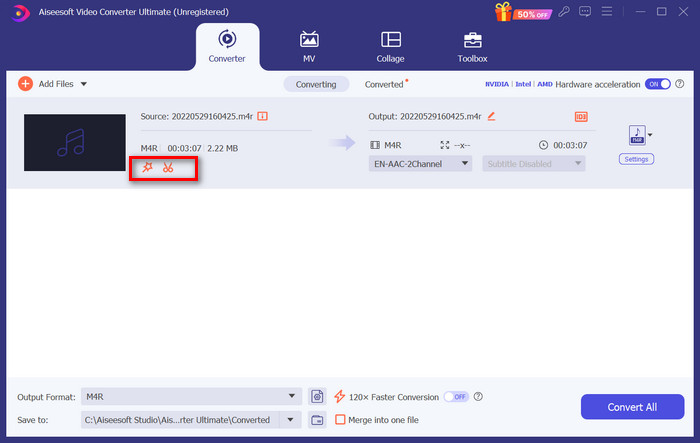
<span>步驟 7</span>.最後,再次點擊「全部轉換(Convert All)」以取得你剪輯完成的 M4R 鈴聲。
將影片製作為 Android 鈴聲
如果您想將影片轉換為 Android 手機鈴聲,請考慮將影片檔案轉換為 MP3、M4A、WAV 或 OGG。
以下是將影片轉換為鈴聲所需執行的操作。
<span>步驟 1</span>.在電腦上下載並安裝 FVC Converter Ultimate,並準備好要轉換的影片。
<span>步驟 2</span>.點擊<span>新增檔案(Add Files)</span>,將目標影片上傳到平台。
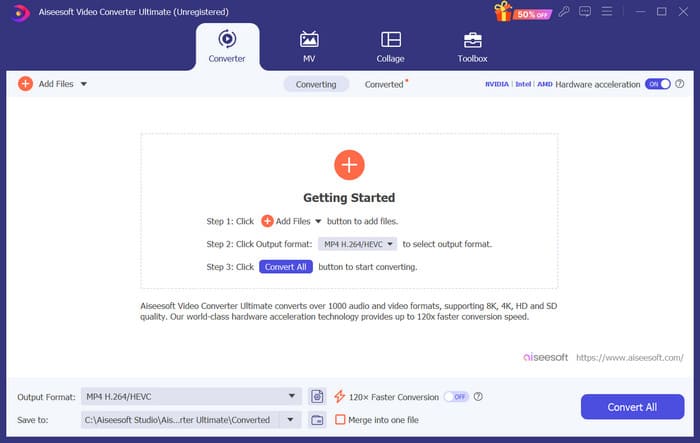
<span>步驟 3</span>.展開<span>輸出格式(Output Format)</span>旁的格式清單。
<span>步驟 4</span>.點擊<span>音訊(Audio)</span>。依照你的需求,可將影片轉成 MP3、M4A、WAV 或 OGG。
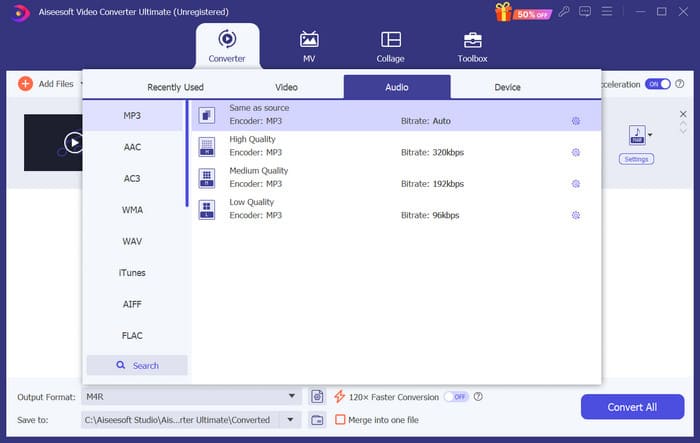
<span>步驟 5</span>.先選擇<span>全部轉換(Convert All)</span>,下載已轉出的音訊檔。
<span>步驟 6</span>.再將音訊檔重新加入軟體。然後點擊<span>剪輯(Cut)</span>,選擇你想用作鈴聲的片段。<span>編輯(Edit)</span>底下的功能,也能幫你調整檔案中的某些元素。
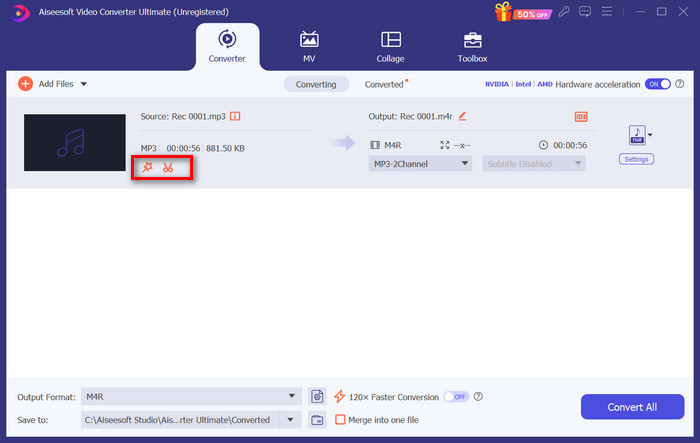
<span>步驟 7</span>.完成編輯後,點擊<span>全部轉換(Convert All)</span>。
第 3 部分. 將轉換後的音訊設定為鈴聲
現在我們已經編輯了音頻文件,我們需要進一步進入手機設置,將此轉換後的視頻設置為鈴聲。
在 iPhone 上設定鈴聲
如果你使用的是 iPhone,可能需要一些工具來把選好的 M4R 音訊設為鈴聲。<span>GarageBand</span>就是一個不錯的選擇。
在這裡,我們將教您如何使用影片中的音訊透過 GarageBand 製作鈴聲。
<span>步驟 1</span>.先確認已將編輯好的音訊檔存到 iPhone 上,然後開啟 GarageBand。
<span>步驟 2</span>.啟動 GarageBand 後,前往<span>循環(Loop)</span>並選擇<span>檔案(Files)</span>,接著點選<span>從「檔案」App 瀏覽項目(Browse items from the Files app)</span>,找到你要使用的音訊。
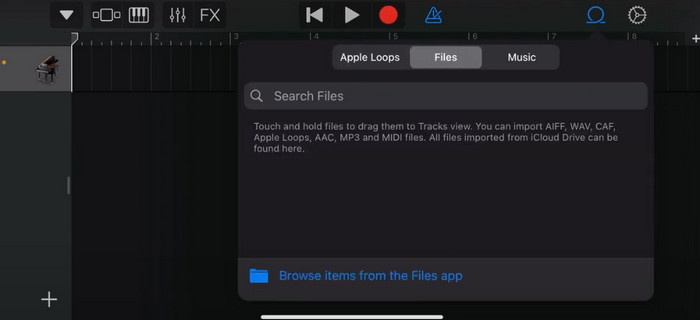
<span>步驟 3</span>.將選好的 M4R 音訊檔拖到 GarageBand 的時間軸上。
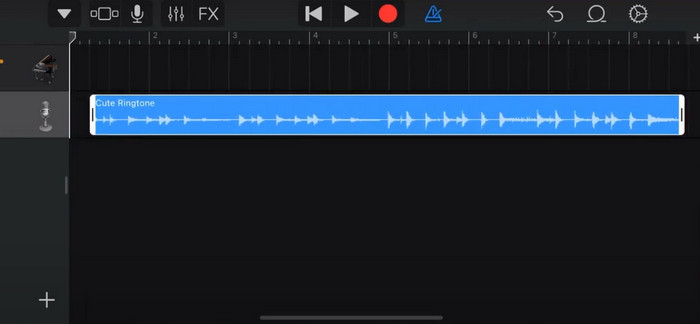
<span>步驟 4</span>.點擊節拍器(Metronome)將其關閉。接著點擊向下箭頭圖示 > 我的歌曲(My Songs)。
<span>步驟 5</span>.長按該聲音檔,然後選擇<span>分享(Share)</span>。
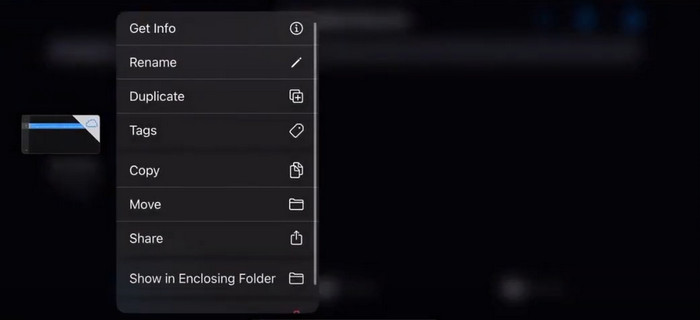
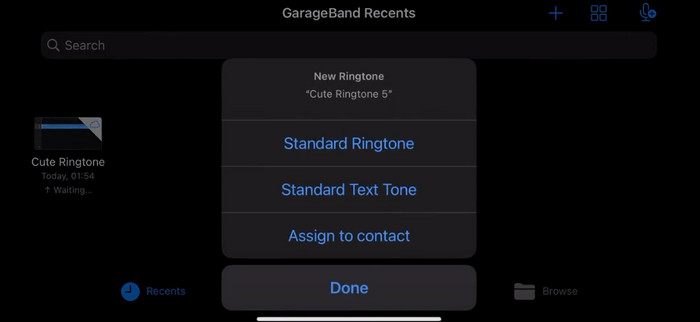
<span>步驟 6</span>.選擇「鈴聲(Ringtone)」>「匯出(Export)」。當出現「使用聲音為(Use sound as)」視窗時,點選「標準鈴聲(Standard Ringtone)」。
在 Android 上設定鈴聲
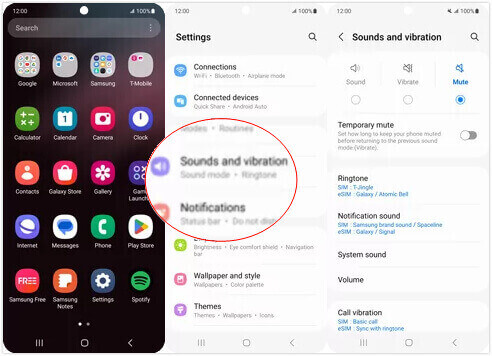
如果您想將從影片中提取的音訊作為 Android 裝置上的鈴聲,請直接在「設定」應用程式中執行此操作。確切的步驟要容易一些。
我們將以三星手機為例,詳細告訴您如何應用。
<span>步驟 1</span>.在 Android 裝置上前往<span>設定(Settings)</span>,點選<span>聲音與震動(Sounds and vibration)</span>。
<span>步驟 2</span>.在<span>音效模式(Sound mode)</span>區段中選擇<span>聲音(Sound)</span>,接著點擊<span>通知鈴聲(Notification sound)</span>。
<span>步驟 3</span>.選擇你已轉換並編輯好的音訊檔。返回上一頁後,這項設定就會生效。
第 4 部分:將影片製作為鈴聲的常見問題解答
如何將鈴聲加入 Android 手機?
在 Android 手機上,轉到“設定”並尋找“聲音”或“聲音和振動”選項。選擇“電話鈴聲”或“鈴聲”以選擇自訂鈴聲。您的自訂鈴聲現在應該會出現在可用鈴聲清單中。選擇它以將其設定為您的鈴聲。
我可以下載 Android 版 iPhone 鈴聲嗎?
是的,你可以下載 iPhone 鈴聲並在 Android 裝置上使用。不過,iPhone 鈴聲通常是 M4R 格式,而該格式並不能直接在 Android 系統上使用。你需要先將 iPhone 的鈴聲轉換成 Android 支援的格式,例如 MP3 或 AAC。比方說,FVC 精選的轉檔工具就能幫你<a href='/mp3-converting/m4r-to-mp3/'>將 M4R 轉為 MP3</a>。
為什麼我的手機接到來電時不響鈴?
如果您的手機在接到來電時沒有響鈴,可能有多種原因導致此問題。確保手機的音量已調高而不是靜音。另外,檢查您的手機是否處於請勿打擾模式。此模式會使所有呼叫和通知靜音。如果問題仍未解決,請嘗試重新啟動手機刷新系統。
結論
以上就是一份完整的<strong>將影片製作成鈴聲</strong>的教學。我們向你推薦其中一款最佳工具──FVC Video Converter Ultimate,協助你把影片檔調整成你想要的樣子。這款工具同時支援 iPhone 與 Android 手機,因此無論你的裝置使用哪一種系統,都能在它的幫助下製作出自己喜愛的專屬鈴聲。
-
 將 WAV 檔案壓縮為較小尺寸的 3 個最佳解決方案
 如果您還在尋找壓縮 WAV 音訊檔案大小的方法,請閱讀我們的內容。我們將從三個方面向您介紹不同的工具。
-
 2024 年深入音訊壓縮教學(逐步)
 您是否需要壓縮音訊但需要幫助弄清楚從哪裡開始?在這篇文章中,我們將介紹減少曲目檔案大小的最佳選擇。
-
 適合離線和線上用戶的有效音訊壓縮器
 處理大型音訊檔案時遇到問題?有許多音訊檔案壓縮器可供離線和線上用戶使用。在這裡查看它們。
