


 视频转换大师
 屏幕录影大师
 视频修复
视频修复
 安全下载
安全下载高级视频的顶级 MOV 到 WebM 转换器的全面审查
在当今的数字环境中,视频内容已成为吸引观众和提高网站性能的强大工具。然而,不同的平台和浏览器通常有不同的视频格式要求,因此将视频转换为兼容格式至关重要。
在本指南文章中,我们将深入探讨MOV 转 WebM转换的重要性,以及它如何对你的网站产生积极影响。我们会说明将 WebM 作为首选视频格式的优势,例如更小的文件体积和更好的网页兼容性。此外,我们还将对市面上多种转换工具进行详细评测,帮助你选择合适的工具,高效地将 MOV 视频转换为 WebM 格式。

第 1 部分。桌面上的 MOV 到 WebM 转换器
1. Video Converter Ultimate(离线用户)
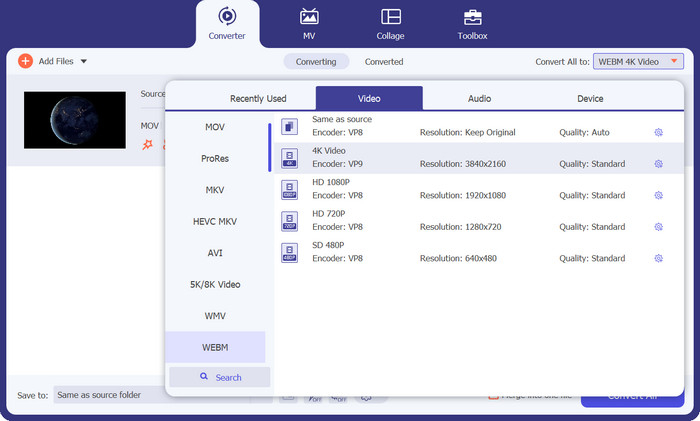
Video Converter Ultimate 是一款视频转换软件,支持将几乎所有主流视频和音频转换成多种格式,包括 MP4、MOV、TS、AVI、WMV、FLAC、MP3 等。它可以通过先将 MOV 文件转换成与 WebM 兼容的其他格式(如 MP4 或 AVI),来帮助完成 MOV 转 WebM 的相关转换需求。
此外,Video Converter Ultimate 可用于将自制 DVD 和视频文件(包括 4K 视频)转换为所有流行的视频和音频,如 MP4、AVI、FLV、TS、M4V、MTS、TS、M2TS、WMV、ASF、VOB、MP3 , 和 AAC。
优点
- 视频格式无水印输出。
- 在几秒钟内转码高分辨率视频。
- 它支持历史管理功能。
缺点
- 免费版的功能有限。
- 有限的客户支持。
2. 免费在线视频转换器(在线用户)
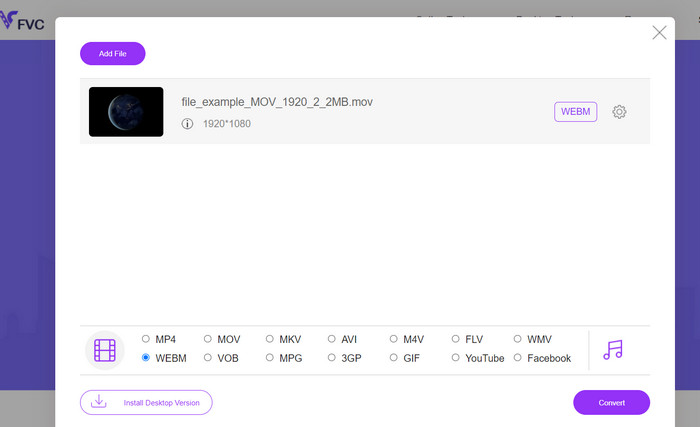
Free Video Converter Online 是一款基于网页的多媒体转换工具,可免费将多种主流视频和音频格式转换为多种输出格式,例如 MP4、FLV、MKV、MOV、M4V、MTS、TS、M2TS、WMV、ASF、VOB、MP3、AAC 等。该软件能够在数秒内高效地将高清影片转换为 MP4、FLV 等常用格式,同时最大程度地保留原始视频质量。
该软件还提供编辑功能,允许用户修改视频的比特率、采样率、帧率和分辨率以满足他们的特定要求。转换过程保证完全安全,并提供可靠的产品和高效的技术支持。
优点
- 免费将 MOV 转换为 WebM。
- 编辑视频比特率、帧率和分辨率。
- 它支持批量转换。
缺点
- 它没有某些付费转换器那么多的高级功能。
- 用户需要下载程序启动器才能在线将 MOV 转换为 WebM。
第 2 部分。移动设备上的 MOV 到 WebM 转换器
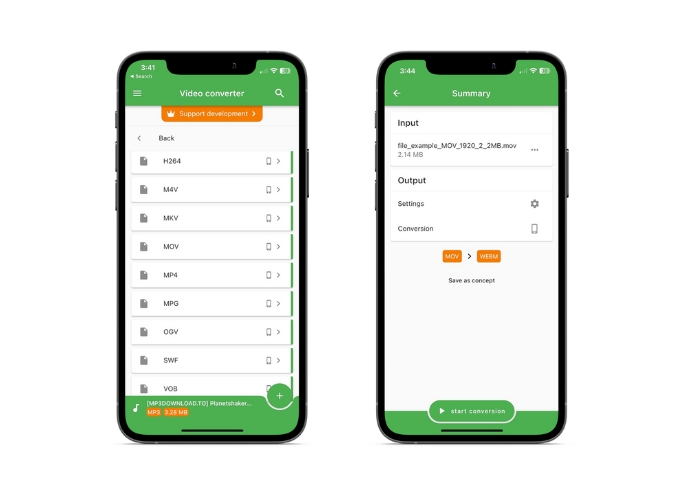
File Converter 是一款适用于 iOS 设备的移动应用程序,它为转换各种文件格式提供了便捷的解决方案,包括将 MOV 等视频转换为 WebM。该应用程序提供了一个用户友好的界面,使导航和执行文件转换变得容易。它提供了一个简单的拖放功能,用于将文件添加到转换队列。该应用程序还包括针对不同设备的预设配置文件,可以方便地为特定平台或设备转换视频。
优点
- 可定制的输出设置。
- 不同设备的预设配置文件。
- 快速高效的转换。
缺点
- 可能缺少高级视频编辑功能。
- 该应用程序的免费版本有限制。
延伸阅读:
MP4 转 WebM 转换器——将 MP4 转换为 WebM 的 4 种最佳方法
第 3 部分 WebM 与 MOV
下面的比较表提供了 WebM 和 MOV 的功能和特性的一般概述。实际性能和适用性可能因具体用例和要求而异。
| 特征 | WebM | 影片 |
| 视频质量 | 卓越品质,高效压缩 | 高质量,支持各种编解码器 |
| 文件大小 | 较小的文件大小,非常适合网络和流媒体平台 | 较大的文件大小,适合高质量的视频编辑 |
| 浏览器支持 | 现代浏览器的良好支持 | 广泛支持流行的浏览器和媒体播放器 |
| 平台 | 跨平台兼容性 | 主要用于 Apple 设备和 macOS 生态系统 |
| 流媒体 | 流媒体平台和网络播放的理想选择 | 广泛应用于专业视频剪辑制作 |
| 编解码器 | 支持 VP8、VP9 和 Opus 音频编解码器 | 支持多种编解码器,包括 H.264 和 ProRes |
| 编辑能力 | 有限的编辑能力 | 全面的编辑功能和元数据支持 |
第 4 部分。有关 MOV 到 WebM 转换器的常见问题解答
转换过程中是否存在质量损失或兼容性问题?
由于 MOV 和 WebM 格式之间的视频编解码器和压缩算法存在差异,转换过程可能会导致一些质量损失。但是,通过适当的设置和使用可靠的转换工具,您可以最大限度地减少任何明显的质量下降。确保转换后的 WebM 文件与您预期的播放设备和平台兼容也很重要。
我可以同时将多个 MOV 文件转换为 WebM 吗?
是的,许多转换工具和软件都支持批量转换,允许您同时将多个 MOV 文件转换为 WebM 格式。在处理大量文件时,此过程可以节省时间和精力。
如果需要,我可以将 WebM 转换回 MOV 吗?
是的,可以使用视频转换工具将 WebM 文件转换回 MOV 格式。但是,请记住,格式之间的多次转换可能会导致质量下降,因此建议尽可能保留原始源文件。
结论
将MOV 转换为 WebM格式,是提升在线视频素材在线传播效率的重要环节。市面上有大量可用于转换的工具,包括桌面软件、手机应用和在线转换器。你可以利用可自定义设置、批量转换功能以及预设配置文件,根据自己的具体需求和目标受众,对视频进行个性化调整。
-
 [免费和在线] 4 种将 MOV 转换为 MP4 的方法
 要将MOV(Apple QuickTime电影)文件转换为MP4?这篇文章分享了4种免费方法,可以将您的MOV视频文件转换为Windows 10/8/7 / XP和Mac OS X上的MP4格式。
-
 适用于Android / iPhone / Windows / Mac的前5名最佳WebM播放器(免费下载)
 如果要在设备上成功播放WebM,则应从本文中了解有关适用于Android,iPhone,Windows和Mac的前5名最佳WebM播放器的更多信息。
-
 如何在不损失文件质量的情况下将 GIF 更改为 WebM 格式
 将您的 Gif 转换为 WebM 视频格式以具有 HTML5 视频标签。依靠下面的这个工具来了解哪一个最适合这项工作。
