


 Video Converter Ultimate
 Gravador de ecrã
 Reparo de vídeo
 Secure Download
4 métodos para converter arquivos M3U8 em MP4 [Guia para iniciantes]
If your downloaded M3U8 videos are not playing on your computers, and you’re looking for ways to convert them, then this article is for you! M3U8 files are just plain text files that can be used to store media track information and the URL paths for streaming audio or video. These kinds of video files will experience a challenge with their playback. But don’t worry, there are methods available to convert M3U8 to MP4 Files. Let’s explore some solutions to help you enjoy your M3U8 videos now.

Parte 1: A maneira mais rápida de converter M3U8 para MP4 no Mac/Windows
The fastest way to convert M3U8 to MP4 on Mac and Windows is by using the FVC Video Converter Ultimate. This converter tool can handle various formats and can convert videos in formats like MXF, MP4, MOV, AVI, MKV, FLV, and more. So, if your files are saved in M3U8 and you’re having issues playing it on your device you can easily convert it to MP4 using this tool. Moreover, if you have plenty of M3U8 video files to convert, you can easily convert them together using the batch conversion feature of this tool. In terms of video quality, with this tool converting M3U8 to MP4 won’t affect the quality of the video.
Step 1. Download and Install the FVC Video Converter Ultimate on your Windows or Mac computer.
Free DownloadFor Windows 7 or laterSecure Download
Free DownloadFor MacOS 10.7 or laterSecure Download
Step 2. After installing the tool, open it. Then, you’ll see the first tab, which is the Converters tab.
Step 3. From the Converters tab, click on the Add Files button to import the M3U8 video that you want to convert.
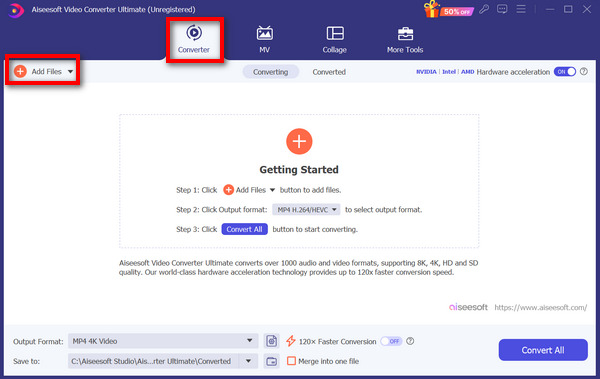
Step 4. To start converting M3U8 to MP4 videos, just click on the Output format button below and choose MP4 among the list of available output formats.
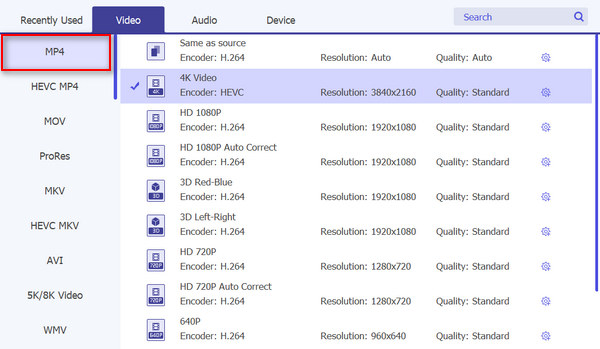
Step 5. Lastly, click on the Convert All button.
Esta ferramenta pode converter incrivelmente M3U8 para MP4 em apenas alguns passos. Agora, tudo o que você precisa fazer é experimentar esta ferramenta e instalá-la no seu computador Mac ou Windows.
Parte 2: Converta M3U8 para MP4 online gratuitamente
If you prefer to use an online converter tool to convert M3U8 to MP4 instead of installing a desktop tool on your computer, then you should try the FVC Free Video Converter Online. This tool is completely free and can convert any type of video format, including M3U8 to MP4, FLV, WMA, AVI, MOV, TS, M2TS, MP3, and more. With this tool, you can easily convert this video file format to MP4 without worrying about installing additional software on your computer.
Step 1. First, visit the official website of FVC Free Video Converter Online.
Step 2. To start, click on the Add Files to Convert button to add the M3U8 video that you want to convert to MP4.
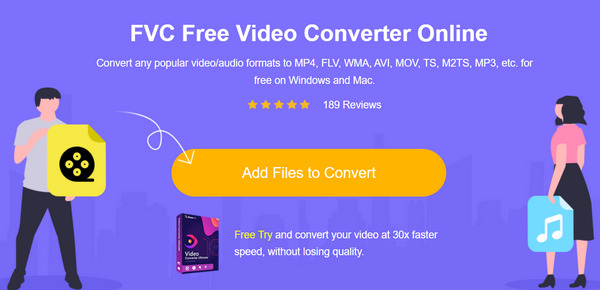
Step 3. After that, select MP4 among the output format drop-down options available below. Once you’ve selected your preferred output format, click Convert to initiate the conversion. The video then will be saved to the folder you have chosen.
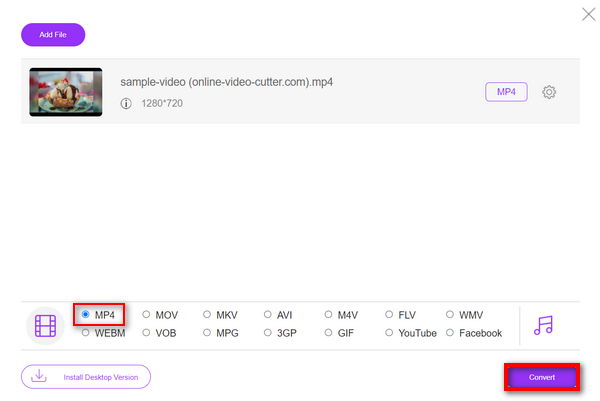
Esta ferramenta também suporta conversão em lote. Se, em qualquer caso, você precisar converter um monte de arquivos M3U8 para MP4, então você provavelmente pode se beneficiar desse recurso.
Parte 3: Converter M3U8 para MP4 no VLC
O VLC é um reprodutor de mídia versátil e um conversor de vídeo, pois você também pode usá-lo para converter arquivos M3U8 para MP4. Portanto, com sua acessibilidade, suporte para vários formatos e interface intuitiva, o VLC é de fato uma excelente escolha para qualquer um que queira converter seus arquivos M3U8 para MP4 de forma eficiente.
Step 1. First, download and install VLC on your computer.
Step 2. Open it, click on Media, and select Convert / Save.
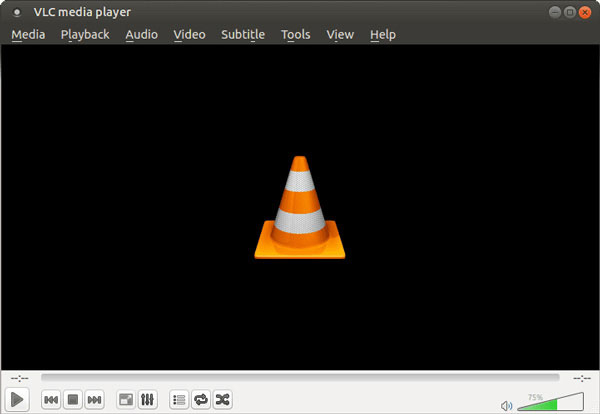
Step 3. Now, click the File tab and then click the Add button to add the M3U8 file that you want to convert.
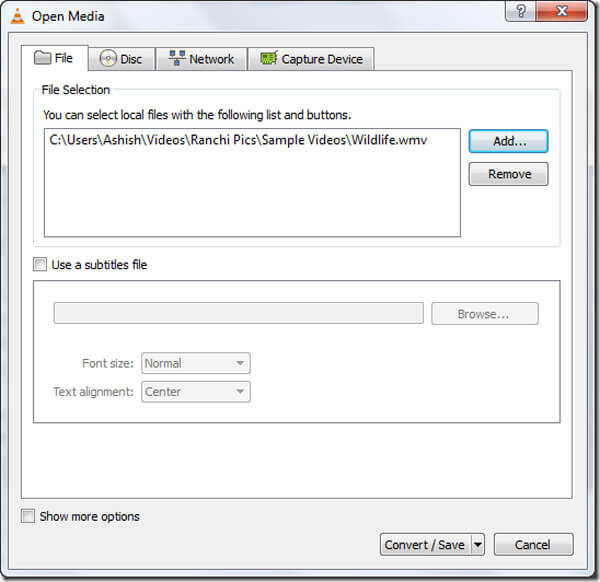
Step 4. Click on the Convert/Save button when you are done. Then, select the destination folder, write a file name, and select the desired video profile or the format, which is MP4.
Step 5. Lastly, click on the Start button once all settings are done to start the conversion process.
Para evitar salvar os arquivos convertidos no formato errado, certifique-se de selecionar o perfil de vídeo apropriado antes de convertê-los. Você precisa ser cauteloso, pois esse é um dos problemas comuns que as pessoas negligenciam prestar atenção ao fazer uma conversão de formato de arquivo.
Apart from converting M3U8, VLC can repair video easily.
Parte 4: Converter M3U8 usando Ffmpeg
Outra maneira de converter M3U8 para MP4 é usando o FFmpeg. Esta ferramenta é uma estrutura multimídia de código aberto. Com sua biblioteca de codecs avançada libavcodec, esta ferramenta pode converter arquivos M3U8 sem perda de qualidade. A única coisa sobre esta ferramenta é que ela não tem uma interface direta como outros conversores de vídeo comuns.
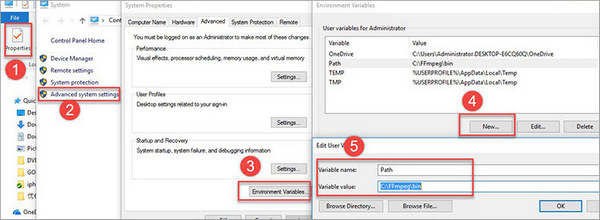
Step 1. First, download and install FFmpeg on your computer. Then, create a folder for the program and its extracted files. Remember to set the Environmental Variables to C:FFmpegin.
Step 2. Get the M3U8 link in Inspect under the Network on your browser. Then type the command line ffmpeg -i http://.../playlist.m3u8 -c copy -bsf:a aac adtstoasc output.mp4 on a Text Document, and replace http://.../playlist.m3u8 by the link you just copy online.
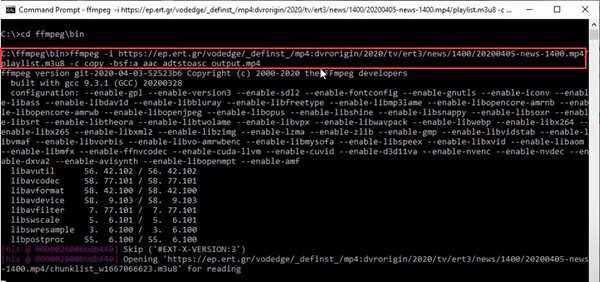
Step 3. Open Command Prompt and paste the command line to it, then press Enter.
Step 4. Finally, locate the MP4 video in the directory specified before the command line, such as C:\ ffmpeg>bin.
Embora esta ferramenta possa converter M3U8 para MP4 com eficiência, você deve estar familiarizado com o uso de linhas de comando para converter vídeos facilmente usando esta ferramenta. Caso contrário, considere outras ferramentas de conversão que ofereçam o mesmo recurso e qualidade de saída.
Parte 5. Perguntas frequentes sobre a conversão de M3U8 para MP4
M3U8 é o mesmo que M3U?
Não. M3U8 e M3U são formatos de playlist multimídia. A extensão de arquivo .m3u8 é uma versão UTF-8 do formato M3, enquanto .m3u pode ter várias codificações.
Por que MP4 é um bom formato de arquivo?
O MP4 é importante porque é quase compatível com muitos dispositivos e plataformas, incluindo computadores, smartphones, tablets e smart TVs. Além disso, ele tem compressão de alta qualidade sem comprometer a qualidade visual e de áudio. Além disso, o MP4 suporta vários elementos multimídia, incluindo vídeo, áudio, legendas e metadados, tornando-o versátil para diferentes tipos de conteúdo.
O que torna um arquivo MP4 diferente de um arquivo M3U8?
Arquivos MP4 armazenam conteúdo de áudio e vídeo em um arquivo, enquanto arquivos M3U8 são listas de reprodução usadas para organizar e transmitir conteúdo multimídia como vídeos. Então, enquanto arquivos MP4 contêm tudo o que você precisa em um só lugar, arquivos M3U8 apenas apontam para onde os vídeos estão.
Conclusão
That’s it! You now know how to convert M3U8 to MP4 format. Just follow any of the methods presented in this article, especially the one that best works for your preference and needs. What are you waiting for? Start converting your M3U8 files to MP4 today!
-
 2 maneiras gratuitas de converter ARF em MP4 em Mac e PC (100% funcionando)
 Obtém um arquivo ARF, mas não sabe como abri-lo? Este post pode te ajudar exatamente. Aqui estão 2 maneiras gratuitas de converter ARF para MP4 em detalhes no Mac e PC.
-
 2 maneiras gratuitas de converter WTV em MP4 (online e desktop)
 Quer converter WTV para MP4? Aqui estão 2 conversores gratuitos que você pode usar para converter arquivos WTV gravados no Windows em vídeos MP4 gratuitos online e desktop.
-
 RM para MP4 | 2 Conversor RMVB / RM para MP4 grátis online / desktop
 Como converter RM para MP4? Aqui estão 2 conversores de RM / RMVB para MP4 gratuitos 100%, que podem mudar de RM para MP4 online e em computadores Windows e Mac.
