


 ビデオコンバーター究極
 スクリーンレコーダー
 ビデオ修復
ビデオ修復
 安全なダウンロード
オフラインおよびオンラインでFiverr透かしを簡単に削除する方法
パンデミックの影響で、多くの人が自宅で仕事をすることを好むようになりました。そのため、多くのフリーランス向けサイトがオンライン上に登場し、そのひとつが Fiverr です。Fiverr はオンラインマーケットであり、フリーランス向けサイトでもあります。しかし現在、購入者と出品者のあいだで Fiverr のウォーターマークを削除できないという問題が起きています。そこで解決策を探したところ、Fiverr のウォーターマークを簡単に削除できる優秀なツールを見つけました。Fiverr のウォーターマークを削除したい方は、ぜひこの記事を読んでみてください。

パート1。Fiverrの紹介
しかし、Fiverrとは何ですか?上記のように、Fiverrはオンラインマーケットプレイスであり、売り手と買い手がオンラインで製品を売買するために使用するフリーランスのWebサイトです。 Fiverrは、その大規模なコミュニティのために有名なフリーランスのWebサイトの1つです。時間貸し料金なしで高品質のサービスを提供します。それに加えて、あなたがビジネスを所有していて、あなたの製品を宣伝して販売したいなら、Fiverrはあなたのために仕事をするのにふさわしいフリーランサーを簡単に見つけることができます。また、Fiverrは安全なWebサイトであり、作業を承認するまで支払いを解放しないため、支払いが保護されることを保証します。
さらに、グラフィックとデザイン、デジタルマーケティング、ライティングと翻訳、ビデオとアニメーション、音楽とオーディオ、プログラミングと技術などのオプションを使用して製品を宣伝できます。このフリーランスのWebサイトには、わかりやすいインターフェース。
Fiverrについて知ったので、次のパートに進みましょう。ここでは、Fiverr透かしを削除する方法を学習します。
パート2。究極のオンラインツールを使用してFiverr透かしを削除します
多くの人がFiverr透かしを削除する方法を探しています。その問題を解決するためのソリューションとツールを探しました。幸い、オンラインで使用できる最も優れたFiverr透かしリムーバーが見つかりました。
FVC Free Watermark Remover は、画像から Fiverr のウォーターマークを削除するのに最適なツールです。このソフトウェアは、インターフェースが分かりやすく操作が簡単なため、初心者にも使いやすいツールとして知られています。画像の形式がどのようなものであっても、PNG、JPG、JPEG、BMP など多数の画像形式に対応しているので、このアプリにアップロードできます。また、多角形選択やなげなわツールを使って、画像上のウォーターマーク、ロゴ、テキストなどを指定して削除できます。さらに、ブラシのプリセットも複数用意されており、好みに合わせてブラシの太さを調整可能です。加えて、このオンラインツールには不要な部分を消去するための消しゴム機能も搭載されています。
長所
100%は無料でご利用いただけます。
安全に使用できます。
テキスト、ロゴ、画像などの透かしを簡単に削除できます。
Google、Mozilla Firefox、Safariを含むすべてのWebブラウザでアクセスできます。
FVC Free Watermark Removerを使用してFiverr透かしを削除する方法:
ステップ 1. まずブラウザで FVC Free Watermark Remover を検索するか、こちらのリンクをクリックして公式サイトにアクセスします。
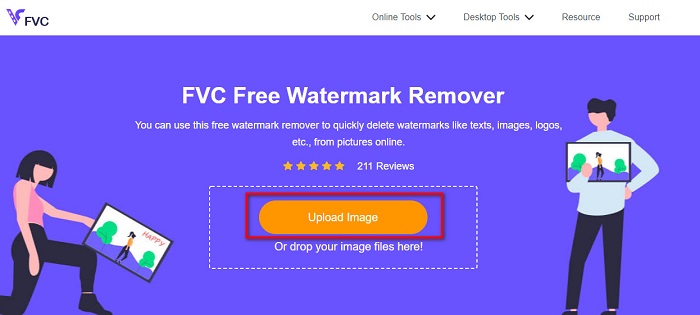
ステップ 2. 次に、ソフトウェアのメインインターフェースにある画像をアップロードボタンをクリックします。PC のファイル画面が表示されるので、Fiverr の画像を選択し、開くをクリックしてアップロードします。
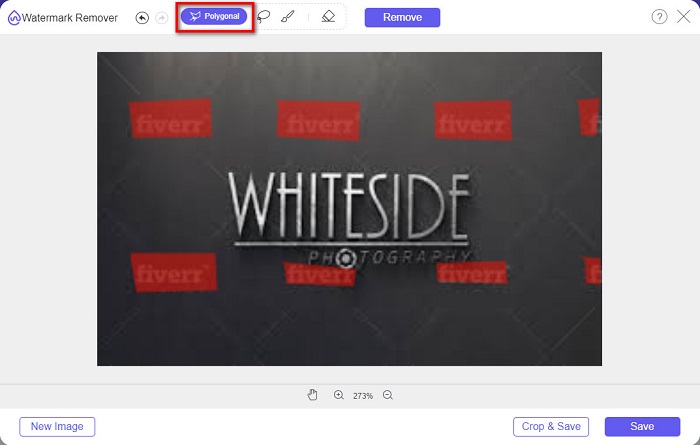
ステップ 3. 続いて、使用したい削除ツール(ポリゴン、なげなわ、ブラシ)を選びます。そして削除したいウォーターマークの範囲を選択します。ここでは例としてポリゴンツールを使用します。
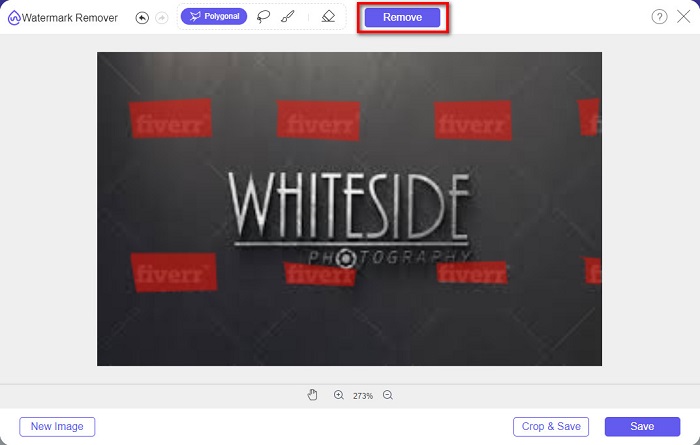
ステップ 4. 次に、選択したウォーターマークを削除するために削除ボタンをクリックします。
ステップ 5. 画像上のウォーターマークが消えていることを確認したら、保存ボタンをクリックして、画像をデバイスに保存します。
![[保存]ボタンをクリックします](/images/2022/05/click-save-buttons.jpg)
以上です!このように、Fiverr のウォーターマークは A-B-C ほど簡単に削除できます。また、このソフトウェアを使えば、卒業写真のウォーターマークを削除することも可能です。
パート3。Fiverr透かしを削除する他の方法
画像のFiverr透かしを削除するために使用できるツールもいくつかあります。この部分では、必要なツールを選択するためのより多くの選択肢が提供されます。したがって、この部分を包括的に読んでください。
WatermarkRemover.io
WatermarkRemover.io は、画像のウォーターマークを手軽に除去できるオンライン型のウォーターマークリムーバーです。このオンラインツールは AI アルゴリズムを利用しており、画像上のウォーターマーク位置を自動的に予測します。また、色分離機能により、ウォーターマークの色と背景の色を分けて処理します。とはいえ、処理後には背景をきちんと再構成してくれるので心配はいりません。このツールの優れている点は、画像内のさまざまな種類のウォーターマークプリセットに対応して削除できることです。
長所
- 透かしの自動検出を使用します。
- これはユーザーフレンドリーなツールです。
- インストールは必要ありません。
- 邪魔な広告は含まれていません。
短所
- インターネット接続が遅い場合は、読み込みプロセスが遅くなります。
ステップ 1. ブラウザで WatermarkRemover.io を検索します。メイン画面が表示されたら、画像をアップロードボタンをクリックします。
ステップ 2. その後、画像のアップロードが完了するまで待ちます。アップロードが終わると、画像上のウォーターマークは自動的に削除されます。
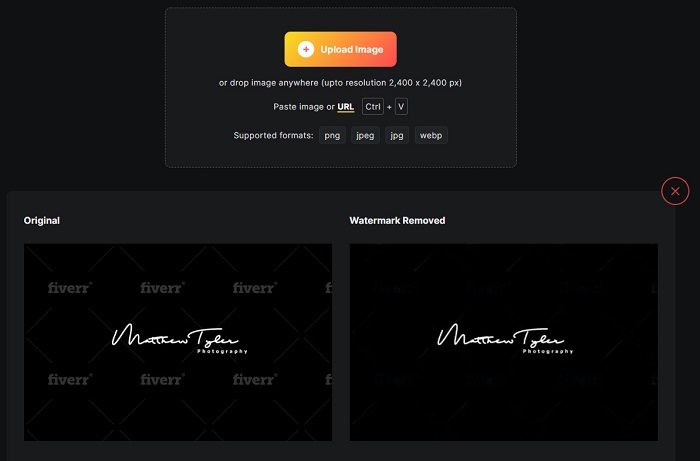
ステップ 3. 最後に、画像をダウンロードボタンをクリックして、処理済みの画像をデバイスに保存します。
Imgkits
もうひとつおすすめのオンラインウォーターマークリムーバーが Imgkits です。このオンラインツールは、シンプルなユーザーインターフェースで使いやすいことから人気があります。にじみ修復、点修復、多角形といった、さまざまな削除ツールのプリセットも搭載されています。もし操作を誤ってしまった場合でも、元の画像に戻すことができます。さらに、他の多くのオンラインツールとは異なり、Imgkits には広告が表示されません。ただし、ウォーターマークが完全に消えないケースがあるため、不満を感じるユーザーもいます。それでも、画像のウォーターマークを削除するうえでは十分便利なツールです。このツールはPhotobucket のウォーターマークを削除するツールとしても利用できます。
長所
- PNG、JPG、BMP、WEBPなどの最も一般的な画像形式をサポートしています。
- 直感的なユーザーインターフェイスを備えています。
- 無料で安全に使用できます。
短所
- インターネットに依存します。
ステップ 1. ブラウザで Imgkits を検索し、公式ページへアクセスします。ソフトウェアのメインインターフェースで画像をアップロードボタンをクリックします。
ステップ 2. その後、使用したい削除プリセットを選択します。次に、画像上のウォーターマーク部分を選択します。すると、ウォーターマークが自動的に消去されます。
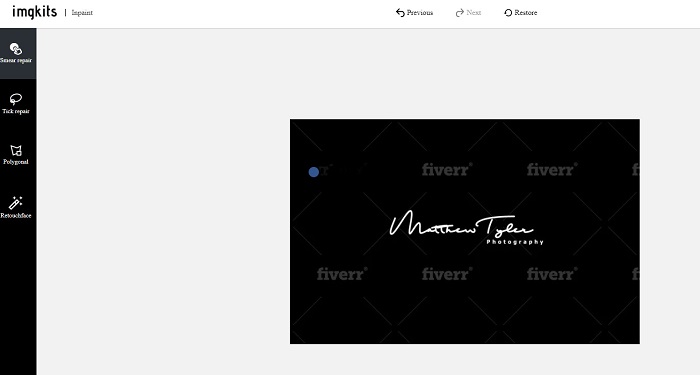
ステップ 3. 最後にダウンロードボタンをクリックして処理を完了し、画像をダウンロードします。
パート4。Fiverr透かしの削除に関するFAQ
透かしを削除できるアプリはありますか?
はい。透かしを削除できるアプリをAndroidにダウンロードできます。それらのいくつかは、PicLab、Photo Retouch、AirBrushなどです。
画像の透かしを削除すると、品質が低下しますか?
透かしを削除するときに画像の品質に影響を与える透かしリムーバーがあります。一部のツールでは、削除した透かしの領域にマークが残ります。
写真に透かしを入れてはいけないのはなぜですか?
多くの写真家は、透かしが目障りであり、写真の魅力を低下させる可能性があるため、写真に透かしを入れません。ただし、透かしは画像や動画の独創性を示すためにも必要です。
結論
以上となります。ここで紹介したツールを使えば、Fiverr のウォーターマークを削除することができます。どのツールを使って Fiverr のウォーターマークを消すかは、あなた次第です。上記で紹介したツールはいずれも、ウォーターマークを手軽に削除するのに役立つでしょう。ただし、最高の機能と最もシンプルなユーザーインターフェースを備えたウォーターマークリムーバーを求めるなら、FVC Free Watermark Remover をおすすめします。
-
 WindowsとMacでLumion透かしを簡単に削除する方法
 専門的に提示するためにLumion透かしを削除する必要がありますか?さて、あなたがそれが残す透かしを取り除くのを助けるためにあなたが使うことができるツールがあります。
-
 ビデオと画像のWeibo透かしを簡単に削除する方法
 エクスポートされたビデオと画像のWeibo透かしを削除するのに問題がありますか?その場合、あなたはあなたを助けることができる以下にリストする透かし除去剤をしなければなりません。
-
 Movavi透かしを無料で削除する方法を学ぶ[必須!]
 Movaviでビデオまたは画像をエクスポートすると透かしが残りますが、それを削除することは可能ですか?透かしを無料で削除する方法を教えるには、これを読んでください。
