


 ビデオコンバーター究極
 スクリーンレコーダー
 ビデオ修復
ビデオ修復
 安全なダウンロード
FlashPlayerを使用せずにオンラインでSWFファイルサイズを縮小する方法
SWFは、インターネットを介したストリーミングに使用されるAdobeFlashファイル形式です。 SWFファイルをダウンロードする場合でも、SWFビデオをオンラインでアップロードする場合でも、SWFのファイルサイズが大きいと難しい線が引かれます。
しかし、良い点としては、この問題を解決するためにSWF ファイルを圧縮できるということです。

当初、公式のSWFプレーヤーであるAdobe Flash Playerは、ビットレートと解像度を変更することでSWFファイルを圧縮できますが、2020年12月31日以降はサポートされなくなりました。
心配しないでください、あなたには選択肢があります!
この記事では、PC と Mac で簡単にSWF 動画サイズを小さくできる、無料のオンライン SWF ファイル圧縮ツールを紹介します。
パート1。最高の無料オンラインSWFファイルコンプレッサー
優れたツールは不可欠です。 SWFファイルを圧縮するには、SWFファイルコンプレッサーがツールです。
Free Online Video Compressor は、SWF ファイルサイズをオンラインで小さくできる無料ツールです。サインアップ不要で、数回のクリックだけで SWF ファイルの圧縮を完了できます。Flash バナー、スライドショー、アニメーション、ゲーム、動画などを圧縮して、SWF ファイルを手軽に小さくすることができます。さらに、このオンライン SWF 圧縮ツールは次のことも可能です。
- 1. SWFファイルサイズを最大95%削減し、品質の低下を最小限に抑えます。
- 2. SWF、MP4、MOV、AVI、WebM、MKVなどの300を超えるビデオ形式を圧縮します。
- 3.透かしなしでビデオフォーマットを自由に圧縮および変換できます。
- 4. 1080p HD、720p HD、およびその他のビデオ解像度をサポートします。
次のパートでは、SWFファイルを圧縮する方法について説明します。
パート2。SWFをオンラインで圧縮する方法(100%無料)
SWFファイルをオンラインで圧縮するプロセスは、いくつかの簡単な手順で実行できます。
ステップ 1. SWF ファイルを追加
Windows または Mac コンピュータのブラウザーで、この無料オンライン SWF ファイル圧縮ツールを開きます。Add Files to Compress ボタンをクリックすると、圧縮用ランチャーのダウンロードとインストールを求められます。
インストールが正常に完了すると、オープンソースウィンドウがポップアップ表示されます。コンピューターでSWFファイルを見つけて、このツールに追加する必要があります。
ステップ 2. 圧縮率とサイズを選択
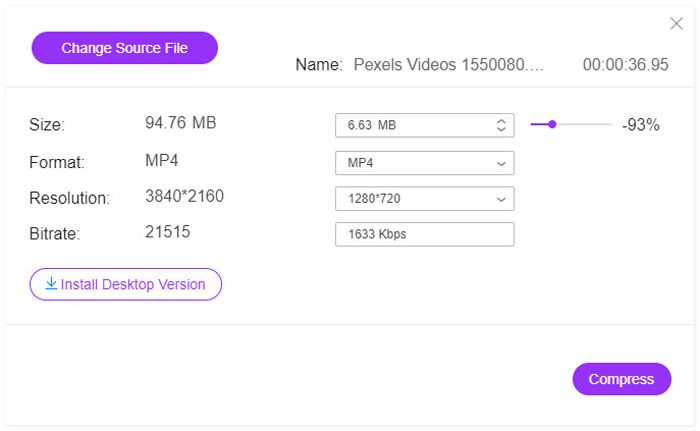
Size の横には、現在の SWF ファイルサイズが表示されます。矢印の下向きまたは上向きアイコンをクリックして、出力される SWF ファイルサイズを調整できます。あるいは、右側のスライダーを動かして圧縮率を決め、ファイルサイズを小さくすることもできます。
Format の横では、MP4、MOV、MKV、AVI、FLV などの他の形式を選択して、SWF を別の形式に変換することもできます。
より低いResolution(解像度)の出力オプションを選択することでも、SWF ファイルサイズを小さくするのに役立ちます。
SWFファイルを小さいサイズに圧縮すると、それに応じてこのファイルのビットレートが表示画面で低くなります。
ステップ 3. SWF を圧縮
Compress をクリックして、圧縮後の SWF ファイルの保存先を選択し、SWF ファイルサイズの圧縮を開始します。
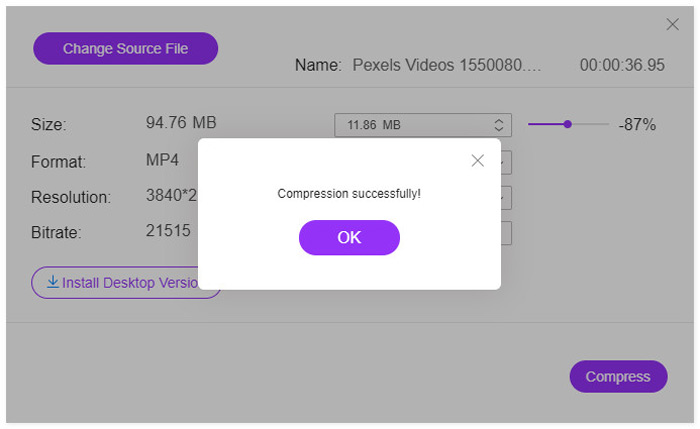
圧縮プロセスが完了すると、ポップアップウィンドウが表示されます。次に、設定した場所に移動して、圧縮ファイルを見つけることができます。
はっきりさせておくと、この無料オンライン SWF 圧縮ツールは、圧縮後に SWF ファイルを別の形式に変換します。元の形式を維持したまま SWF ファイルを圧縮したい場合や、4K 動画を圧縮したい場合は、デスクトップ版の SWF 圧縮ソフトである Video Converter Ultimate のダウンロードをおすすめします。
無料ダウンロードWindows 7 以降に対応安全なダウンロード
無料ダウンロードMacOS 10.7 以降に対応安全なダウンロード
パート3。SWFファイルサイズを小さくするためのFAQ
どのプログラムがSWFファイルを開きますか?
もともと SWF ファイルは、Adobe Flash Player という公式プレーヤーを通じてブラウザー上で開くことができました。しかし、Adobe Flash Player は 2021 年 1 月をもって提供終了となりました。現在では、VLC や Windows Media Player などの他の SWF プレーヤー、およびその他のSWF プレーヤーソフトで SWF ファイルを開くことができます。
SWFは圧縮されていますか?
SWFはロスレス圧縮を使用して画像の品質を維持します。つまり、SWFファイルに保存されているビデオは圧縮されておらず、ファイルサイズが大きくなります。
Adobe Flashがシャットダウンするのはなぜですか?
HTML5、WebGL、WebAssemblyなどのオープンスタンダードは、長年にわたって継続的に成熟しており、Flashコンテンツの実行可能な代替手段として機能します。また、主要なブラウザベンダーは、これらのオープンスタンダードをブラウザに統合し、他のほとんどのプラグイン(Flash Playerなど)を非推奨にしています。そのため、AdobeはAdobe FlashPlayerをシャットダウンすることにしました。
結論
SWF ファイルはロスレスであり、その分容量も大きくなります。コンピュータ上で SWF のダウンロード用により多くの空き容量を確保したい場合や、SWF ファイルをオンラインに正常にアップロードしたい場合など、SWF ファイルを圧縮することは一般的な課題です。この記事では、オンライン SWF ファイル圧縮ツールを使って、3 ステップで無料で SWF ファイルサイズを小さくする方法を解説しました。ウォーターマークやサインアップは不要で、すばやく圧縮を完了できます。
今度はあなたの番です。
SWFビデオサイズを縮小する方法を理解しましたか?
または、SWF圧縮を完了するための他の提案がありますか?
以下にコメントを残してお知らせください。
-
 MP4ビデオをより小さなサイズに圧縮する方法
 MP4ビデオはアップロードするには大きすぎますか?ビデオサイズを縮小したいですか? MP4ファイルを無制限に小さいサイズに圧縮する3つの効率的な方法を次に示します。
-
 YouTubeのビデオを圧縮する2つの方法
 YouTubeビデオは大きくてアップロードが遅いですか?オンラインとコンピューターの2つの方法で、YouTube用にビデオファイルのサイズを小さくするだけです。
-
 Facebook用のビデオをGBからMBに解放する方法
 Facebookに大きな動画をアップロードすることが禁止されている場合でも、心配する必要はありません。無料のビデオコンプレッサーを使用して、大きなビデオサイズをGBからMBに圧縮するだけです。
