


 ビデオコンバーター究極
 スクリーンレコーダー
 ビデオ修復
ビデオ修復WMVを3GPに簡単に変換する方法に関する究極のガイド
第3世代のモバイル端末でWMVファイルを再生したいですか?残念ながら、3G対応のモバイル端末はWMVファイルをサポートしていません。そのため、最適な解決策は、WMVファイルを3G端末で再生可能な3GP形式に変換することです。では、WMVを3GPに変換する方法を知りたい場合は、この記事を最後までお読みください。

パート1。WMVファイルを3GPファイルに変換する理由
WMVファイルは、3Gモバイルデバイスがサポートしていないファイル形式です。したがって、3GデバイスでWMCを再生する場合は、3Gモバイルデバイスで再生できるファイルである3GPファイルに変換する必要があります。 3GPファイルは、第3世代のモバイルデバイスでビデオを共有するために作成されているため、WMVよりも小さくなっています。したがって、3GモバイルデバイスでWMVファイルを再生する最良の方法は、3GPファイルに変換することです。
パート2。WMVから3GPへのコンバーターを選択する際の標準
コンバーターを使用する場合は、使用しているコンバーターの種類を常に確認する必要があります。また、コンバーターを使用する前に確認する必要のある標準がわからない場合は、WMVから3GPへのコンバーターを選択する前に考慮する必要のある標準を以下に示します。
標準1.安全に使用
ダウンロードするコンバーターを選択するときは、安全に使用できることを確認してください。また、コンバーターの安全性を知るには、検索ボックスにあるサイト情報を参照してください。
標準2.変換速度
WMVを3GPに最終的に高速に変換できると便利です。したがって、ダウンロードするコンバーターをまだ探している場合は、変換速度を常に考慮してください。
標準3.サポートされているファイル形式
常に考慮すべきことの1つは、コンバーターがサポートできるファイル形式です。ファイルコンバーターが異なれば、サポートするファイル形式も異なります。他のコンバーターは、変換するファイル形式が限られています。したがって、コンバーターでサポートされているファイル形式の数を検討してください。
標準4.コンバーターの可用性
すべてのコンバーターが使用できるわけではないため、プラットフォームで使用できることを確認してください。
標準5.使いやすいツール
コンバーターは、特に初心者にとって使いやすいものでなければなりません。したがって、WMVを3GPに変換するソフトウェアツールを選択する際には、使いやすいGUIがあるかどうかを確認してください。
そして、コンバーターに必要な標準がわかったので、これらの標準を満たす最高のコンバーターを以下にリストします。
パート3。WMVをオンラインおよびオフラインで3GPに変換する2つの最良の方法
Web上で利用可能なオンラインおよびオフラインコンバータの種類があります。ただし、最高の機能を備え、コンバーターを選択する際の基準を満たすコンバーターはごくわずかです。記事のこの部分では、インターネットで見ることができるすべてのコンバーターの中から優れたコンバーターを選択しました。私たちはあなたがそれ以上の苦労なしに試さなければならない最高のオンラインとオフラインのコンバーターを提示します!
FVCビデオコンバーターアルティメット[オフライン]
FVC Video Converter Ultimate は、WMV、3GP、MP4、AVI、FLV、MPG など多数の形式に対応したオフラインコンバーターです。さらに、ファイルに字幕を追加したりウォーターマークを入れたりすることもできます。このコンバーターはプロ仕様の仕上がりを提供できる一方で、インターフェースがシンプルで分かりやすく、初心者にも使いやすいツールです。加えて、超高速変換機能を備えており、WMVファイルを一瞬で3GPに変換できます。利用してみたい方は、以下の手順に従ってください。
ステップ1. まず、下の Windows または Mac 用の ダウンロード ボタンをクリックしてコンバーターをダウンロードします。インストール手順に従い、完了したらアプリを起動します。
無料ダウンロードWindows 7 以降に対応安全なダウンロード
無料ダウンロードMacOS 10.7 以降に対応安全なダウンロード
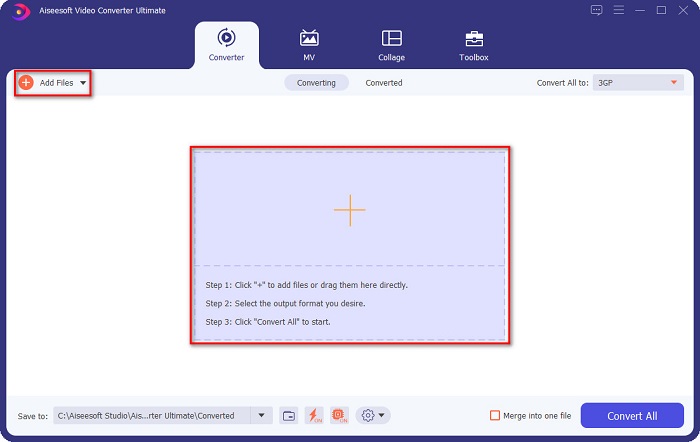
ステップ2. アプリを開いたら、Add Files ボタンまたは + マークのボタンをクリックします。するとパソコン内のファイルが表示されるので、ソフトのメイン画面に取り込みたいWMVファイルを選択します。
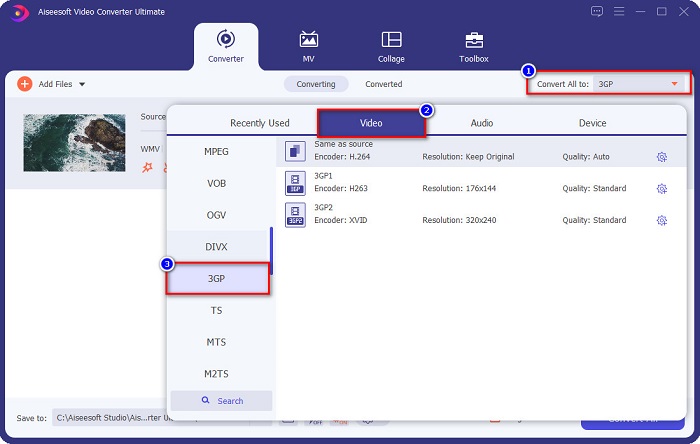
ステップ3. 次に、Convert All to ボタンをクリックして、出力したい形式を選択します。3GP をクリックし、最後のステップに進みます。
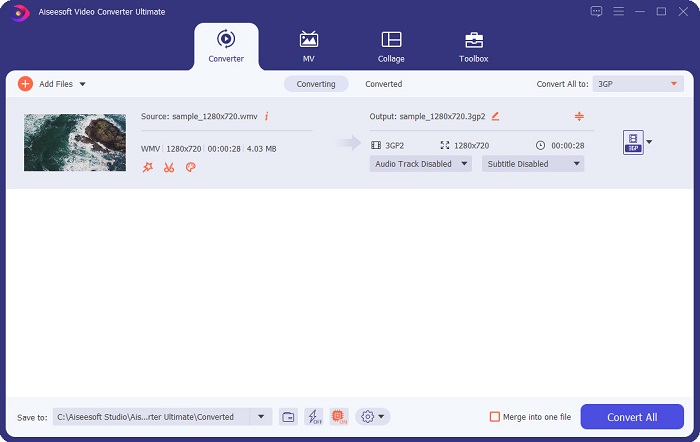
ステップ4. 最後に、Convert All ボタンをクリックします。これでWMVから3GPへの変換が始まります。数秒待つだけで完了です。このように、1-2-3ステップの簡単操作で、WMVファイルをすぐに3GPに変換できます。
FVC無料ビデオコンバーターオンライン
ダウンロードせずにコンバーターを使いたい場合は、オンラインコンバーターを利用できます。ウェブ上で利用できるWMVから3GPへのコンバーターの中でも特に有名で優れたものに、FVC Free Video Converter Online があります。このオンラインコンバーターは、一般的なファイル形式のほとんどをサポートしています。インターフェースもわかりやすく、操作に迷うことはありません。さらに、オンライン上で手軽にWMVを3GPに変換できます。
FVC Free VideoConverterOnlineを使用してWMVファイルを3GPファイルに変換する手順
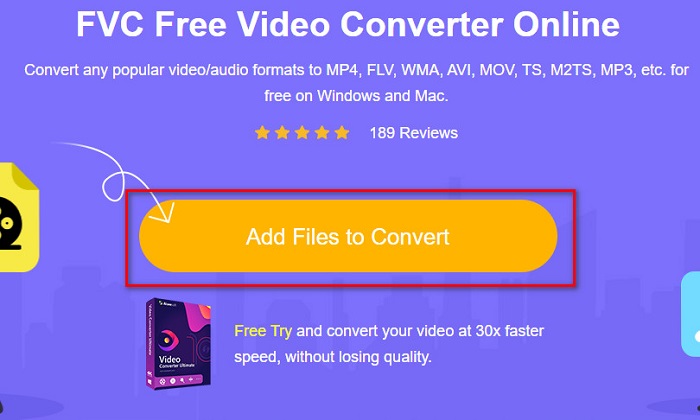
ステップ1. Googleで FVC Free Online Video Converter Online と検索するか、このリンクをクリックして直接公式サイトにアクセスします。サイトにアクセスしたら、Add Files to Convert ボタンをクリックしてアプリを起動します。
ファイルを一括変換するには、デスクトップ版をダウンロードしてください。
ステップ2. WMVファイルをアップロードするには、もう一度 Add Files to Convert ボタンをクリックします。
ステップ3. ソフトの画面下部で、出力したい形式を選択します。ここでは、3GP 形式をクリックします。
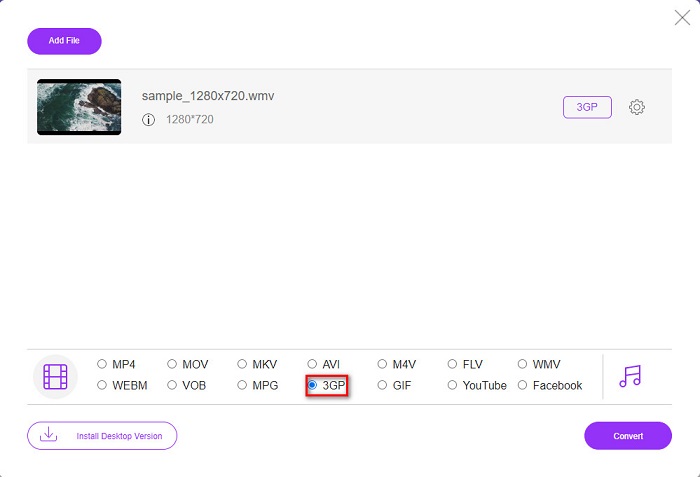
ステップ4. 最後に、Convert ボタンをクリックして、WMVファイルを3GPに変換します。以上が、オンラインコンバーターを使ってWMVを3GPに変換する方法です。
パート4。WMVと3GPに関する詳細知識
WMVまたはWindowsMediaVideoは、WindowsおよびMacが広くサポートしている最も一般的なファイル形式の1つです。ビデオアニメーション、クリップ、ムービーを保存でき、高解像度ビデオをサポートします。さらに、多くのメディアファイルプレーヤーがこのファイル形式をサポートできます。対照的に、3GPファイルはThird Generation Partnership Project(3GPP)によって作成されます。このファイルは、3Gモバイルデバイスがサポートする数少ないファイルの1つです。さらに、このタイプのファイルは、3Gモバイルデバイスと共有するために作成されています。
WMVと3GP
Microsoftによって作成されたWMVは、2000年代に最も一般的なビデオ形式の1つでした。 Webで表示したり、Windowsのさまざまなメディアプレーヤーで再生したりできます。また、WindowsMediaPlayerのデフォルトのビデオファイル形式でもあります。しかし、最近は他のフォーマットに引き継がれています。
3rd Generation Partnership Project(3GPP)は、マルチメディアコンテナフォーマットとして3GP/3GPPフォーマットを作成しました。実際には、ISOメディアファイル形式に基づいています。 3G携帯電話とオンラインの間で送信されるビデオ/オーディオストリームを保存するためによく使用されます。
パート5。WMVから3GPへの変換に関するFAQ
品質に影響を与えることなく、WMVファイルを3GPに変換できますか?
はい。 FVC Video Converter Ultimateをコンバーターとして使用することにより、品質を損なうことなくWMVを3GPに変換できます。このコンバーターは、ファイルをロスレスで変換することを提供します。
Windows Media Playerで3GPファイルを再生できますか?
幸いなことに、はい。 WindowsMediaPlayerで3GPファイルを再生できます。ただし、再生するにはコーデックをインストールする必要がある場合があります。
3GPをMOVに変換できますか?
もちろん可能です。3GPをMOVに変換するには、FVC Video Converter Ultimate のようなコンバーターを使用できます。3GPをMOVに変換する方法の詳細については、こちらの記事をご覧ください。
結論
要約すると、提示されているオンラインおよびオフラインのコンバーターは、最適なコンバーターを選択するために必要な基準を満たしています。さらに、WMVを3GPファイルにすばやく変換するのに確実に役立ちます。しかし、最高の独自機能を備えたコンバーターが必要な場合は、FVC VideoConverterUltimateが最適なツールです。今すぐダウンロードして、この最高で使いやすいコンバーターをお楽しみください。
-
 3GPからFLVへの変換に使用するのに最適な3GPからFLVへのコンバーター[2022]
 3GPをFLVに変換しようとしたことがありますが、どの種類のコンバーターを使用するかわかりませんか?この記事を読んで、3GPからFLVへの変換に関するすべての詳細を確認してください。
-
 サポートされていない3GPをDivXに変換するための2つの最良の方法[2022]
 多くのユーザーが3GPをDivXに変換する方法を尋ねます。そのため、.3gpファイルを手間をかけずに変換するのに役立つ記事を提供します。
-
 WindowsとMacで3GPをWMVに変換するための2つのエキスパートのヒント[2022]
 専門的な方法で3GPをWMVに変換する方法を知りたいですか?その場合は、以下を読むと、使用できる3GPコンバーターを判別するのに役立ちます。

