


 ビデオコンバーター究極
 スクリーンレコーダー
 ビデオ修復
ビデオ修復2つの最高のコンバーターでMPGをWMVに変換する方法をご覧ください
MPGファイルをほかの形式と比較すると、やや時代遅れと言えます。さらに、多くのユーザーが、画質を落とさずにMPGを無料でWMVに変換する方法を知りたがっています。では、これ以上待たずに、.mpgファイルを変換する際に使えるツールや、この2つの形式についての詳細を見ていきましょう。テンポを落とさず、そのまま利用できるコンバーターの紹介へ進みます。

パート1。無料オンラインでMPGをWMVに変換する
もしオンラインでMPGをWMVに変換したい場合は、とくにファイルサイズなどの制限を考慮する必要があります。MPGファイルはビットレートによってはサイズが大きくなるため、サイズ制限のないオンラインコンバーターが必要です。FVC Free Video Converter Onlineは、アップロードできるサイズや変換回数に制限がありません。制限はないものの、対応している形式はそれほど多くないという欠点があります。しかし、変換にお金をかけたくないのであれば、このコンバーターを選ぶ価値があります。なぜなら、無料でありながら、変換ニーズにおいて高いクオリティを提供してくれる、ほぼ唯一のオンラインコンバーターだからです。このオンラインMPGコンバーターの使い方を知りたいですか?それなら、以下の説明を読み進めて、このオンラインコンバーターの利用方法を学んでください。
ステップ1. まず、このリンクをクリックすると、新しいタブが自動的に開きます。
ステップ2. ツールを起動するために、Add Files to Convertボタンにチェックを入れます。その後、画面に表示されるパソコン内のフォルダーから変換したい.mpgファイルを選択します。ファイルを選んだら、Openをクリックしてアップロードします。
ファイルを一括変換するには、デスクトップ版をダウンロードしてください。
ステップ3. その下に選択可能な形式の一覧が表示されるので、その中からMKVをクリックし、最後のステップへ進みます。
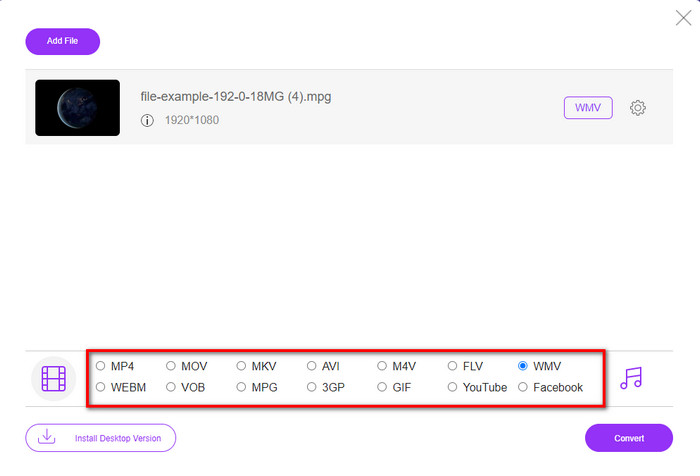
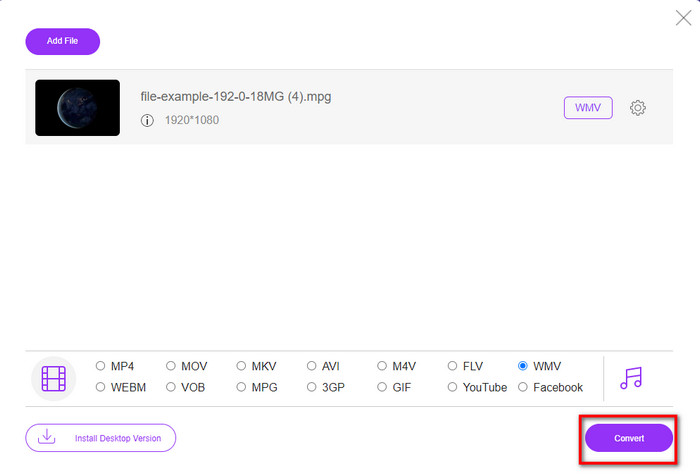
ステップ4. 下部にあるConvertボタンをクリックして、ファイルの変換を開始します。
パート2。品質を損なうことなくWindows11/10でMPGをWMVに変換する[推奨]
オンラインコンバーターではまだ物足りませんか?それなら、他の機能も備え、より高速に動作する無料のMPG to WMVコンバーターをダウンロードして使う方法もあります。FVC Video Converter Ultimateは、とくに形式変換において、動画に関するさまざまな問題を解決してくれるツールです。このツールは変換だけでなく、多くの機能を備えていますが、ここではその一部を詳しく見ていきます。もっと知りたい方は、以下の主な機能を確認してください。

FVCビデオコンバーターアルティメット
4,255,366以上のダウンロード- MPG、WMV、AVI、MP4、MOV、MKV、FLV、M4Vなどを200以上の形式に変換することをサポートします。
- 使い方は簡単で、多くのユーザーが愛する非常に直感的なインターフェースを備えています。
- 切り取り、マージ、切り抜き、GIFの作成など、ビデオの編集に最適です。
- 超高速変換とハードウェアアクセラレーションは、超高速変換プロセスで利用できます。
- WindowsやmacOSなどのすべてのプラットフォームでアクセスできます。
- サポートされているバッチ変換を使用して、複数のMPGまたはWMVファイルを一度に変換します。
無料ダウンロードWindows 7 以降に対応安全なダウンロード
無料ダウンロードMacOS 10.7 以降に対応安全なダウンロード
この究極のツールがあれば、これらすべての機能を利用できます。ただし、その前に、これを使用してMPGをWMVに変換するための詳細な範囲と手順をすべて読んでみましょう。
ステップ1. まず下のダウンロードボタンをクリックして、使用しているプラットフォームを選択します。ダウンロード後、コンバーターをインストールし、起動します。
無料ダウンロードWindows 7 以降に対応安全なダウンロード
無料ダウンロードMacOS 10.7 以降に対応安全なダウンロード
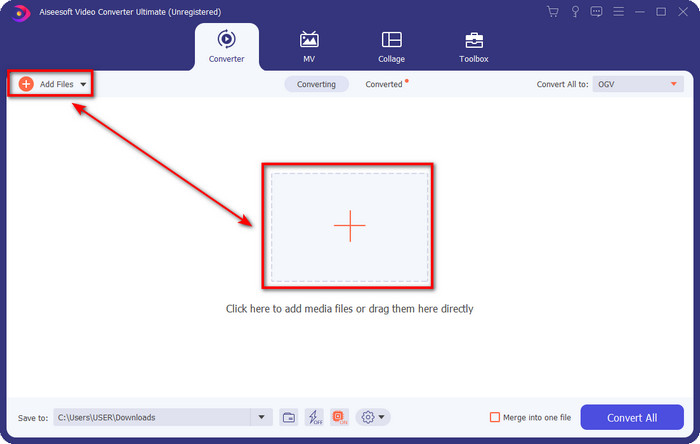
ステップ2. MPGファイルをアップロードするには、Add Files、もしくは中央にある+ボタンをクリックします。すぐにフォルダーが表示されるので、ファイルを選択し、Openを押して次へ進みます。
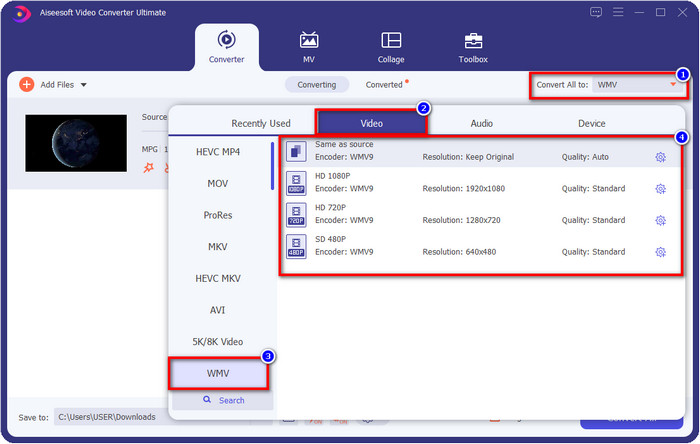
ステップ3. 変換を開始する前に、Convert All toボタンをクリックして、一覧から出力形式を選択します。WMV形式を選び、その後使用したいエンコーダーを指定します。
オプション. 複数のMPGファイルを結合したい場合は、ボックスにチェックを入れて、最終出力を1つにまとめることができます。
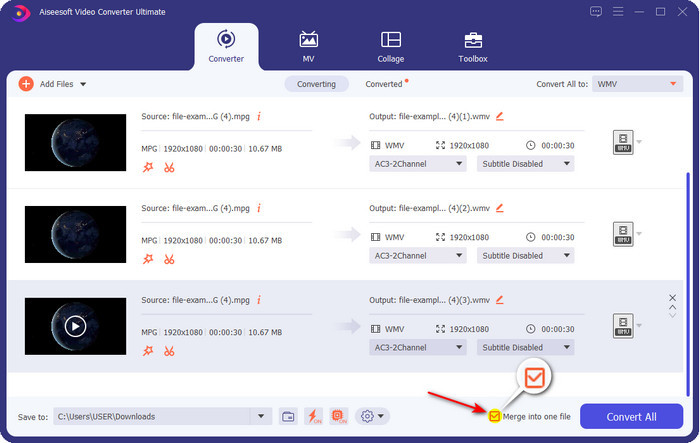
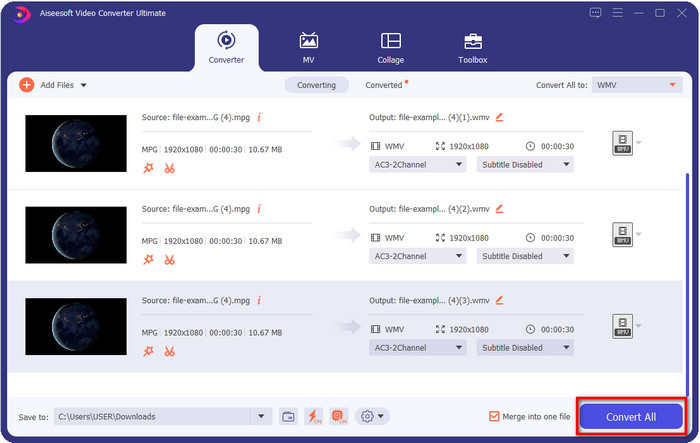
ステップ4. Convert Allをクリックして変換プロセスを開始します。MPGからWMVへの変換が完了すると、保存先のフォルダーが画面に表示されます。
パート3。MPGとWMVの違いは何ですか
MPGとWMVはどちらも、音声と映像を格納できるメディアコンテナ形式です。ただし、どちらも動画を保存できるとはいえ、この2つの形式には多くの違いがあります。もっと詳しく知りたいですか?以下では、MPGとWMVについて、それぞれの特徴や、無料のオンライン/オフラインMPG to WMVコンバーターを選ぶ前に再確認しておきたいポイントを解説します。
MPGは、比較的初期に開発された動画形式の1つとして知られています。この形式はMPEG規格に属する2種類のエンコーダー、すなわちMPEG-1とMPEG-2を利用しています。MPEG-1だけでは対応しきれないニーズを補うために2種類の圧縮方式を使っており、MPEG-2はMPGのバックアップ的な役割を果たしています。かつては高画質な動画形式の1つとされていましたが、その後登場した多くの形式が画質面で優位になっており、その代表例がWMVです。MPGファイルを再生したい場合は、おすすめのMPG/MPEGプレーヤーについて解説したページを参照してください。
WMVは、2つのWindowsコンプレッサーと多くを1つのファイルに使用することもできます。これは、Windowsで利用できる一流の形式であるため、すべてのWindowsユーザーに知られています。 2つ以上のコンプレッサーを使用しますが、コーデックを使用した後でも品質を損なうことはありません。また、この形式はすべてのWindowsデスクトップとの互換性が高く、ビデオストリーミングに最適です。
MPG と WMV
Moving Picture Experts Group(MPEG)によって作成されたMPGは、ビデオ、オーディオ、およびメタデータ情報を保存するための一般的なデジタルビデオ形式です。インターネットで共有するためのムービーを作成するときに非常に便利です。 MPGのこれらのファイルには、通常、MPEG-1またはMPEG-2ビデオ/オーディオ圧縮が含まれています。
Microsoftによって作成されたWMVは、2000年代に最も一般的なビデオ形式の1つでした。 Webで表示したり、Windowsのさまざまなメディアプレーヤーで再生したりできます。また、WindowsMediaPlayerのデフォルトのビデオファイル形式でもあります。しかし、最近は他のフォーマットに引き継がれています。
パート4。MPGからWMVへの変換に関するFAQ
Windows Media Playerを使用してMPGをWMVに変換する方法は?
まず、Windows Media Player自体には形式変換機能はありませんが、CDをリッピングしてデスクトップに保存する際に、保存形式を変更することはできます。最初にPCでWindows Media Playerを開き、整理(Organize)をクリックしてからオプション(Options)を選びます。その中の音楽の取り込み(Rip Music)タブを開き、ドロップダウンボタンから形式を選択し、OKを押します。あとはCDを挿入すれば、自動的にCDからファイルをリッピングできます。
MPGビデオファイルはどこで見ることができますか?
.mpgファイルは、Windows標準のメディアプレーヤーであるWindows Media Playerで再生できます。しかし、より使い勝手のよいプレーヤーを探しているなら、すべてのプラットフォームで利用可能なMPG/MPEGプレーヤーを紹介している記事をぜひチェックしてみてください。
WindowsムービーメーカーでMPGをWMVに変換する方法は?
Windows Movie Makerは本来編集用のソフトですが、ここでも形式を変更することは可能です。ただし、一般的なオンライン/オフラインのコンバーターとは変換の手順や仕組みが異なります。さらに、このエディターはWindows 10以前のみ対応で、最新バージョンのWindowsではダウンロードできません。MPG動画をWMV形式に変換するには、以下の手順に従ってください。エディターを開き、空白の画面にファイルをドラッグします。次にファイル(File)をクリックし、ムービーの保存(Save Movie)を選択して、使用したいデバイス向けの設定を指定し、処理が完了するまで待ちます。こうして書き出したファイルはすべて.wmv形式で保存されます。
結論
上で紹介したツールはいずれも、この記事の内容が事実のみで構成されるよう実際に検証したうえで、自信を持ってMPGをWMVに変換できるとおすすめしているものです。もし、ストレージ容量を節約するためにコンバーターをPCへインストールしたくない場合は、FVC Free Video Converter Onlineの利用を推奨します。一方、オンラインコンバーターでは物足りず、よりプロフェッショナルな仕上がりを求めるのであれば、FVC Video Converter Ultimateこそが最適なツールです。それでもなお、この究極ツールにピンとこない場合は、まずデスクトップにソフトウェアをダウンロードして実際に使ってみて、究極レベルの変換体験を味わってみてください。
-
 [2022] MPGをAVIに変換するのに役立つMPGからAVIへのコンバーターのホットピック
 ビデオプレーヤーで再生するためだけにMPGをAVIビデオファイルに変換することを考えたことはありますか?これは、上記の問題について説明している、見つけることができる最高の記事です。
-
 Mac / Windows / OnlineでMPGをMOVに変換する3つの簡単な方法
 MPGファイルを変換して、後でiOS、iPod、iPad、またはMacに転送しますか?この記事は、ステップを使用してMPGをMOVに変換する方法を理解するのに役立ちます。
-
 品質を損なうことなくMPGをFLVに変換する方法[実証済み]
 このメディアプレーヤーでお気に入りの映画を見る必要がありますが、MPGはサポートされていません。この記事で紹介するこれらのコンバーターを使用して、MPGファイルをFLVに変換してみてください。

