


 Video Converter Ultimate
 Screen Recorder
 Riparazione video
 Download sicuro
2 semplici modi per comprimere MXF con file di dimensioni inferiori
MXF è un formato di file standard del settore che supporta timecode completo e metadati. È progettato principalmente per l’uso professionale di contenuti video, in particolare nella radiodiffusione televisiva. MXF è un formato contenitore video per contenuti video e audio professionali conformi agli standard SMPTE. Puoi facilmente ottenere un video MXF di alta qualità dalla tua videocamera digitale. Allo stesso tempo, però, un file MXF occupa solitamente molto spazio sul disco.
Quando vuoi condividere un grande video MXF, è davvero necessario comprimere il file MXF per ridurne le dimensioni. La domanda è: sai come comprimere i file MXF?

In realtà, sul mercato sono disponibili molti strumenti di compressione e montaggio video che possono aiutarti a comprimere file MXF e ridurne le dimensioni. Questo articolo ti mostrerà come comprimere file MXF con Adobe Premiere Pro e con un compressore video online gratuito.
Parte 1. Come comprimere file MXF online gratuitamente
Per comprimere un file MXF riducendone le dimensioni, puoi scegliere il popolare software di compressione MXF, Free Video Compressor. Ha la capacità di ridurre la dimensione del file video MXF mantenendo la qualità originale di immagine e suono. Questo compressore video supporta pienamente tutti i formati video più comuni, tra cui MXF, MP4, MOV, AVI, MKV, FLV e altri. Ti permette di comprimere file MXF sia su PC Windows che su Mac.
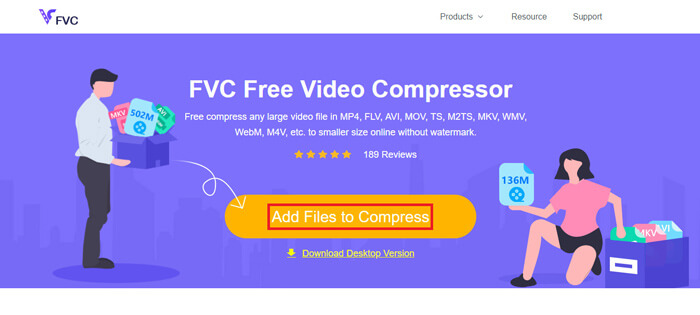
Passaggio 1. Quando desideri comprimere un file MXF, vai al sito ufficiale di questo compressore di file MXF. Fai clic sul pulsante Add Files to Compress per installare un piccolo launcher necessario alla compressione dei file MXF.
Passaggio 2. Seleziona e aggiungi il file MXF che vuoi comprimere a questo compressore video online gratuito. Qui puoi regolare liberamente il livello di compressione video in base alle tue esigenze. Inoltre, puoi personalizzare risoluzione, frame rate, bitrate e nome del video. Puoi anche scegliere un altro formato di output, come MP4, per il tuo video compresso.
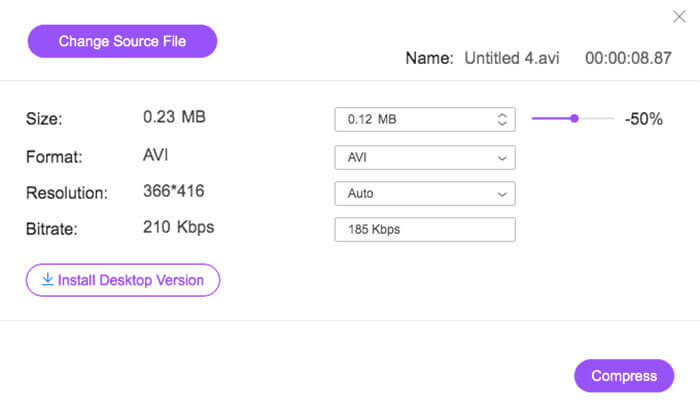
Passaggio 3. Dopo di che, puoi semplicemente fare clic sul pulsante Compress per iniziare a comprimere gratuitamente il file MXF online.
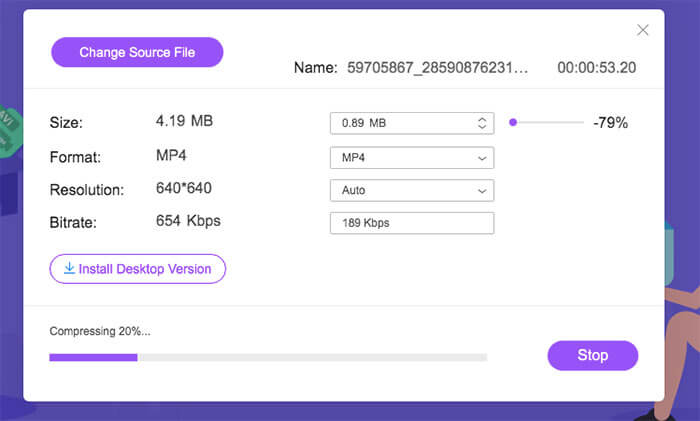
Diversamente da molti altri compressori video online, questo compressore video gratuito non aggiungerà alcuna filigrana al tuo file MXF compresso.
Parte 2. Come comprimere MXF in Adobe Premiere Pro
Adobe Premiere Pro è una suite professionale di produzione video molto diffusa per utenti Mac e Windows. Se hai Premiere Pro installato sul tuo computer, puoi usarlo per comprimere i file MXF.
Passaggio 1. Avvia Premiere Pro sul tuo computer. Quando entri nell’interfaccia principale, fai clic su New Project per creare un nuovo progetto. Puoi personalizzare varie impostazioni nella finestra che si apre.
Passaggio 2. Fai clic su File, Import e poi su Media per selezionare e importare il tuo file MXF. Se vuoi comprimere un file MXF presente sulla tua videocamera digitale, puoi collegare la videocamera al computer. Inoltre, puoi trascinare e rilasciare direttamente il video MXF da una cartella.
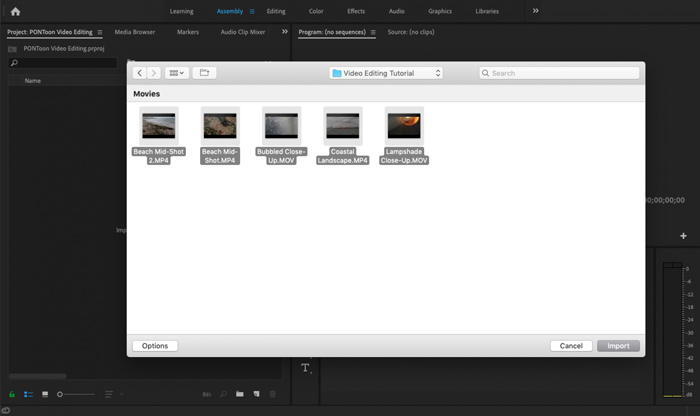
Passaggio 3. Passa all’area di lavoro Editing per comprimere al meglio il tuo file MXF.
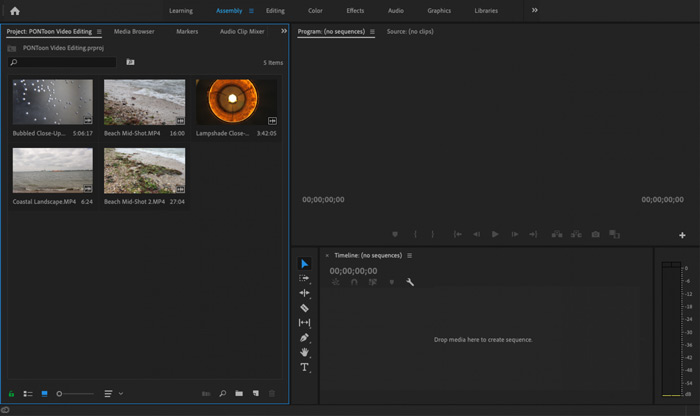
Passaggio 4. Ora puoi modificare il tuo file MXF sulla timeline. Trascina semplicemente una clip MXF dai tuoi media importati sulla timeline per creare una nuova sequenza. In questo modo puoi tagliare il file MXF per ridurne le dimensioni.
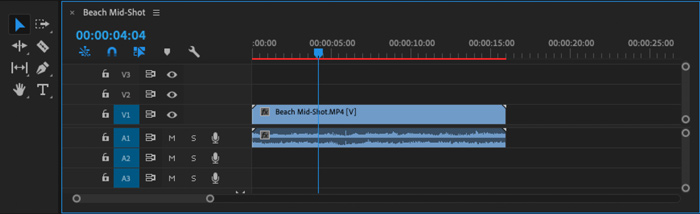
Puoi anche scegliere di personalizzare la risoluzione video e altri per comprimere il file MXF. Inoltre, è possibile eseguire l'output di MXF in un formato video che trasporta file di dimensioni inferiori.
Parte 3. Domande frequenti sulla compressione dei file MXF
Domanda 1. Cos'è il formato video MXF?
MXF, acronimo di Material eXchange Format, è un formato contenitore che memorizza video, audio e metadati. È un formato contenitore video per contenuti video e audio professionali standard SMPTE. Molte videocamere digitali professionali come Sony, Panasonic, Canon e altre archiviano i video in formato MXF.
Domanda 2. Come convertire gratuitamente MXF in MP4 online?
MP4 è senza dubbio il formato più popolare, supportato praticamente da tutti i lettori, editor e dispositivi. Quindi, in molti casi, è necessario convertire MXF in MP4 per una migliore riproduzione o per il montaggio. Puoi scegliere il Free Online Video Converter per effettuare facilmente la conversione da MXF a MP4.
Domanda 3. MXF è un formato video senza perdita di dati?
MXF può archiviare metraggio RAW senza perdita di dati che offre agli studi di post-produzione professionali funzionalità avanzate nei flussi di lavoro per il color grading e l'editing video. Il formato MXF può supportare completamente il timecode SMPTE.
Conclusione
In questo articolo abbiamo parlato principalmente di come comprimere i file MXF. Bisogna ammettere che comprimere file MXF con Adobe Premiere Pro è piuttosto complesso. Per questo ti consigliamo di usare il Free Video Compressor suggerito per ridurre la dimensione dei tuoi file MXF.
-
 Come comprimere un video MP4 in dimensioni inferiori
 Il video MP4 è troppo grande per il caricamento? Vuoi ridurre le dimensioni del video? Ecco 3 modi efficaci per comprimere un file MP4 in dimensioni inferiori senza limiti.
-
 Tutorial per comprimere GIF e ridurre le dimensioni del file con alta qualità
 Ecco 2 semplici modi per comprimere GIF sul tuo computer o telefono cellulare. Puoi utilizzare FVC Free Online Video Compressor e Photoshop riduce le dimensioni del file GIF in diversi aspetti.
-
 4 modi per comprimere file MOV QuickTime di grandi dimensioni senza perdere la qualità
 Questo articolo mostra come comprimere i video QuickTime MOV sul tuo telefono o computer in dettaglio. Se il tuo video MOV è troppo grande per essere inviato, condiviso o salvato, puoi ottenere 4 soluzioni praticabili qui.
