


 Video Converter Ultimate
 Screen Recorder
 Riparazione video
I 3 migliori convertitori online e offline utilizzati per convertire file XviD in formato AVI
XviD è un codec molto conosciuto perché è il concorrente di DivX. Dopotutto, questo codec è open‑source ed è supportato dalla licenza GNU. Questo codec viene utilizzato per comprimere e decomprimere i file nel tuo formato. Sebbene questo codec aiuti a ridurre le dimensioni del video, alcuni lettori multimediali non riescono comunque a elaborarlo. Quindi, se il tuo lettore multimediale non supporta il codec XviD, devi convertire il file in AVI. Qui sotto sono riportati alcuni dei convertitori più scelti che vengono usati per convertire XviD in AVI.
Parte 1. XviD e AVI - Una panoramica
Un'ulteriore spiegazione su XviD è che questo codec non è un formato o un contenitore come l'AVI o qualsiasi altro contenitore multimediale. Con l'aiuto di XviD, il tuo file video può essere compresso in una dimensione molto più piccola senza distruggerne la qualità. Inoltre, XviD può codificare AVI per renderlo più piccolo; tuttavia, non tutti i formati AVI utilizzano XviD come codec. Poiché il formato AVI è un formato accessibile non compresso, se hai un file con il nome di file .avi, aspettati che questo file sia enorme. Forse ti stai chiedendo perché devi convertire XviD, semplicemente perché non tutti i lettori multimediali supportano questo codec. Quindi ora, proviamo a trasformare il tuo file non riproducibile in uno riproducibile imparando a convertire XviD in formato AVI.
Parte 2. 1° e 2° modo su come convertire XviD in AVI offline
1° modo. Convertitore video FVC Ultimate
Per convertire un file codificato con estensione .xvid, è meglio lasciare che uno strumento professionale svolga il lavoro di conversione in un nuovo file. FVC Video Converter Ultimate non è solo valido nel convertire il file o il formato in una nuova versione, ma puoi anche usare questo strumento per modificare video, potenziare l’audio, creare GIF, accelerare i video e molto altro. Questo software è un vero coltellino svizzero, uno strumento completo che ti farà innamorare. Tuttavia, prima di poter usare questo strumento, devi acquistarlo per accedere alle funzioni avanzate che offre. Nel complesso, questo software può convertire qualsiasi formato in oltre 200 nuovi formati tra cui scegliere. Dunque, se vuoi vedere come convertire XviD in AVI con questo strumento, leggi i passaggi riportati di seguito.
Passaggio 1. Fai clic sul pulsante di download per scaricare il software sull’unità. Poi installalo, segui la procedura di configurazione e premi Start Now per avviare lo strumento.
Download gratuitoPer Windows 7 o versioni successiveDownload sicuro
Download gratuitoPer MacOS 10.7 o versioni successiveDownload sicuro
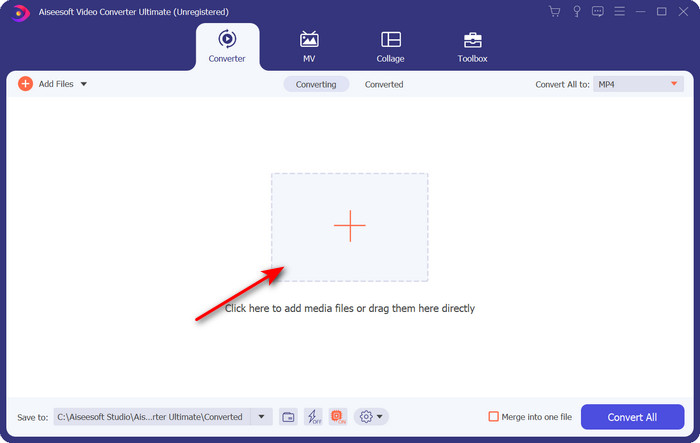
Passaggio 2. Dopo aver fatto clic su Start Now, lo strumento si aprirà; nella parte centrale, fai clic sul pulsante + per inserire il file con estensione .xvid e fai clic su Open.
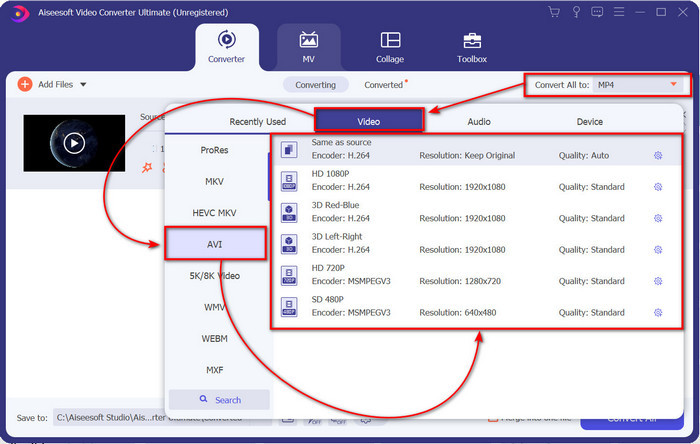
Passaggio 3. Per cambiare il formato in AVI, fai clic su Convert All to: e trova il formato AVI; scegli la risoluzione. Ricorda: più alta è la risoluzione, migliore sarà la qualità, ma più grande sarà la dimensione del file.
Passaggio 4. Una volta scelto il formato, puoi avviare la conversione facendo clic sul pulsante Convert All.
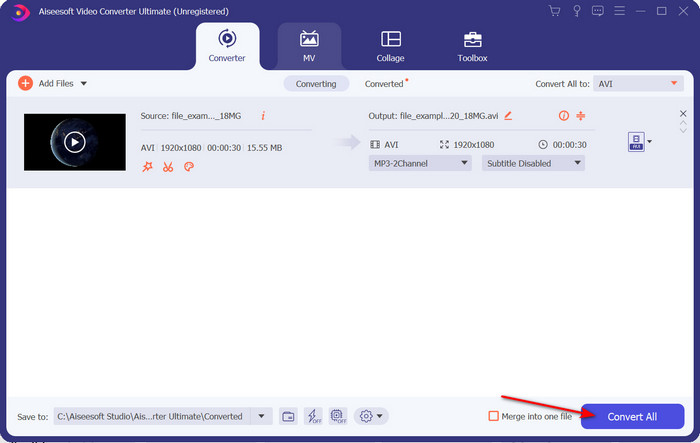
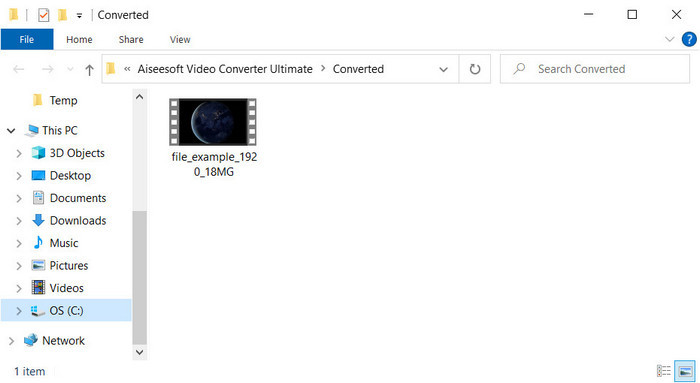
Passaggio 5. La conversione del file richiederà meno di un minuto; al termine comparirà una cartella con il file AVI. Per guardare il video convertito, fai clic sul file e goditi la visione.
2a Via. VLC
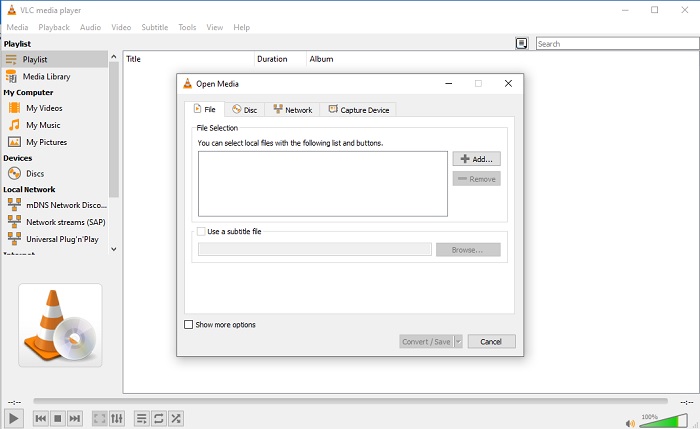
Se stai cercando un convertitore gratuito da XviD a AVI, prova a utilizzare VLC. Questo software open source non serve solo per riprodurre video, ma puoi anche utilizzare questo strumento per convertire file o formati. Sebbene lo strumento sia ancora gratuito, puoi scegliere solo diversi formati per questo convertitore. Quindi ora, se vuoi convertire il tuo file XviD in un nuovo formato come AVI, segui i passaggi seguenti.
Passaggio 1. Avvia VLC sul desktop e fai clic su Media; nel menu che si apre, fai clic su Convert/Save.
Passaggio 2. Premi Add, cerca il file nella cartella, fai clic su Open e poi su Convert/Save.
Passaggio 3. Cambia il formato facendo clic sul pulsante drop-down, fai clic su Browse per individuare la cartella di destinazione e poi su Start.
Parte 3. 3° miglior modo gratuito per convertire XviD in AVI
3a Via. Convertitore video gratuito FVC online
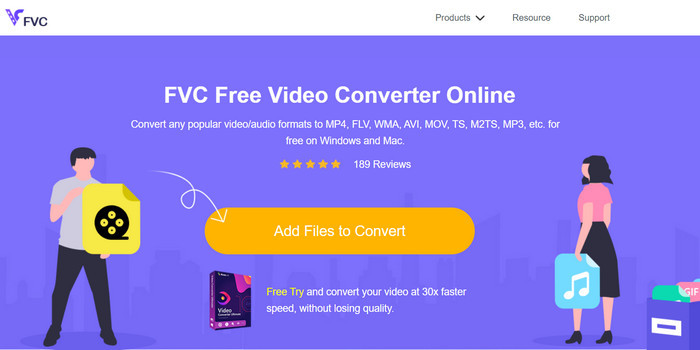
Stai cercando un convertitore web per convertire XviD in AVI online e anche gratuitamente? FVC Free Video Converter Online è il miglior convertitore online che puoi usare nel tuo browser. Questo strumento web ha già aiutato molti utenti a risolvere problemi di conversione dei file, e forse sarai il prossimo. Uno dei vantaggi è che non devi scaricare alcun software sul desktop, perché puoi accedervi tramite il tuo browser preferito in qualsiasi momento e ovunque. Tuttavia, uno svantaggio è che non puoi usarlo se non hai traffico dati o una connessione Internet nella tua zona. Inoltre, questo strumento online è un’ottima scelta per quanto riguarda la conversione dei formati. Ora proviamo a usare questo software online seguendo i passaggi.
Passaggio 1. Per accedere a questo strumento web, devi fare clic su questo link.
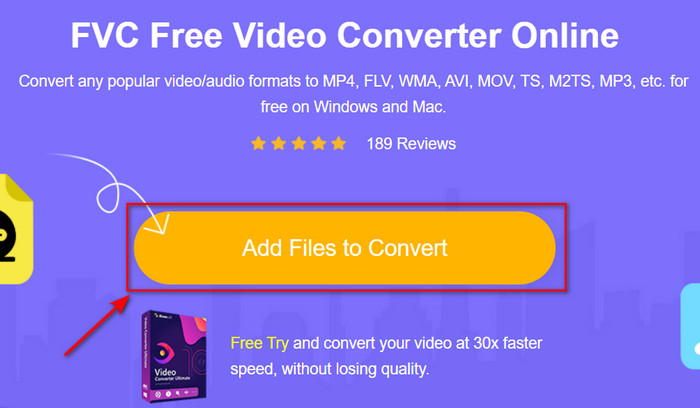
Passaggio 2. Quindi fai clic su Add Files to Convert per aprire lo strumento web; dopo il clic si aprirà una cartella, cerca il file .xvid nella cartella e poi fai clic su Open.
Passaggio 3. Dopo il caricamento del file, scegli il formato AVI nel sottomenu.
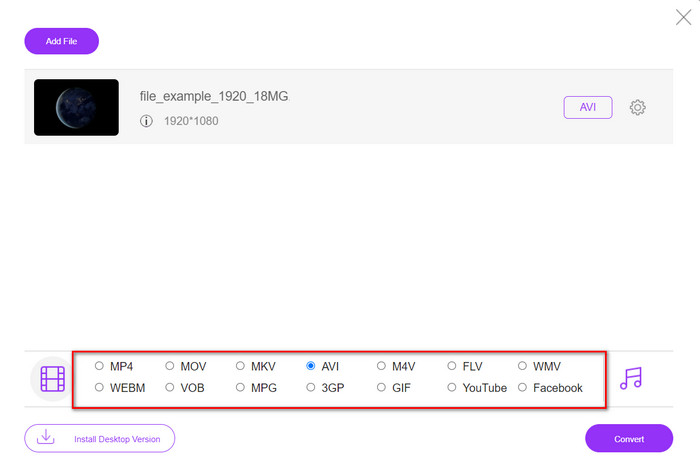
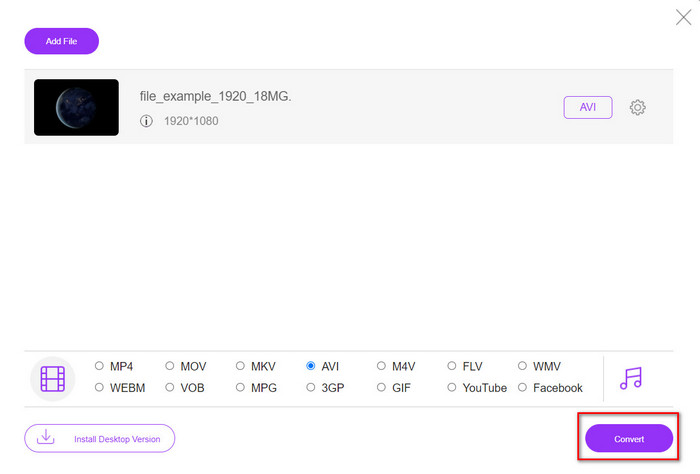
Passaggio 4. Una volta terminata la selezione del formato, fai clic su Convert per iniziare la conversione.
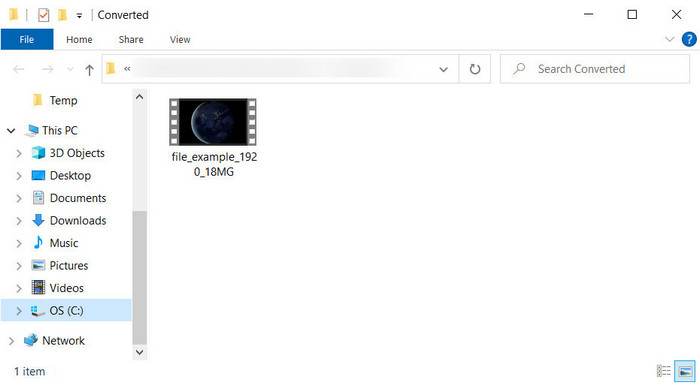
Passaggio 5. Una cartella apparirà sullo schermo con il nuovo file .avi.
Parte 4. Domande frequenti Conversione da XviD a AVI
Dopo aver convertito XviD in AVI, la qualità è la stessa?
Bene, ovviamente, la qualità del file video XviD non deve cambiare dopo la conversione. Tuttavia, se modifichi la qualità dell'output e la imposti su bassa o media, aspettati un cambiamento di qualità, specialmente se il tuo XviD è 1080 o 4k pixel.
La dimensione del file di XviD cambia dopo la conversione?
Dipende dal formato in cui lo trasformerai; ad esempio, quando trasformi .xvid in .avi, aspettati un leggero cambiamento nella dimensione del file del video. Ma non dovrebbe essere così enormemente diverso dalla dimensione precedente.
Dove posso riprodurre il mio video Xvid?
Se stai cercando il miglior lettore multimediale che supporti il codec Xvid, prova a fare clic su questo link, dove abbiamo raccolto tutti i sette migliori lettori XviD per Windows, Mac, iOS e Android.
Conclusione
In conclusione, convertire XviD può essere fatto rapidamente se utilizzi gli strumenti disponibili sopra. Inoltre, i suddetti strumenti offrono prestazioni eccellenti e ti aiuteranno a risolvere i problemi legati a XviD. Ora sta a te scegliere il convertitore perfetto da usare. Che tu lo scarichi o vi acceda online, qualunque sia la tua scelta, puoi aspettarti un risultato eccellente. Ma se non sai cosa scegliere, ti suggeriamo di scaricare FVC Video Converter Ultimate per ottenere risultati straordinari. Inoltre, se lo scarichi, potrai effettuare conversioni e molto altro ancora semplicemente toccando il pulsante di download.
-
 Come convertire M2TS in AVI con i migliori convertitori su Web e desktop
 Vuoi convertire il tuo file M2TS in formato AVI? Quindi leggi questo contenuto mentre specifichiamo informazioni dettagliate su come convertire e quali sono gli strumenti disponibili che puoi utilizzare.
-
 I 4 migliori convertitori MXF per convertire MXF in AVI [gratuito ea pagamento]
 Che cos'è un file MXF? Come convertire MXF in AVI? Queste sono le poche domande a cui rispondiamo. Quindi, se hai la stessa domanda, leggi questo articolo.
-
 I 4 modi più efficaci per convertire il formato 3GP in AVI [2025]
 Posso convertire i miei file 3GP in AVI? Bene, puoi convertirlo facilmente se provi questi strumenti disponibili poiché abbiamo raccolto tutte le possibili soluzioni al tuo problema di conversione da 3GP a AVI.
