


 Video Converter Ultimate
 Screen Recorder
 Riparazione video
[Gratuito e a pagamento] Padroneggia l'arte della conversione per il formato MKV in AVI
Matroska ha sviluppato il formato MKV per preservare i file in modo che possano essere utilizzati in futuro. In pratica, il file in questo formato è “sigillato” singolarmente con diversi codec al suo interno. Tuttavia, in alcuni casi non può essere riprodotto dal lettore multimediale predefinito del tuo PC o Mac. Perciò, la scelta migliore è convertirlo in un file AVI o in un altro formato adatto. Vuoi sapere come trasformare un file MKV in AVI? Allora devi leggere con attenzione le informazioni dettagliate qui sotto, perché abbiamo riportato solo la verità, nient’altro che la verità.

Parte 1. Come convertire MKV in AVI gratuitamente online e offline
1. Convertitore video online gratuito FVC
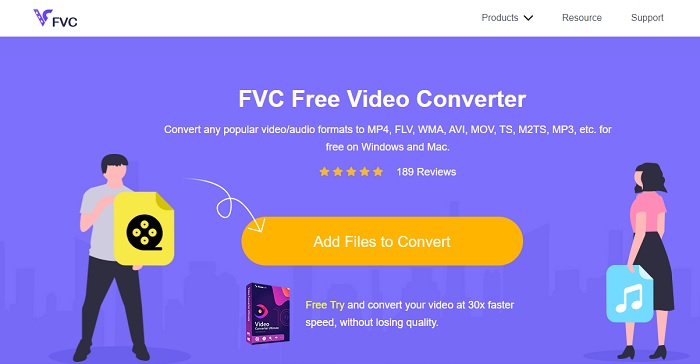
Puoi usare questo strumento per convertire MKV in AVI online con l’aiuto del migliore. FVC Free Video Converter è pensato per essere facile da usare e gratuito, come richiesto dagli utenti. A differenza di qualsiasi altro strumento menzionato qui, questo offre un’eccellente compressione per ogni file. Puoi anche modificare bitrate, fps, codec e altro ancora nel file che vuoi convertire. Al contrario, tutte le funzioni principali disponibili nella versione premium di questo strumento qui non sono presenti. Permette infatti di usare solo un numero limitato di formati, noti come formati di base. Per ora continuiamo e vediamo dove ci porterà l’onda della conversione video. Segui i passaggi e iniziamo a salpare nel mare della conversione.
Passo 1. Vai al link fornito apposta per te per iniziare.
Passo 2. Per avviare lo strumento, devi fare clic su Add Files to Convert.
Scarica la Versione Desktop per convertire i file in batch.
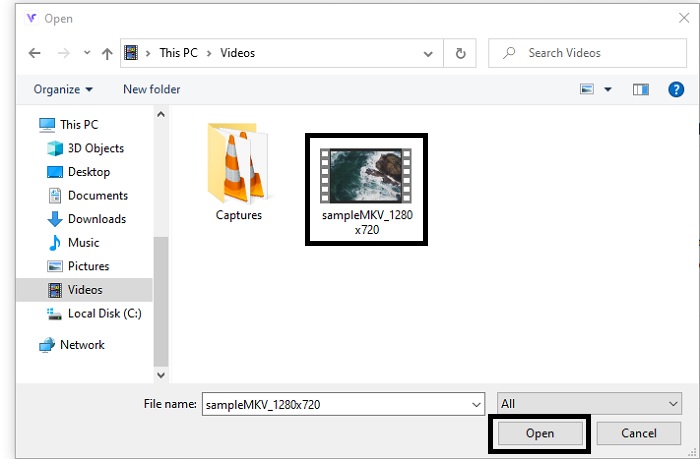
Passo 3. Seleziona il file MKV che vuoi convertire e fai clic su open per procedere.
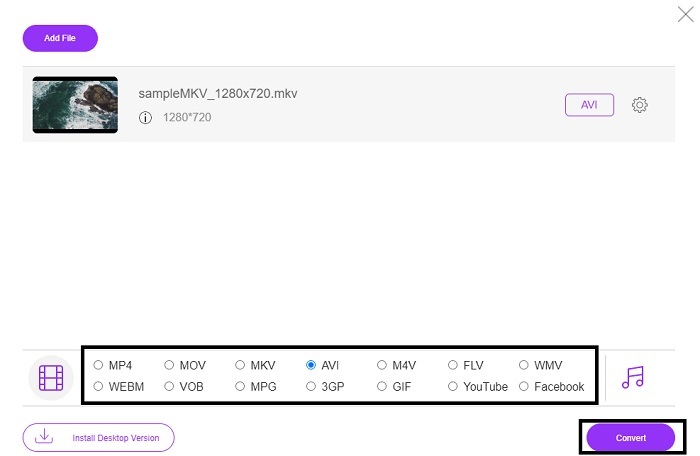
Passo 4. Nell’interfaccia scegli il formato AVI in basso e seleziona Convert per avviare il processo.
Passo 5. Attendi finché non è terminato. Dopo circa un minuto, sullo schermo verrà visualizzata l’icona di una folder su cui cliccare per aprire il file manager, dove troverai il file convertito.

Professionisti
- Nessun download necessario perché puoi accedervi tramite il tuo motore di ricerca.
- Fornisce più formato rispetto agli altri due strumenti gratuiti di seguito.
- Ottimo anche in compressione.
Contro
- Non fornisce funzionalità di modifica e il formato disponibile è limitato.
- Se la connessione non è disponibile non è possibile utilizzare questo strumento.
2. VLC Media Player
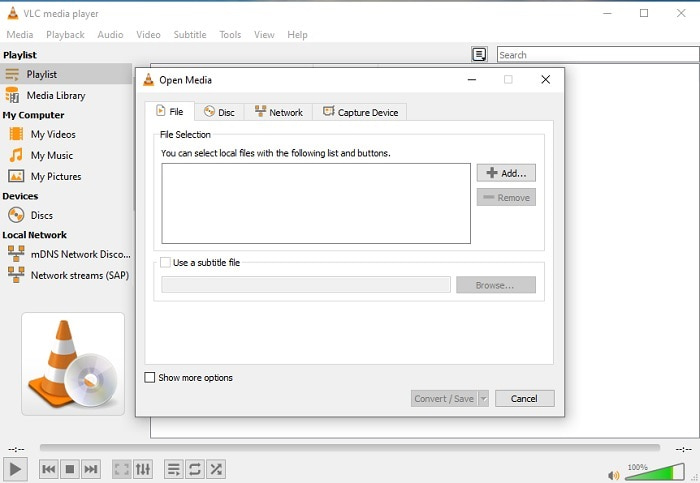
Se hai VLC, perché non provare a usarlo per convertire i file? Come già detto, puoi convertire MKV in AVI su Mac usando VLC. Tuttavia, non è stato progettato per essere il migliore nella conversione, a causa dei formati limitati supportati e di altri motivi. Nonostante ciò, questo strumento è notissimo per essere uno dei migliori lettori multimediali che puoi usare per guardare video e ascoltare audio. Quindi, se vuoi provare a usare VLC come convertitore, segui questi passaggi qui sotto.
Passo 1. Apri VLC sul tuo desktop.
Passo 2. Clicca su File e trova la funzione di conversione del programma.
Passo 3. Aggiungi il file che vuoi convertire e avvia il processo.
Professionisti
- Uno dei più grandi lettori multimediali che offre funzionalità di conversione.
- Scaricabile gratuitamente.
- Supporta la maggior parte dei codec.
Contro
- Non è la scelta per principianti per i neofiti della conversione
- Istruzioni difficili da leggere e da capire.
3. Freemake

Freemake è uno degli strumenti desktop che puoi usare per convertire MKV in AVI su Mac e PC. Questo programma è scaricabile, quindi non ti serve la connessione a internet per utilizzarlo. I formati che offre sono molto limitati rispetto all'FVC converter online descritto sopra. Inoltre, l’interfaccia del programma è datata: facile da capire, ma poco attraente. Tuttavia, per quanto riguarda il lavoro di conversione puoi fare affidamento su questo strumento. Impara a usare Freemake seguendo i passaggi qui sotto.
Passo 1. Scarica Freemake sul tuo computer e avvialo.
Passo 2. Scegli il formato di file in cui vuoi convertire.
Passo 3. Attendi più di un minuto per completare la conversione.
Professionisti
- Non c'è bisogno di internet per usarlo.
- Facile da usare.
- Interfaccia di facile comprensione.
Contro
- La combinazione di colori dell'interfaccia è un po' noiosa e ha anche un'atmosfera infantile.
- Limitato a offrire formato e funzionalità.
Parte 2. Il modo migliore per cambiare il file MKV in formato AVI con passaggi dettagliati
Se vuoi portare la conversione dei formati a un livello superiore, è indispensabile sapere come usare questo strumento. Inoltre, FVC Video Converter Ultimate offre la migliore qualità di conversione che tu possa desiderare. Ti consente anche di eseguire più conversioni contemporaneamente. Quindi, converti finché non ti stanchi, ma non preoccuparti: non ti stancherai grazie alle funzioni speciali che fornisce. Per esempio, vuoi convertire MKV in AVI e poi migliorarlo in un secondo momento? Con FVC Video Converter Ultimate puoi fare molto di più. Per capire quanto sia straordinario questo strumento, ecco i passaggi per usare la sua esclusiva funzione di conversione.
Passo 1. Installa il programma sul tuo disco e segui la procedura guidata per avviarlo.
Download gratuitoPer Windows 7 o versioni successiveDownload sicuro
Download gratuitoPer MacOS 10.7 o versioni successiveDownload sicuro
Passo 2. Avvia il programma dopo l’installazione. Questa è un’anteprima dell’interfaccia del software.
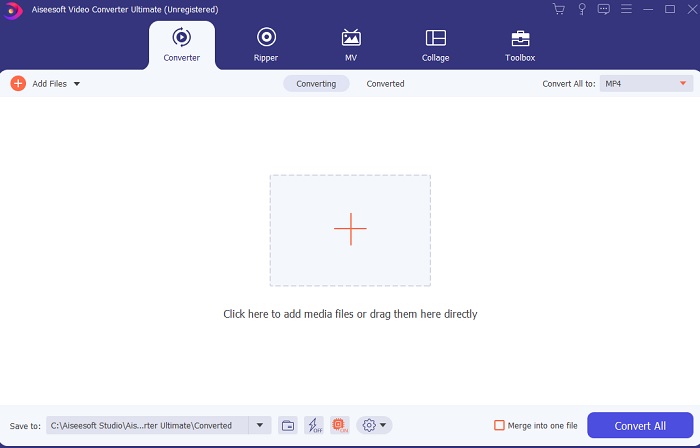
Passo 3. Clicca sul pulsante con il segno plus per inserire il file MKV che vuoi convertire. Per esempio, se i file sono più di due o tre, il modo migliore per aggiungerli è trascinarli e rilasciarli nell’interfaccia.
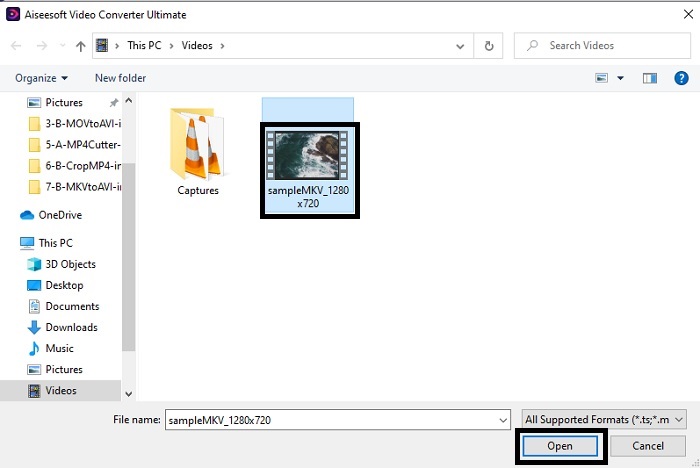
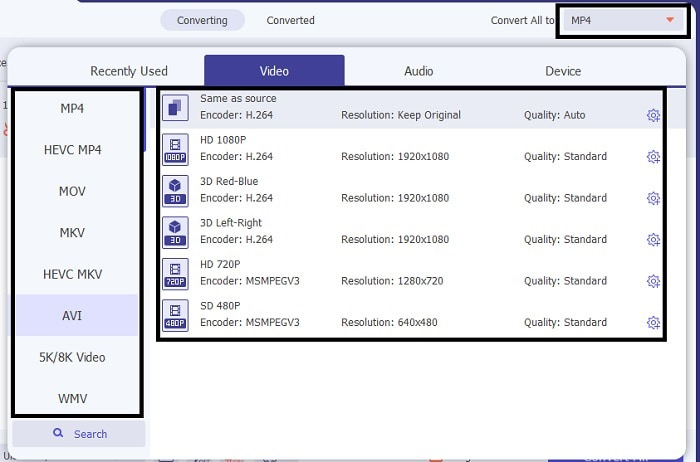
Passo 4. Nel menu a tendina scegli il formato in cui vuoi convertirlo. Clicca su Convert All e attendi che la conversione sia completata.
Passo 5. La conversione richiederà meno di un secondo, quindi non dovrai praticamente aspettare. Una volta terminata, l’esplora risorse verrà visualizzato automaticamente sullo schermo con il file che hai convertito. Cliccalo e goditi il nuovo file appena creato.
Professionisti
- Fornisce importanti funzionalità di modifica per migliorare il tuo file multimediale.
- 30 volte più veloce nella conversione rispetto allo strumento online. Ed è 100 volte migliore in compressione rispetto all'altro strumento.
- Facile come 1-2-3 da usare. Non c'è bisogno di diventare un professionista per usare questo strumento.
Contro
- Deve essere pagato ma non è molto costoso.
- Devi scaricare lo strumento sul desktop.
MKV contro AVI
Il formato contenitore multimediale Matroska, rilasciato nel 2002, è un formato open source che può includere numerose tracce video, audio, immagini e sottotitoli. Quindi, puoi usarlo per archiviare facilmente brevi video clip, programmi TV e film. È abbastanza popolare per i sottotitoli dei fan degli anime.
Basato sul Resource Interchange File Format (RIFF), il formato AVI è stato introdotto da Microsoft nel 1992. Può salvare video/audio di alta qualità poiché utilizza meno compressione. Ma ciò causa anche la grande dimensione del file di un file AVI, che potrebbe essere un problema quando lo spazio è limitato.
Parte 3. Domande frequenti su MKV in AVI
Il freno a mano può convertire MKV in AVI?
Sì, puoi utilizzare il freno a mano per convertire qualsiasi formato. Ma questo strumento è limitato solo a Windows 10 e versioni successive.
MKV è lossy o lossless?
MKV è un tipo di compressione senza perdita di dati.
Quali sono gli svantaggi di MKV?
Mentre MKV apre nuove prospettive per i formati multimediali in tutto il mondo, questo tipo di file è ancora in fase di sviluppo e, come già accennato, può contenere codec diversi. Ciò significa che è molto più grande di un file AVI e anche più complesso. Tuttavia, puoi scegliere di convertire MKV in MP4 per ottenere un file più piccolo.
Conclusione
Per il momento, imparare a convertire è fondamentale, soprattutto per chi ama guardare video. A volte il nostro file non può essere riprodotto dal lettore multimediale predefinito perché il formato o il codec non è supportato. Quindi, la cosa migliore che possiamo fare per risolvere il problema è convertirlo in un nuovo formato. FVC Video Converter Ultimate è lo strumento definitivo che ti offre le prestazioni che desideri. Invece di scegliere uno strumento di bassa qualità, perché non provi a usare lo strumento definitivo che risolve qualsiasi problema di conversione, miglioramento, unione e creazione che tu possa avere?.
-
 MKV to MOV - Come convertire MKV in MOV
 Come posso convertire MKV in MOV su Mac? IMovie può leggere MKV? Cosa significa formato MOV? Questo post spiega 2 semplici modi per aiutarti a convertire MKV in MOV con convertitori video online e professionali gratuiti.
-
 Come convertire i file MKV per riprodurli su PS3 senza problemi [Risolto]
 Vuoi riprodurre video MKV sulla tua PS3? Tuttavia, la PS3 non può riprodurre direttamente i file MKV. Questo articolo ti mostrerà come convertire i video MKV in formati video supportati da PS3 per riprodurli su PS3 senza problemi.
-
 Come convertire video MKV in GIF animate senza Photoshop/FFmpeg
 Dopo aver scaricato e visto film MKV sul tuo computer, potresti voler condividere alcuni momenti meravigliosi con gli amici o su Internet come GIF. In questo articolo, puoi conoscere i 2 modi più semplici per convertire MKV in GIF.

