


 Video Converter Ultimate
 Screen Recorder
 Riparazione video
 Download sicuro
Linee guida di facile comprensione per convertire 3GP in MKV
Sui telefoni 3G viene utilizzato il formato contenitore multimediale 3GP. Questo formato può essere usato anche sui dispositivi mobili 2G e 4G. Tuttavia, sebbene sia un ottimo formato, 3GP è comunque un formato video ormai datato. Ciò implica che è impossibile riprodurre questo tipo di file con altri programmi. Se desideri riprodurre il tuo video 3GP, devi convertirlo in uno dei formati più recenti e popolari oggi disponibili, come ad esempio MKV. Con il formato MKV puoi sfruttare la sua ampia compatibilità e riprodurre i video praticamente su qualsiasi software e hardware. Puoi convertire facilmente 3GP in MKV con l’aiuto di questa guida. Allora, cosa aspetti? Leggi attentamente l’articolo.

Parte 1: metodo eccezionale per convertire 3GP in MKV offline
Puoi usare Video Converter Ultimate per convertire 3GP in MKV in alta qualità. È in grado di convertire i file video all’istante perché permette di eseguire conversioni in batch, rendendo la conversione di più file contemporaneamente un’operazione semplice. Anche se il formato 3GP non è più popolare in questa era moderna, Video Converter Ultimate supporta ancora questo formato. Questo è uno dei motivi per cui dovresti affidarti a questa applicazione offline. Supporta oltre 100 formati video, inclusi AVI, MP4, MOV, MKV, WMV, DV, MTS, VOB e altri ancora. Ancora più importante, puoi usare questo convertitore sia che tu sia esperto sia che tu sia un principiante. Ha un’interfaccia intuitiva che ti permette di capire facilmente ogni pulsante e opzione sullo schermo. Inoltre, questa applicazione scaricabile è disponibile sia su Mac che su Windows.
Funzioni
◆ Converte oltre 100 formati video, come 3GP, MKV, MP4, M4V, MTS, MKV, WMV, AVI, FLV, MOV, ecc.
◆ Il processo di conversione batch è disponibile.
◆ Modifica i video utilizzando un potenziatore video, un compressore, un trimmer, un rotatore, un invertitore e altro ancora.
◆ Crea un collage con filtri gratuiti e modelli pronti all'uso.
◆ Il creatore di video musicali è a portata di mano, compresi i temi gratuiti.
◆ Converti formati immagine, come JPG, PNG, BMP e altri.
Professionisti
- Perfetto per tutti gli utenti.
- Il processo di download e installazione è poco impegnativo.
- Ha un'interfaccia intuitiva.
- È gratuito convertire file video illimitati.
- Gli utenti Mac e Windows possono utilizzare questa applicazione.
Contro
- Per funzionalità più eccezionali, usa la versione pro.
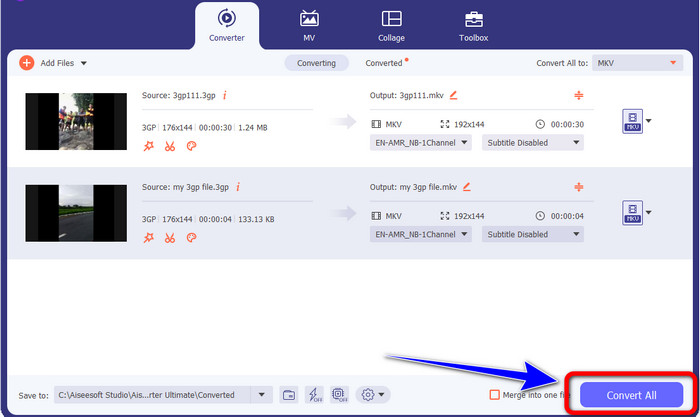
I semplici passaggi seguenti ti offriranno il modo migliore per convertire 3GP in MKV utilizzando FVC Video Converter Ultimate.
Passaggio 1: Per prima cosa, scarica FVC Video Converter Ultimate sul tuo computer. Fai clic sul pulsante Download qui sotto. Quindi apri l’applicazione al termine dell’installazione.
Download gratuitoPer Windows 7 o versioni successiveDownload sicuro
Download gratuitoPer MacOS 10.7 o versioni successiveDownload sicuro
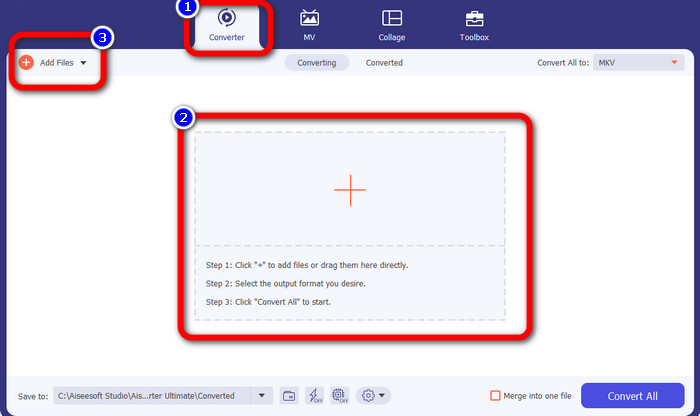
Passaggio 2: Premi l’icona Più o il pulsante Aggiungi file dal pannello Convertitore. Verrà visualizzata la cartella del tuo computer. Quindi scegli il file 3GP che desideri convertire.
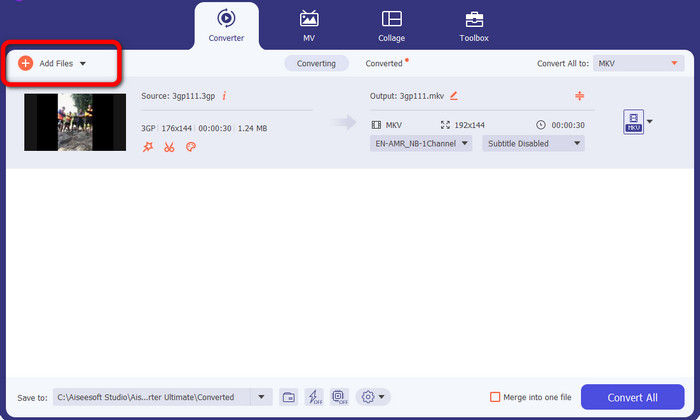
Passaggio 3: Vuoi aggiungere un altro file 3GP? Allora fai clic sul pulsante Aggiungi file.
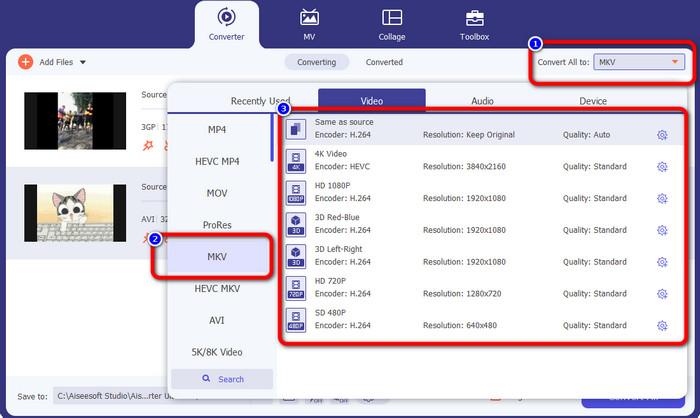
Passaggio 4: Per trasformarli in formato file MKV, fai clic sul pulsante Converti tutto in. Poi seleziona il formato MKV dalle opzioni di formato. Quindi fai clic sulla qualità video che preferisci.
Passaggio 5: Converti i tuoi video facendo clic sul pulsante Converti tutto. Poi salva il risultato finale dopo il processo di conversione.
Parte 2: Modo semplice per convertire 3GP in MKV usando FFmpeg
Un altro modo è usare FFmpeg per convertire 3GP in MKV. Questo strumento è anche bravo a convertire i file. Tuttavia, il file FFmpeg è complicato da utilizzare, il che non è adatto ai principianti. Esistono molti processi per configurare questa applicazione sul tuo computer prima di poterla utilizzare. Assicurati di avere tutorial da guardare quando utilizzi questo software.
Passaggio 1: Scarica e installa FFmpeg sul tuo computer.
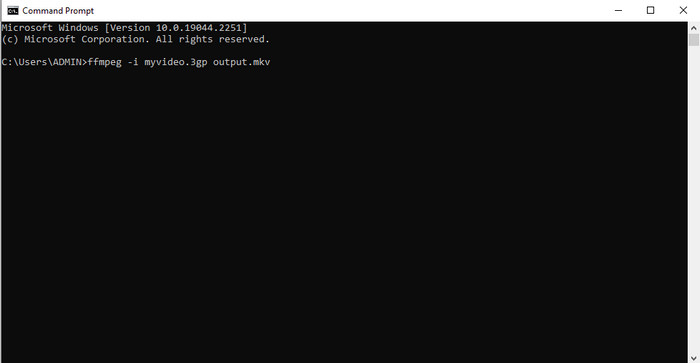
Passaggio 2: Vai al prompt dei comandi e digita “FFmpeg -i .3gp out.mkv”. Quindi premi Invio. Tutto qui! Ora puoi riprodurre il video finale. Inoltre, puoi usare FFmpeg per modificare i metadati dei file.
Parte 3: la migliore soluzione per convertire 3GP in MKV online
Se preferisci convertire i file tramite browser, usa FVC Free Video Converter Online. Questa applicazione basata sul web può convertire 3GP in MKV senza difficoltà. Offre metodi semplici per la conversione dei file, il che è perfetto per chiunque. Come suggerisce il nome, puoi usare questo convertitore gratuitamente. Puoi sfruttare le sue funzioni, come modificare bitrate, frame rate, frequenza di campionamento, risoluzione e altri parametri di video e audio. Inoltre, oltre ai formati 3GP e MKV, supporta vari formati video, come MOV, AVI, FLV, MP4, M4V, VOB e altri. Puoi anche convertire file audio come WAV, AC3, AAC, FLAC, WMA, ecc. Segui i passaggi seguenti per convertire facilmente i file video.
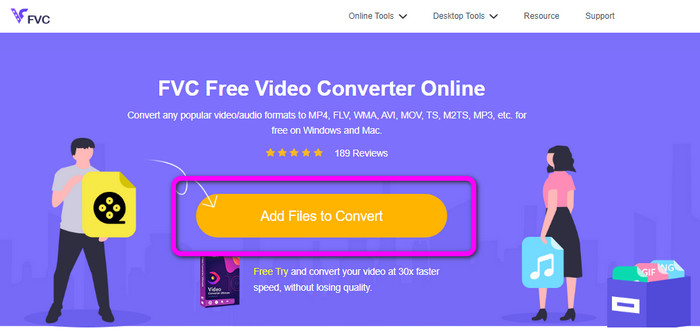
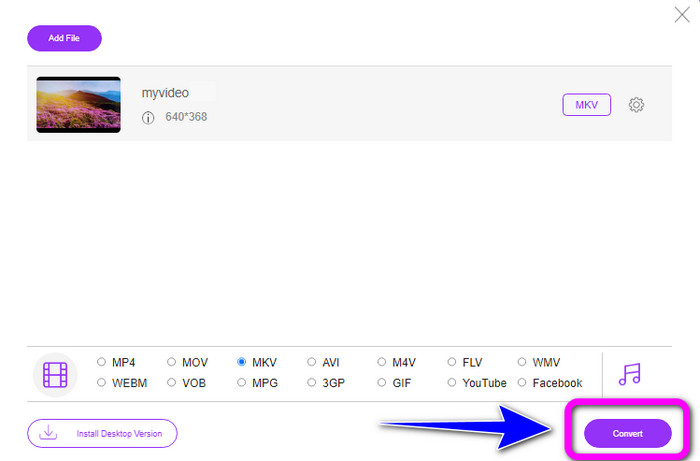
Passaggio 1: Visita il sito web di FVC Free Video Converter Online. Aggiungi il video 3GP facendo clic sul pulsante Aggiungi file da convertire.
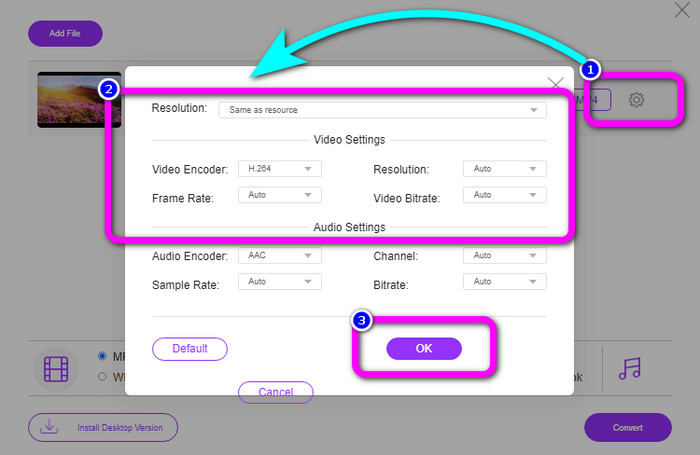
Passaggio 2: Puoi modificare il bitrate, il frame rate, la risoluzione e altri parametri del tuo video facendo clic sull’icona Impostazioni. Poi fai clic su OK.
Passaggio 3: Nella parte inferiore dell’interfaccia vedrai le opzioni di formato. Seleziona il formato MKV e fai clic sul pulsante Converti. Puoi anche usare questo strumento online per convertire F4V in MKV.
Parte 4: 3GP contro MKV
| File | 3GP | MKV |
| Estensione | .3 mo | .mkv |
| Categoria | video | video |
| Descrizione | Riproducibile su telefoni cellulari 3G e altri telefoni, 3GP è un formato contenitore multimediale creato dal Third Generation Partnership Project (3GPP). Nel 1998 è stato inizialmente creato 3GP. I telefoni cellulari con reti basate su GSM in genere si adattano a questo supporto (Global System for Mobile Communications). È adatto per i telefoni cellulari perché utilizza una piccola quantità di larghezza di banda e occupa meno spazio per i file che richiedono una piccola quantità di dati. | Un formato contenitore multimediale open source chiamato MKV Matroska consente molte tracce audio e sottotitoli in un singolo file. È il tipo di file più adatto per aggiungere molto materiale, inclusi film, audio, testi e foto. È un formato RAW che puoi capovolgere e separare in base alle tracce di dati. |
| Sviluppato da | Progetto di partenariato di terza generazione | Steve Lomme |
| Tipo MIME | video/3gpp audio/3gpp | video/x-matroska |
| Programmi associati | Microsoft Film e programmi TV VLC Media Player Windows Media Player QuickTime Player | KMPlayer VLC Media Player MX Player Lettore GOM PotPlayer |
Parte 5: Domande frequenti sulla conversione di 3GP in MKV
Qual è la qualità di 3GP?
Il formato di file video 3GP ha due risoluzioni video. Per i telefoni che supportano il formato 3GP, la risoluzione è 176X144. Per i telefoni con widescreen, PSP, lettore MP4 e iPod, la risoluzione è 320X240.
Qual è il vantaggio del formato file 3GP?
La dimensione del 3GP è il suo vantaggio principale. È un file video compatto creato per ridurre l'utilizzo dello spazio di archiviazione. Le dimensioni compatte utilizzano pochi dati, rendendolo ideale per il download di video tramite dispositivi mobili.
3GP è un codec?
SÌ. Questo file è un formato contenitore multimediale che supporta altri codec, inclusi video H.263, H.264 e MPEG-2.
Conclusione
Queste sono ottime soluzioni per convertire 3GP in MKV. Tuttavia, FFmpeg è complicato da installare e richiede molte procedure. Quindi, se desideri metodi senza complicazioni, usa Video Converter Ultimate e FVC Free Video Converter Online. Sono strumenti che puoi utilizzare senza fare troppa fatica!
-
 Da WebM a 3GP: i modi più efficaci per utilizzare questi strumenti
 Stai cercando un eccezionale convertitore da WebM a 3GP? Questo articolo ti assicurerà di ottenere i migliori metodi efficaci per convertire il tuo WebM in 3GP
-
 Scopri il semplice processo su come convertire M4V in 3GP
 Ecco le procedure più semplici per convertire M4V in 3GP sul tuo dispositivo. Se sei disposto a imparare, allora andiamo avanti e procediamo a questo articolo
-
 Scopri il semplice processo su come convertire M4V in 3GP
 Questo articolo ti mostrerà le migliori tecniche che puoi provare a convertire rapidamente XviD in 3GP. Quindi, rimanete sintonizzati e testimoniate i grandi modi di questo articolo
