


 Video Converter Ultimate
 Screen Recorder
 Riparazione video
 Download sicuro
Converti MP4 in GIF gratuitamente e online [Guida passo passo]
Questa guida si concentra sulla conversione dei file video MP4 in immagini animate GIF. Il formato di file GIF viene utilizzato per archiviare immagini animate. Di solito contiene una ventina di fotogrammi per raccontare una storia o per divertimento. Oggi vengono creati e condivisi sui social media oceani di file immagine GIF. In realtà, non c’è bisogno di invidiare gli altri, perché puoi imparare diversi modi per estrarre vari fotogrammi da un file video MP4 e salvarli come GIF animata.

Parte 1. Convertire in batch MP4 in GIF mantenendo un'alta qualità
Come convertire un MP4 in GIF sul desktop
Vuoi trasformare il tuo clip video MP4 preferito in una GIF animata in loop? Che tu voglia creare meme, condividere una reazione o rendere i contenuti più coinvolgenti, convertire MP4 in GIF è facile con FVC Video Converter Ultimate. Questa toolbox video tutto-in-uno ti permette di convertire, comprimere e modificare i video senza perdita di qualità, e creare GIF richiede solo pochi clic.
• Converti MP4, MOV, AVI, MKV e altri in GIF e altri formati multimediali.
• Ritaglia, ritaglia e visualizza in anteprima il tuo video prima di trasformarlo in GIF.
• Grazie all'accelerazione hardware, i file vengono convertiti in pochi secondi.
• Regola la frequenza dei fotogrammi, la risoluzione e le opzioni di loop per ottenere un output perfetto.
• Converti più video in GIF contemporaneamente per risparmiare tempo.
Download gratuitoPer Windows 7 o versioni successiveDownload sicuro
Download gratuitoPer MacOS 10.7 o versioni successiveDownload sicuro
Ecco come convertire MP4 in GIF con FVC Video Converter Ultimate:
Passaggio 1: Scarica, installa e avvia FVC Video Converter Ultimate sul tuo computer.
Passaggio 2: Fai clic su Add Files oppure trascina e rilascia il tuo video MP4 nell’interfaccia principale.

Passaggio 3: Scegli GIF come formato di output e fai clic su Convert All per convertire MP4 in GIF animata.

FVC Video Converter Ultimate rende la conversione da MP4 a GIF semplice, veloce e flessibile. Che tu sia un creatore di contenuti o semplicemente desideri realizzare animazioni divertenti, questo strumento ti offre tutto ciò di cui hai bisogno.
Parte 2. Converti MP4 in GIF animate gratuitamente e facilmente
Come trasformare un MP4 in GIF usando FVC Free Video to GIF Maker
Come dovrebbe essere il miglior convertitore da MP4 a GIF? Innanzitutto, dovrebbe essere facile da usare sia per i principianti sia per gli utenti esperti. Inoltre, dovrebbe essere in grado di proteggere la qualità dell’immagine. Pertanto, consigliamo FVC Free Video to GIF Maker.

Video gratuito FVC per GIF Maker
122.446+ download- Converti MP4 in GIF animate gratuitamente senza alcun limite.
- Estrai frame specifici per creare una nuova GIF.
- Offri strumenti di modifica estesi per le immagini GIF.
- Elabora rapidamente più file video MP4 in batch.
Download gratuitoPer Windows 7 o versioni successiveDownload sicuro
Download gratuitoPer MacOS 10.7 o versioni successiveDownload sicuro
In breve, è l'opzione migliore per convertire MP4 in GIF senza perdere qualità.
Come convertire un MP4 in GIF sul desktop
Passaggio 1: importa i file MP4
Avvia il miglior convertitore MP4 in GIF gratuito dopo averlo installato sul computer. Poi fai clic sul grande pulsante Add Files per importare tutti i video MP4 che desideri convertire. In alternativa, trascina e rilascia i file MP4 nel riquadro tratteggiato per importarli direttamente.
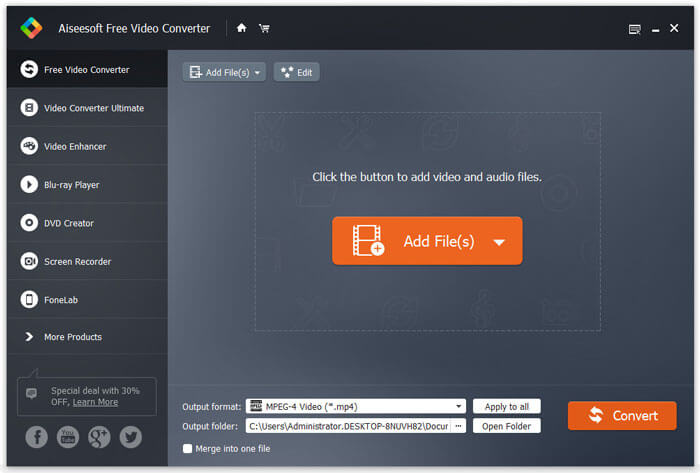
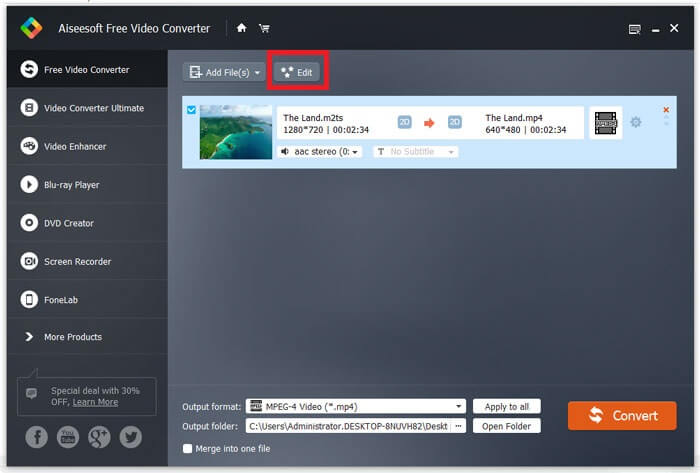
Passaggio 2: ritaglia e modifica i video
Dopo il caricamento, fai clic sul menu Edit nella barra superiore per aprire la finestra di modifica video. Rimuovi i fotogrammi indesiderati con lo strumento di taglio. Ti consente di reimpostare i punti di inizio e di fine. Poi taglia gli altri file MP4.
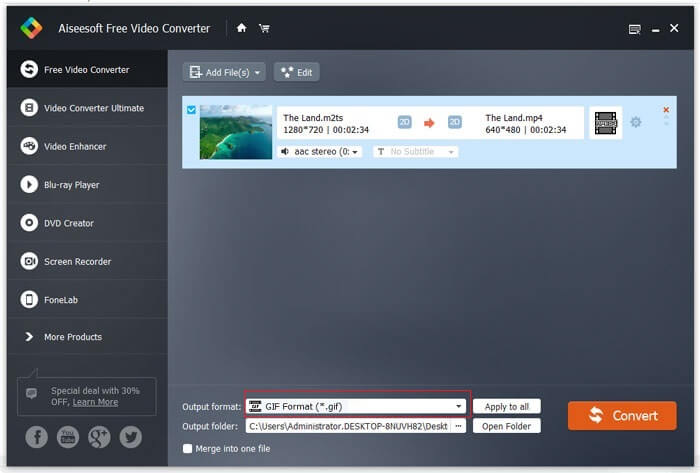
Passaggio 3: converti MP4 in GIF
Una volta tornato all’interfaccia principale, fai clic per espandere l’elenco a discesa Output format, cerca gif e seleziona l’opzione corrispondente. Premi il pulsante Open Folder e imposta una cartella specifica in cui salvare l’output. Infine, fai clic sul pulsante Convert per iniziare a convertire MP4 in GIF in modalità batch.
Questa è una soluzione gratuita per convertire MP4 in GIF. Tuttavia, questo strumento non offre strumenti di editing video avanzati come l'aggiunta di sovrapposizioni di testo, filtri o effetti rispetto a FVC Video Converter Ultimate. Quindi, consiglio comunque di scaricare e provare lo strumento definitivo.
Download gratuitoPer Windows 7 o versioni successiveDownload sicuro
Download gratuitoPer MacOS 10.7 o versioni successiveDownload sicuro
Parte 3. Come convertire MP4 in GIF con Adobe Photoshop
Trasforma MP4 in GIF con Photoshop
Photoshop è un popolare editor di immagini in tutto il mondo. Sia le persone comuni che i fotografi professionisti ce l'hanno sulle loro macchine. Potresti chiederti se Photoshop può convertire MP4 in GIF. La risposta è sì e condivideremo i passaggi seguenti.
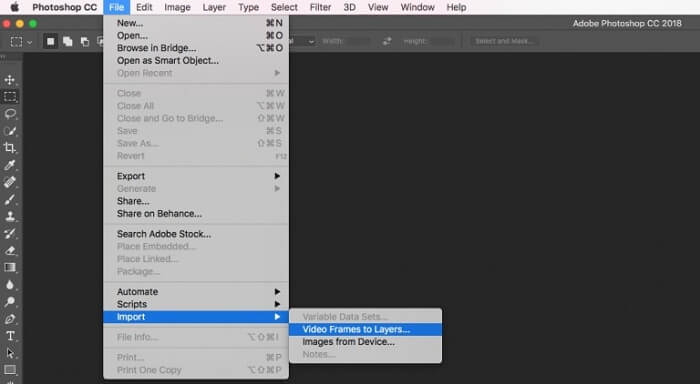
Passaggio 1: Avvia Photoshop, vai al menu File nella barra superiore, seleziona Import e poi scegli Video Frames to Layers. Ora trova e apri il video MP4 sorgente dal tuo disco rigido.
Se Photoshop non è in grado di aprire il tuo video, devi prima convertirlo nei codec supportati.
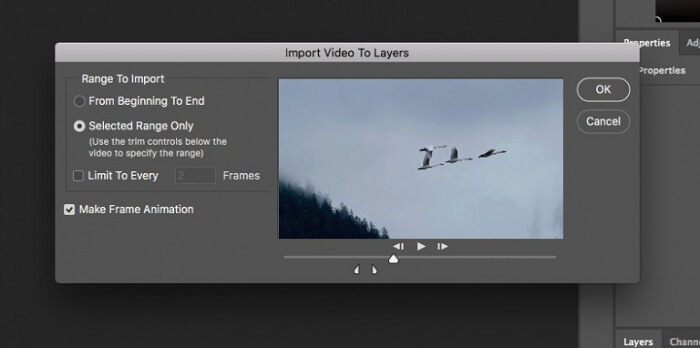
Passaggio 2: Quando richiesto, seleziona la casella accanto a Make Frame Animation. Se il tuo file video è molto lungo, taglialo con i cursori sulla timeline. Quindi fai clic su OK per confermare.
Passaggio 3: Photoshop importerà quindi ogni fotogramma del clip video come immagine. Puoi modificare ogni immagine oppure mantenerle come impostazione predefinita.
Passaggio 4: Vai al menu File, seleziona Export e poi Save for Web. A questo punto verrà visualizzata la finestra di dialogo per il salvataggio per il web. Personalizza le opzioni nel pannello di destra, come Image Size, Quality e altro ancora. Per creare una GIF in loop, seleziona l’opzione appropriata dal menu a discesa Looping Options.
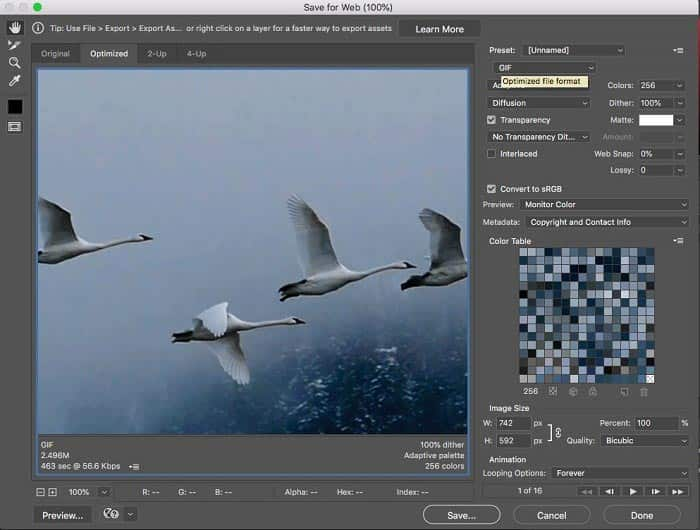
Passaggio 5: Premi l’icona Play nell’angolo in basso a destra per visualizzare l’anteprima dell’effetto. Se è tutto a posto, fai clic sul pulsante Save e segui le istruzioni su schermo per trasformare MP4 in GIF in Photoshop.
Se hai già acquistato Photoshop, potrebbe essere una buona opzione. In caso contrario, è meglio utilizzare un convertitore professionale da MP4 a GIF come FVC Video Converter Ultimate. In definitiva, usare Photoshop per convertire MP4 in GIF può essere costoso a causa dell'abbonamento, e la sua interfaccia complessa lo rende meno adatto ai principianti. Il processo di esportazione spesso genera file di grandi dimensioni con un'ottimizzazione limitata.
Parte 4. Come convertire MP4 in GIF online
Converti MP4 in GIF con il convertitore video online gratuito FVC
Se desideri salvare un MP4 come immagine GIF con Windows Movie Maker, hai comunque bisogno di un’app di conversione online. A dire il vero, è più semplice convertire direttamente MP4 in GIF online se utilizzi lo strumento giusto, come FVC Free Online Video Converter. Si tratta di un software gratuito basato sul web per convertire MP4 in GIF.
Passaggio 1: Vai alla pagina ufficiale di FVC Free Online Video Converter nel browser per aprire direttamente il software gratuito.
Scarica la Versione Desktop per convertire i file in batch.
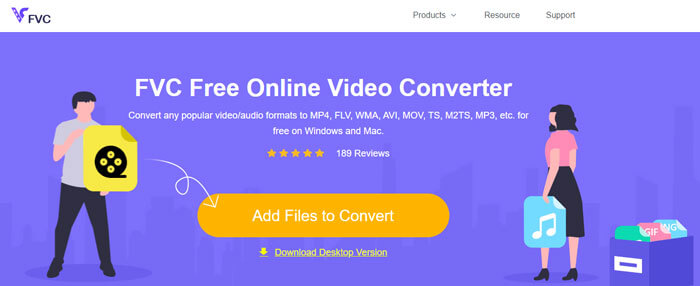
Passaggio 2: Fai clic sul pulsante Add Files to Convert per installare il launcher e importare un MP4 dal tuo computer.
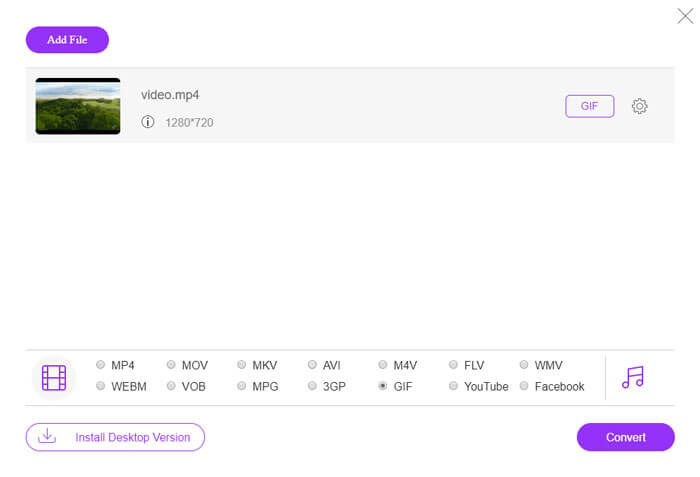
Passaggio 3: Ora seleziona GIF come formato di output. Personalizza le altre opzioni, come Encoder, Frame rate, Resolution, Bitrate e altri parametri.
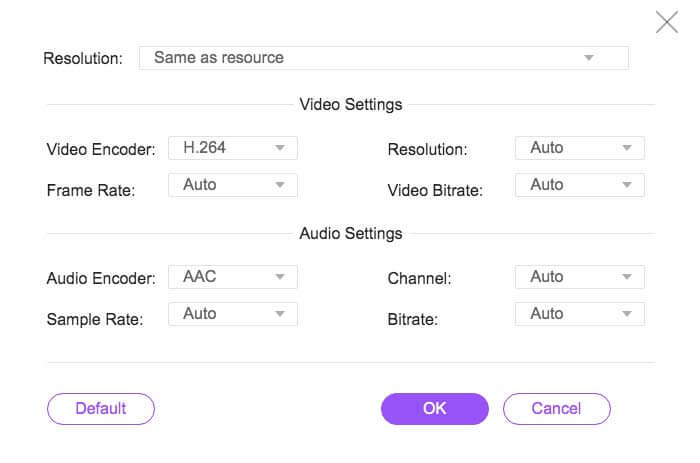
Passaggio 4: Premi il pulsante Convert per iniziare a trasformare MP4 in GIF online. Al termine, la cartella di output verrà visualizzata immediatamente.
L'app online comprimerà automaticamente le tue immagini durante la conversione, quindi la qualità dell'output non è molto buona.
Come usare Ezgif per convertire MP4 in GIF
Ezgif è un popolare strumento online gratuito che permette di convertire facilmente video MP4 in GIF senza dover scaricare alcun software. Supporta diverse funzioni di editing come il ritaglio, il ridimensionamento e l'ottimizzazione delle GIF per una migliore qualità e file di dimensioni ridotte.
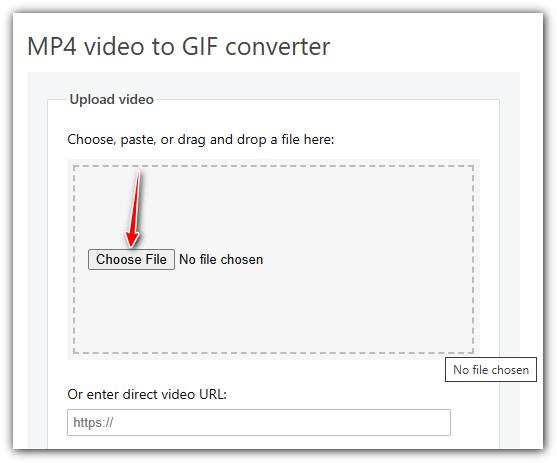
Passaggio 1. Vai al sito Ezgif e seleziona lo strumento di conversione video in GIF. Fai clic su Choose File per selezionare il tuo video MP4 dal dispositivo, quindi fai clic su Upload video per caricarlo.
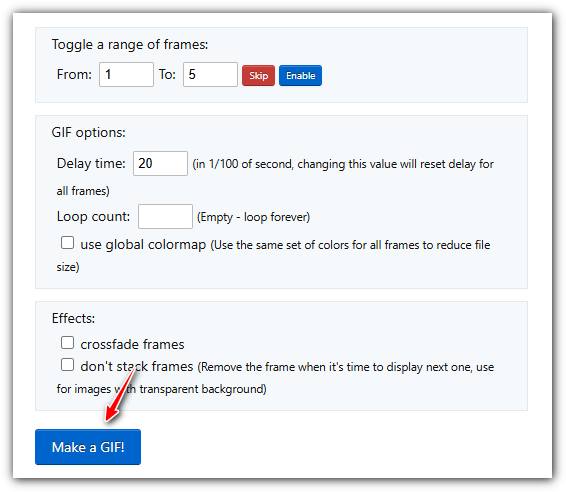
Passaggio 2. Dopo il caricamento, puoi tagliare il video impostando i tempi di inizio e fine, ridimensionarlo o modificare il frame rate per regolare la qualità e le dimensioni della GIF.
Passaggio 3. Una volta impostate le tue preferenze, fai clic su Make a GIF! per elaborare il video e generare la GIF.
MP4 contro GIF
Rilasciato dal Moving Picture Experts Group (MPEG) nel 2001, il formato MP4 può aiutarti a salvare video, audio, sottotitoli e dati di immagine in tracce separate. È l'abbreviazione di MPEG-4 Part 14. Inoltre, è uno dei formati più popolari utilizzati per lo streaming e la condivisione di video.
GIF è un formato di immagine comune per la grafica web. Oltre a salvare piccole immagini e immagini che contengono testo, GIF può anche contenere e visualizzare animazioni di base sui siti Web. È un formato senza perdita di dati e la compressione GIF non degrada la nitidezza dell'immagine.
FVC Free Online Video Converter è uno strumento gratuito e facile da usare per convertire rapidamente i video in formati popolari come MP4, AVI e MOV senza dover installare software. Non richiede registrazione e ha un'interfaccia semplice. Tuttavia, dipende dalla velocità della connessione, limita le dimensioni dei file e non offre funzionalità avanzate. È un'ottima scelta per conversioni video rapide e informali.
Parte 5: domande frequenti sulla conversione di MP4 in GIF
Come trasformare GIF in MP4 gratuitamente con FFmpeg?
Apri www.7-zip.org e fai clic su release builds per scaricare ffmpeg-release-full.7z. Dopo aver estratto questo file zip, puoi aprire il Prompt dei comandi ed inserire la riga di comando ffmpeg -f gif -i file.gif -c:v libx264 outfile.mp4. Poi premi Enter per confermare il comando.
Come si visualizzano i file GIF?
GIF è un formato di immagine unico. È più simile a un video ma non a un'immagine fissa. Tuttavia, la maggior parte dei software per lettori multimediali non è in grado di aprire GIF. Inoltre, solo poche applicazioni di gestione delle foto possono riprodurre immagini animate. Fortunatamente, puoi visualizzare i file GIF nei principali browser Web, come IE, Chrome, Firefox e altri.
È legale convertire un MP4 in GIF?
Nella maggior parte dei casi, va bene convertire MP4 in GIF per divertimento. Tuttavia, la maggior parte dei film MP4 e dei file video personali sono protetti da copyright. Se desideri modificare un video privato, è meglio ottenere il consenso dell'autore.
Conclusione
Questo articolo ha condiviso quattro modi per convertire MP4 in formato GIF. Photoshop è un editor di foto professionale e può estrarre diversi fotogrammi da MP4 per salvarli come GIF. Tuttavia, è piuttosto costoso. Windows Movie Maker deve lavorare con convertitori extra per completare il lavoro. Il convertitore online da MP4 a GIF è un modo conveniente per ottenere ciò che desideri se non ti dispiace la perdita di qualità. FVC Free Video to GIF Maker, d'altra parte, è il modo più semplice per soddisfare le tue esigenze. Più domande? Per favore lascia il tuo messaggio qui sotto.
-
 I 3 migliori modi gratuiti per convertire MTS in MOV
 Non riesci a riprodurre il file MTS sul tuo computer o iPhone / telefono Android? Cos'è un file MTS e come riprodurlo? Qual è il miglior convertitore video MTS? Questo post condivide 3 modi semplici e gratuiti per aiutarti a convertire MTS in MOV per una migliore riproduzione.
-
 6 migliori registratori WAV da non perdere sul desktop e online
 Il miglior software di registrazione WAV che condividiamo in questo articolo ha una varietà di funzioni utili, che ti aiutano a catturare audio e voce come professionisti.
-
 Qual è la differenza tra MTS e M2TS
 Cos'è il file MTS o M2TS? Qual è la differenza tra M2TS e MTS? Come posso guardare il file MTS o M2TS registrato dalla videocamera? Trova tutte le risposte in questo post.

