


 Video Converter Ultimate
 Screen Recorder
 Riparazione video
 Download sicuro
5 metodi per convertire WMA in MP3: desktop e online
WMA è un formato audio sviluppato da Microsoft. Ovviamente è compatibile con i dispositivi Windows, ma al di fuori di questo ecosistema è una scelta piuttosto mediocre. Alcuni vecchi modelli di dispositivi mobili e lettori musicali non supportano questo formato. Se vogliamo essere sicuri che il contenuto di questo file audio possa essere riprodotto su qualsiasi dispositivo o piattaforma, prova a convertire WMA in MP3. I file MP3 sono più piccoli in termini di dimensioni e quindi ci fanno risparmiare molto spazio di archiviazione sul disco rigido. E nessuna piattaforma è in grado di modificare e riprodurre musica se non supporta il formato MP3.
Convertire WMA in MP3 è un'opzione molto conveniente e molti programmi e piattaforme possono farlo per noi. Dopo ricerche e utilizzo pratico, questo articolo ne seleziona 5 tra i migliori. Troverete dettagli su come utilizzarli e vedrete i vantaggi e gli svantaggi di ciascun convertitore.

Parte 1. Come convertire WMA in MP3 su Win/Mac [senza perdita di qualità]
FVC Video Converter Ultimate
Se apprezzi le prestazioni stabili del software su desktop, dovresti assolutamente provare per primo FVC Video Converter Ultimate. Questo software è adatto sia agli utenti Windows che Mac e supporta oltre 1.000 formati, il che garantisce che difficilmente incontreremo problemi di compatibilità durante l’uso. La sua funzione di conversione in batch e la tecnologia di accelerazione hardware assicurano che possa gestire più attività di conversione da WMA a MP3 con un’efficienza fino a 30 volte superiore in qualsiasi momento. FVC Video Converter Ultimate non è mai solo un convertitore di formati: nella sua casella degli strumenti dispone di un set completo di strumenti di editing video, audio e immagini, come ritaglio, miglioramento, compressione, rimozione del rumore e così via. Scaricando questo software, non abbiamo più bisogno di passare da una piattaforma all’altra, ma risolviamo tutti i problemi in un colpo solo.
Download gratuitoPer Windows 7 o versioni successiveDownload sicuro
Download gratuitoPer MacOS 10.7 o versioni successiveDownload sicuro
Passaggio 1. Scarica e installa FVC Video Converter Ultimate sul tuo computer. Useremo come esempio un dispositivo Windows. Premi Converter > Add Files per caricare il tuo audio WMA.

Passaggio 2. Vai a Convert All to, espandi l’elenco sotto questa scheda e scegli Audio > MP3. Sono disponibili molte opzioni diverse per la qualità audio. Scegli quella che desideri ottenere.
Se vuoi tagliare il file audio aggiunto, fai clic su Cut sotto il nome del file.

Passaggio 3. Dopo aver terminato tutte queste impostazioni, fai clic su Convert All per esportare il tuo audio MP3.

Parte 2. Come convertire WMA in MP3 gratuitamente
Come convertire WMA in MP3 con VLC Media Player
Oltre a FVC Video Converter Ultimate, c'è un altro programma desktop a cui puoi rivolgerti: VLC Media Player. Sebbene l'uso più comune di questa applicazione sia l'apertura e la riproduzione di file multimediali, supporta anche il completamento di alcune semplici operazioni di editing, come la conversione di formato. Oltre alla sua eccellente compatibilità, VLC Media Player ha il vantaggio di essere completamente gratuito e facile da usare.
Ecco come convertire i file WMA in MP3 con VLC Media Player.
Passaggio 1. Prepara il tuo computer per VLC Media Player. Nell’angolo in alto a sinistra, scegli Media > Convert/Save.
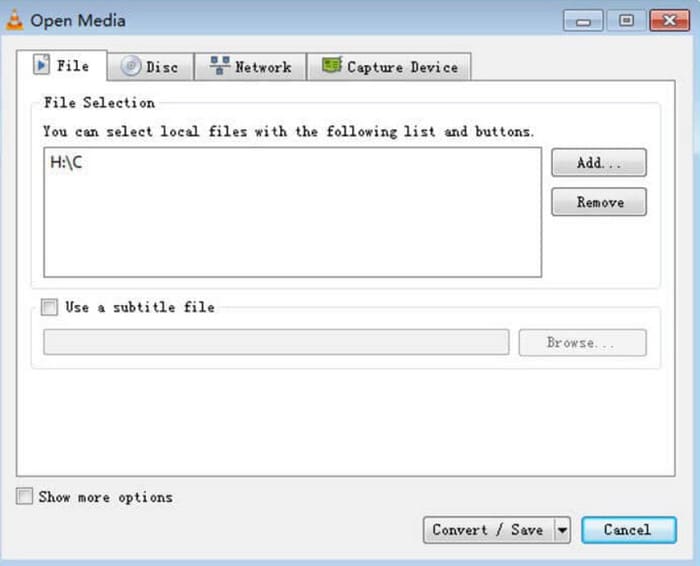
Passaggio 2. Si aprirà quindi la finestra Open Media. Scegli File e fai clic su + Add per selezionare il file audio WMA preparato. Poi fai clic su Convert/Save.
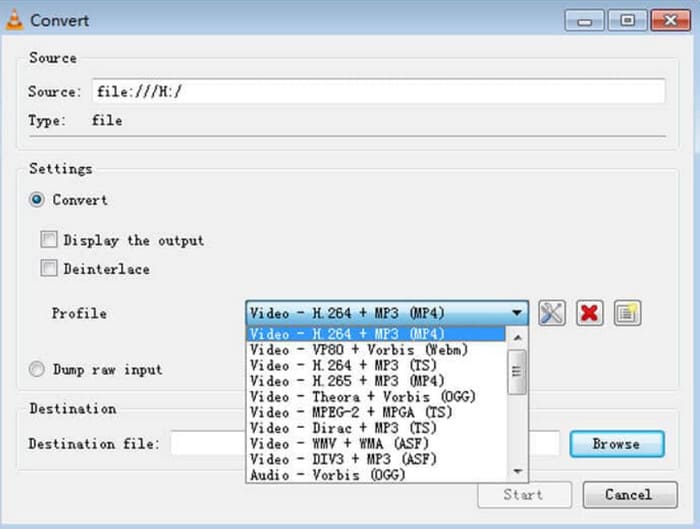
Passaggio 3. Vai all’opzione Profile ed espandi l’elenco accanto ad essa. Scegli il formato di destinazione e fai clic su Browse per trovare un percorso di archiviazione.
Passaggio 4. Quando hai terminato tutte le impostazioni di cui sopra, fai clic su Start per avviare la conversione del formato WMA in MP3.
VLC Media Player non supporta molti formati di output e offre solo strumenti di regolazione dei parametri audio molto basilari. È adatto per convertire semplicemente WMA in MP3, ma per un editing più specializzato, consigliamo FVC Video Converter Ultimate.
con VLC Media Player
iTunes, un lettore multimediale sviluppato da Apple, può fare molto di più che riprodurre e archiviare file audio. Possiamo anche affidargli alcune semplici operazioni di conversione di formato. Sebbene sia riconosciuto come il più compatibile con i dispositivi Mac, offre anche una versione scaricabile dagli utenti Windows.
Alcuni dei servizi base di iTunes sono gratuiti. Di seguito, mostreremo come convertire WMA in MP3 utilizzando iTunes.
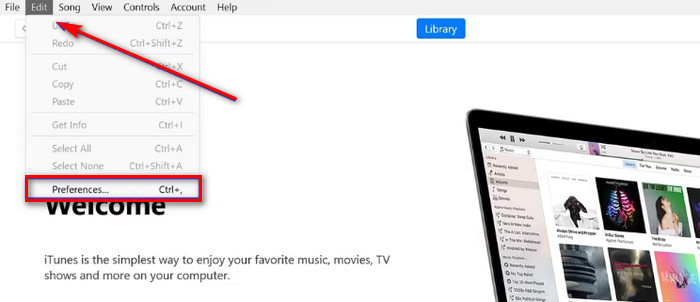
Passaggio 1. Avvia iTunes sul tuo computer. Scegli Modifica > Preferenze.
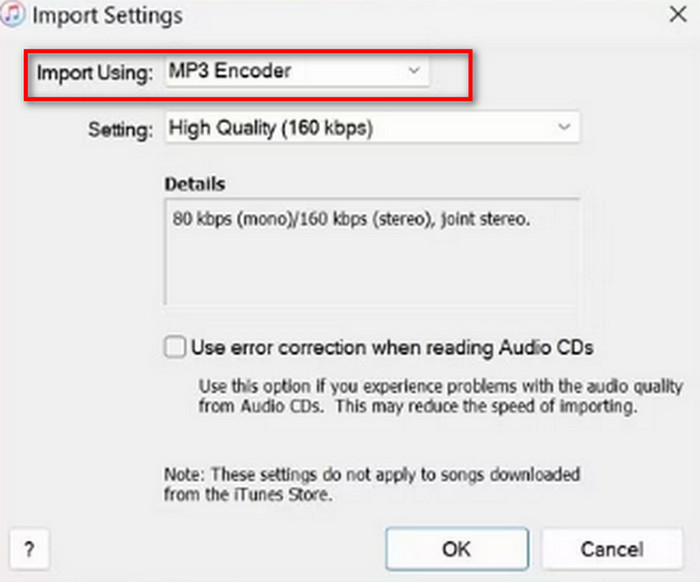
Passaggio 2. Dopo aver aperto la finestra Preferenze generali, scegli Generale e vai a Impostazioni importazione. Seleziona Codificatore MP3 e scegli OK per mantenere la modifica.
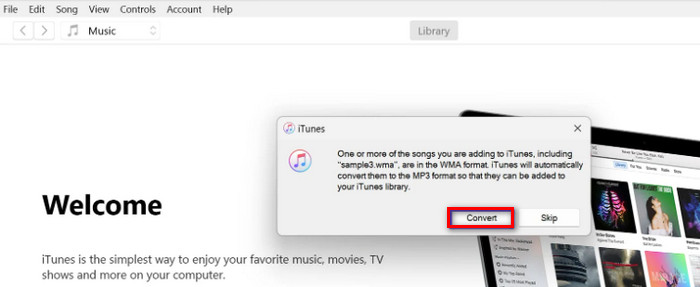
Passaggio 3. Torna nuovamente a File e tocca Aggiungi file alla libreria. Apparirà una finestra pop-up. Dovrai fare clic su Convert.
È importante notare che iTunes offre anche pochi strumenti di editing audio professionali e che l'app è stata interrotta per i dispositivi Apple dopo il rilascio della versione per macOS Catalina. Assicurati che il modello del tuo dispositivo corrisponda prima di scaricarla.
Parte 3. Come convertire WMA in MP3 online
Convertitore audio gratuito FVC
Queste sono le raccomandazioni fornite per gli utenti che preferiscono le applicazioni desktop. Se trovi troppo complicato scaricare e installare il software e desideri una piattaforma che inizi a convertire non appena accedi all’interfaccia, prova FVC Free Audio Converter. Può essere aperto nel tuo browser e l’interfaccia è progettata in modo molto intuitivo. Questo convertitore gratuito ed efficiente è il nostro assistente più fidato ogni volta che abbiamo un’urgenza nel modificare i formati audio.
Ecco come convertire WMA in MP3 online con FVC Free Audio Converter.
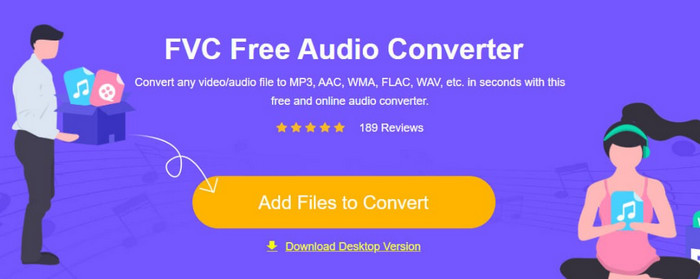
Passaggio 1. Avvia FVC Free Audio Converter con il tuo browser. Fai clic su Add Files to Start e carica il tuo file audio WMA.
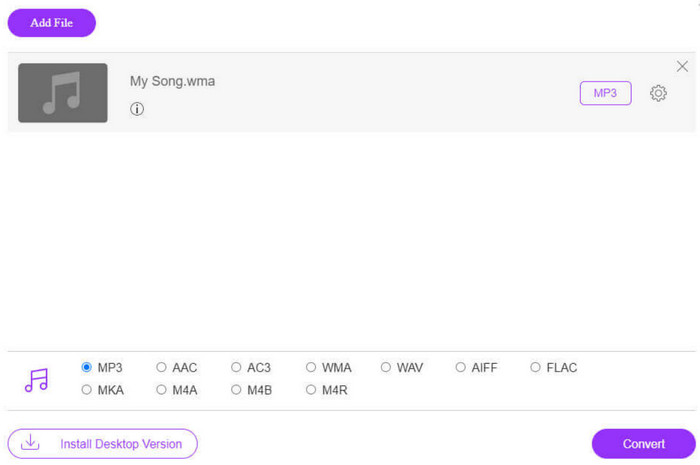
Passaggio 2. Scegli MP3 come formato di output. Poi fai clic su Convert per avviare il processo. Se desideri regolare alcuni parametri dell’audio, scegli l’icona Impostazioni sul lato destro del file audio.
La velocità di conversione di FVC Free Audio Converter è molto elevata, ma offre comunque meno funzionalità di FVC Video Converter Ultimate. Se desideri un output audio di qualità superiore, ti consigliamo di scaricare la versione desktop.
Conversione gratuita
Un altro convertitore di formati online altrettanto leggero è FreeConverter. Supporta oltre 1500 conversioni di formati di file e gestisce file eBook oltre a video, audio e immagini. La piattaforma dichiara di eliminare automaticamente il file sorgente entro poche ore dal termine delle modifiche da parte dell'utente, per garantire la privacy.
Leggi la guida qui sotto per scoprire come trasformare WMA in MP3 utilizzando FreeConverter.
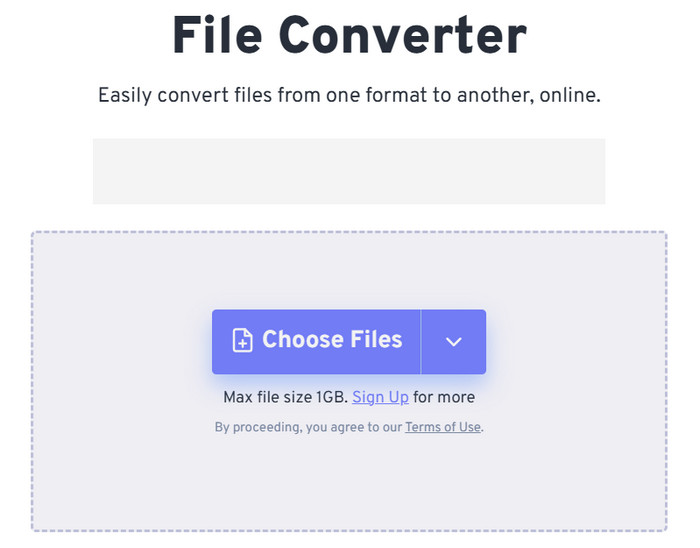
Passaggio 1. Visita il sito ufficiale di FreeConvert. Fai clic su Choose Files per aggiungere il tuo audio WMA a questa piattaforma.
Passaggio 2. Espandi il menu di Output. Scegli Audio > MP3.
Se vuoi migliorare la qualità audio, fai clic sull’icona Advanced settings.
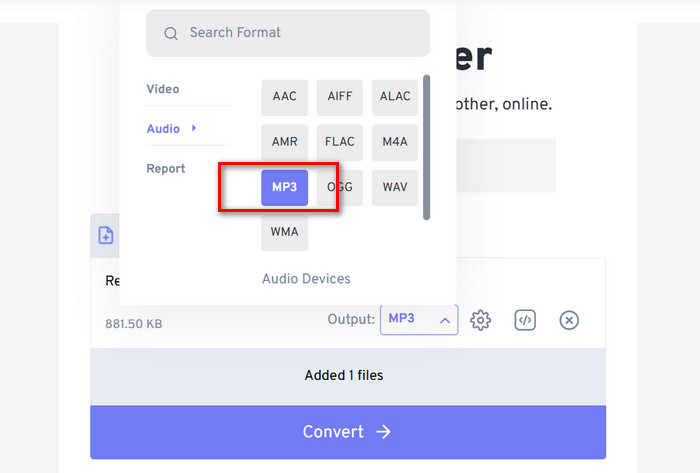
Passaggio 3. Fai clic su Convert per avviare il processo di conversione.
Anche se FreeConvert sostiene che la conversione dei formati audio è completamente gratuita, non dimentichiamo che esiste un limite alla dimensione dei file. Non può gestire audio superiori a 1 GB, quindi se il nostro file supera questo limite dovremo pagare per continuare a convertire correttamente con questo convertitore da WMA a MP3.
Parte 4. Domande frequenti sulla conversione da WMA a MP3
File WMA o MP3: qual è il migliore?
A seconda del metodo di confronto, l'MP3 è chiaramente superiore al WMA in termini di compatibilità. Le dimensioni dei file MP3 sono inferiori a quelle del WMA, una caratteristica che lo rende più adatto per l'archiviazione e il trasferimento di file audio. Tuttavia, il WMA è migliore in termini di qualità audio.
Come posso riprodurre vecchi file WMA?
Quando si tratta di scegliere un lettore audio WMA, l’opzione migliore è Windows Media Player, che è integrato in Windows. Naturalmente, vale la pena provare anche alcuni lettori di terze parti, come VLC Media Player e MPlayer.
La musica di YouTube può riprodurre file WMA?
Sì, attualmente il formato WMA rientra tra i formati audio ufficialmente supportati da YouTube.
Parte 4. Conclusione
Questa è una guida che ti insegna come convertire WMA in MP3. Sebbene la qualità del suono del formato WMA sia leggermente migliore, i suoi file sono allo stesso tempo più grandi. Inoltre, al giorno d’oggi non molte piattaforme e lettori musicali supportano questo formato. Per essere sicuri di non avere ostacoli nella riproduzione dei contenuti audio, convertire WMA in MP3 è necessario. Qui troverai cinque strumenti, tra cui tre software desktop e due piattaforme online. Confrontando questi cinque strumenti, FVC Video Converter Ultimate è la scelta più versatile.
-
 Lettore musicale WMA – Recensione dei 10 migliori lettori musicali WMA 2025
 Google Music può riprodurre WMA? Qual è il miglior lettore musicale WMA? Quale lettore musicale Android può riprodurre file WMA? Questo post fa un elenco dei 10 migliori lettori musicali WMA per riprodurre musica WMA su Mac, PC Windows, Android e iPhone.
-
 2 metodi per convertire FLV in WMA audio [gratuiti e online]
 Vuoi estrarre l'audio WMA da video FLV? Ecco 2 estrattori audio WMA gratuiti per convertire FLV (Flash Video) in WMA (Windows Media Audio) con velocità di conversione elevata su Mac OS X e Windows 10/8/7.
-
 I 3 migliori registratori WMA facili da usare adatti ai talenti vocali
 Sei un talento vocale? Questo articolo parla dei registratori WMA che producono un'alta qualità come WMA per i creatori di contenuti vocali.

