


 Video Converter Ultimate
 Screen Recorder
 Riparazione video
 Download sicuro
Come convertire file video RMVB in FLV su Windows e Mac
Secondo le nostre ricerche, sul mercato esistono oltre un centinaio di formati video. Sono stati sviluppati per scopi diversi. L’RMVB, ad esempio, è perfetto per distribuire film su internet poiché le dimensioni dei file sono ridotte ma la qualità è elevata. Gli studi di anime e i produttori di film asiatici preferiscono distribuire i video utilizzando questo formato. Tuttavia, non è ampiamente supportato dai lettori video o dai dispositivi mobili. Pertanto, questo articolo condividerà i migliori convertitori da RMVB a FLV.

Parte 1: il miglior convertitore da RMVB a FLV per PC
FVC Free FLV Converter è uno dei migliori convertitori da RMVB a FLV per PC. Ti consente di convertire i film RMVB in formato FLV senza perdita di qualità. Ancora più importante, il convertitore è completamente gratuito e senza alcun limite.
Funzioni principali del miglior convertitore da RMVB a FLV
- 1. Converti rapidamente in batch RMVB in FLV.
- 2. Produci video di alta qualità dopo la conversione.
- 3. Nessun pagamento, registrazione, filigrana o altro limite.
Download gratuitoPer Windows 7 o versioni successiveDownload sicuro
Download gratuitoPer macOS 10.7 o versioni successiveDownload sicuro
Come convertire RMVB in FLV su PC
Passaggio 1: apri i file RMVB
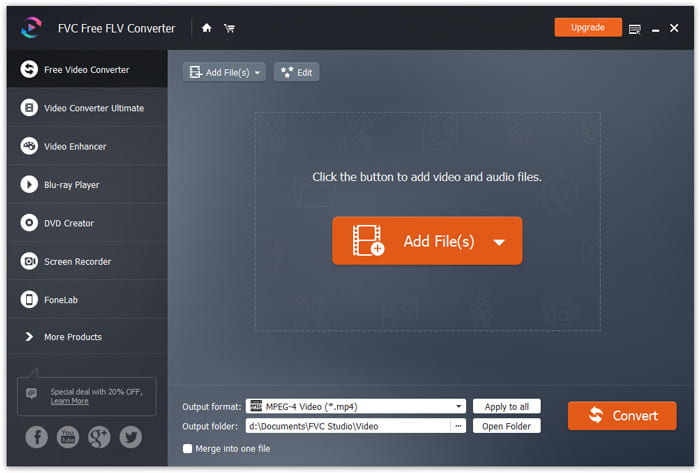
Esegui il miglior convertitore da RMVB a FLV dopo averlo installato sul PC. Fai clic sul pulsante Add File(s) nell’interfaccia principale per aggiungere i file RMVB. Potrai quindi guardare i film con il lettore multimediale integrato.
Passaggio 2: imposta FLV come formato di output
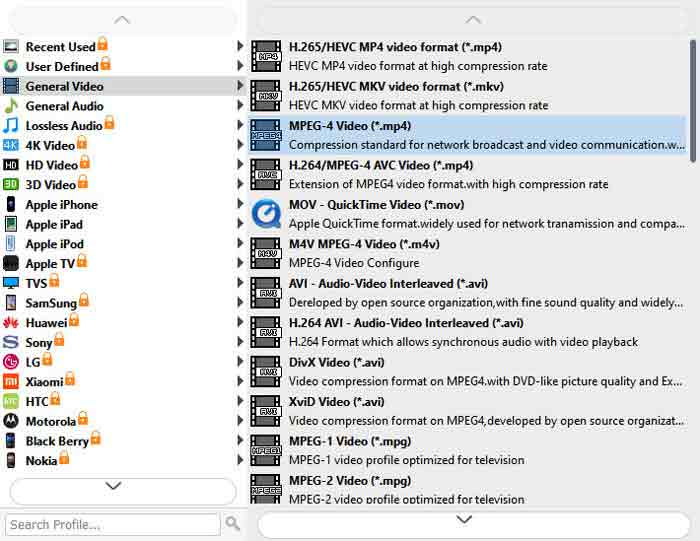
Fai clic e apri il menu dell’opzione Output format in basso e seleziona FLV dall’elenco General Video. Fai clic sull’icona Gear se vuoi modificare la risoluzione e altre opzioni.
Passaggio 3: converti RMVB in FLV
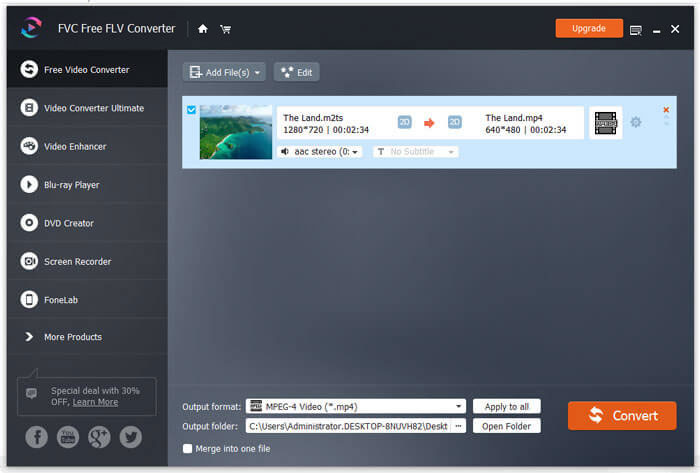
Quindi, premi il pulsante Open Folder e scegli una cartella specifica in cui salvare il risultato. Infine, fai clic sul pulsante Convert per avviare immediatamente la conversione da RMVB a FLV.
Parte 2: i 3 migliori convertitori da RMVB a FLV online
Top 1: Convertitore video online gratuito FVC
FVC Free Online Video Converter è uno dei migliori convertitori online da RMVB a FLV. È gratuito e non prevede limiti di dimensione dei file. Inoltre, la funzione di conversione in batch è comoda se hai molti film in formato RMVB.
Funzioni principali del miglior convertitore online da RMVB a FLV
- 1. Converti RMVB in FLV online gratuitamente.
- 2. Facile da usare.
- 3. Supporta la conversione in batch.
Come convertire RMVB in FLV online
Passaggio 1: Apri https://www.free-videoconverter.net/free-online-video-converter/ in un browser. Fai clic su Add Files to Convert per scaricare il launcher.
Scarica la Versione Desktop per convertire i file in batch.
Passaggio 2: Premi il pulsante Add File e carica i file RMVB che desideri convertire. Quindi seleziona FLV in basso.
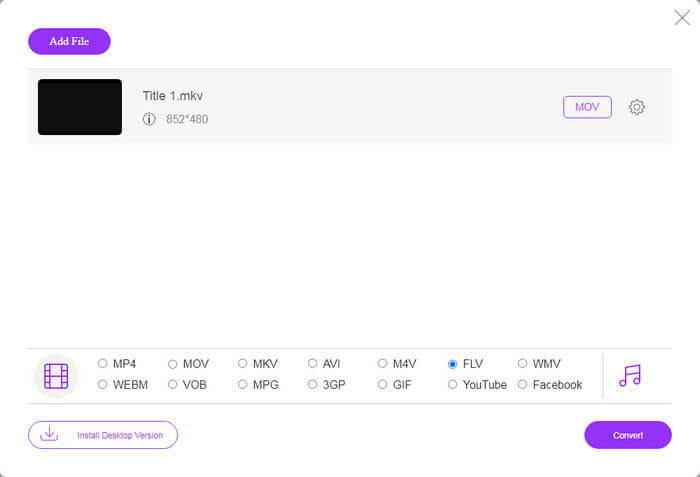
Passaggio 3: Fai clic sul pulsante Convert e attendi che il processo termini. Poi scarica i file FLV.
Primi 2: CloudConvert
CloudConvert è un'app di conversione file basata su cloud. Ti consente di elaborare gratuitamente file RMVB fino a 1 GB per conversione. Inoltre, puoi caricare video da una varietà di fonti, come Google Drive.
Funzioni principali di CloudConvert, convertitore da RMVB a FLV
- 1. Converti RMVB dal computer o online.
- 2. Fornire opzioni personalizzate di base.
- 3. Taglia il video durante la conversione.
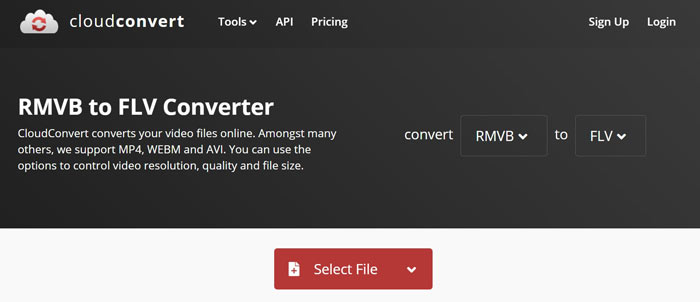
Come convertire RMVB in FLV online
Passaggio 1: Apri https://cloudconvert.com/rmvb-to-flv nel browser. Fai clic sul pulsante Select File per caricare i file RMVB.
Passaggio 2: Premi il pulsante Convert dopo il caricamento dei video.
Passaggio 3: Al termine, scarica i file FLV.
Top 3: Conversione gratuita
FreeConvert è simile a CloudConvert. È anche un convertitore web da RMVB a FLV. La dimensione massima del file è 1 GB per impostazione predefinita, ma puoi registrarti con la tua e-mail personale o pagare piani per ottenere più capacità.
Funzioni principali di FreeConvert, convertitore da RMVB a FLV
- 1. Converti RMVB in FLV online.
- 2. Fornire impostazioni avanzate.
- 3. Elimina i video dopo la conversione.
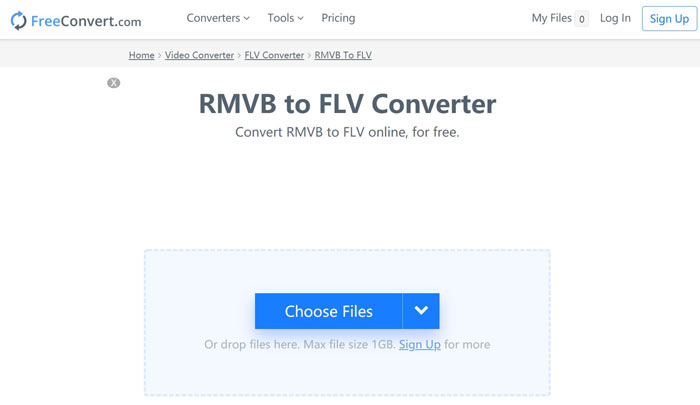
Come convertire RMVB in FLV con FreeConvert
Passaggio 1: Apri un browser e visita https://www.freeconvert.com/rmvb-to-flv.
Passaggio 2: Fai clic sul pulsante Choose Files e carica i file RMVB dal tuo computer.
Passaggio 3: Quando richiesto, fai clic sul pulsante Convert To FLV. Poi scarica i file FLV dopo la conversione.
RMVB contro FLV
RMVB, una variazione più recente del formato standard Real Media (.RM), è un formato di file video Real Media compresso utilizzando un bitrate variabile. È un formato popolare per film e anime asiatici. I file RMVB sono di dimensioni inferiori e hanno bitrate inferiori ma una qualità migliore.
Adobe Flash Player utilizzava FLV per fornire contenuti video come film e programmi TV. Al giorno d'oggi, Adobe non sviluppa più il lettore e consiglia agli utenti di disinstallarlo per motivi di sicurezza. Tuttavia, puoi ancora utilizzare il formato FLV su molti programmi non Adobe/Macromedia.
Parte 3: Domande frequenti sul convertitore da RMVB a FLV
Qual è il formato di file RMVB?
RMVB è il Real Media Video compresso da un bitrate variabile. È ottimizzato per il contenuto dei video. RMVB è una variazione più recente del formato di file Real Media standard.
Windows Media Player può aprire i file RMVB?
Sebbene l’ultima versione di WMP includa molti codec, i file RMVB non possono essere aperti in Windows Media Player. Devi convertire RMVB in MP4 o in altri formati video popolari. In alternativa, puoi utilizzare lettori RMVB per aprire i tuoi file RMVB.
VLC può convertire i file RMVB?
Sì, VLC è in grado di aprire e convertire file RMVB, ma ci vuole molto tempo per completare il lavoro. Inoltre, la qualità dell'output è scarsa.
Conclusione
Ora dovresti imparare almeno i quattro migliori convertitori da RMVB a FLV per Windows e Mac. Le app di conversione video web sono un modo conveniente per trasformare i file RMVB in formato FLV senza installarli. Tuttavia, FVC Free FLV Converter è più stabile e produce una qualità di output migliore. Più domande? Sentiti libero di lasciare un messaggio qui sotto.
-
 Da MP4 a FLV | I 3 migliori convertitori gratuiti (online / Mac / Windows)
 Questo post è la guida dettagliata alla conversione da MP4 a FLV. Puoi prendere i primi 3 convertitori gratuiti per cambiare MP4 in FLV online, su computer Windows o Mac con facilità.
-
 Che cos'è il file VOB e come trasformare un file VOB in GIF gratuitamente?
 Vuoi saperne di più sui file VOB e su come condividerli dopo essere stati copiati? o Perché hai bisogno di convertire VOB in GIF? Allora leggi attentamente questo articolo.
-
 2 semplici metodi per comprimere i video FLV per un caricamento veloce
 Se non riesci a caricare i video FLV o ci vuole tempo per condividere i file, puoi ottenere maggiori dettagli su 2 semplici modi per comprimere i video FLV dall'articolo.

