


 Video Converter Ultimate
 Screen Recorder
 Riparazione video
 Download sicuro
Come convertire i tuoi file video FLV in formato AVI su PC/Mac
Questa guida si concentra su come convertire FLV in AVI con software desktop e applicazioni online. Ci sono molti motivi per cui potresti aver bisogno di convertire i tuoi video FLV. FLV è stato sviluppato per distribuire contenuti video online, ma non per la riproduzione sui dispositivi digitali. Quando vuoi guardare un FLV sul computer, devi convertirlo in un altro formato video. Inoltre, è una buona idea convertire i file FLV in un formato video non compresso se desideri modificarli.

Parte 1: I 2 migliori modi gratuiti per convertire FLV in AVI
Metodo 1: Converti FLV in AVI con FLV Converter gratuito Free
Quando converti FLV in AVI, potresti preoccuparti di diversi fattori, come la qualità in uscita, la facilità d’uso e altro ancora. FVC Free FLV Converter è la scelta migliore. Sebbene sia gratuito, offre molte funzionalità di livello professionale senza richiedere particolari competenze tecniche. Inoltre, fornisce numerosi strumenti extra, come il montaggio video.
Caratteristiche principali del miglior convertitore FLV
- 1. Converti facilmente i video FLV in altri formati multimediali.
- 2. Supporta quasi tutti i formati video, come AVI, MP4, MKV, ecc.
- 3. Elabora in batch centinaia di file FLV per conversione.
Download gratuitoPer Windows 7 o versioni successiveDownload sicuro
Download gratuitoPer macOS 10.7 o versioni successiveDownload sicuro
Come convertire gratuitamente FLV in AVI sul desktop
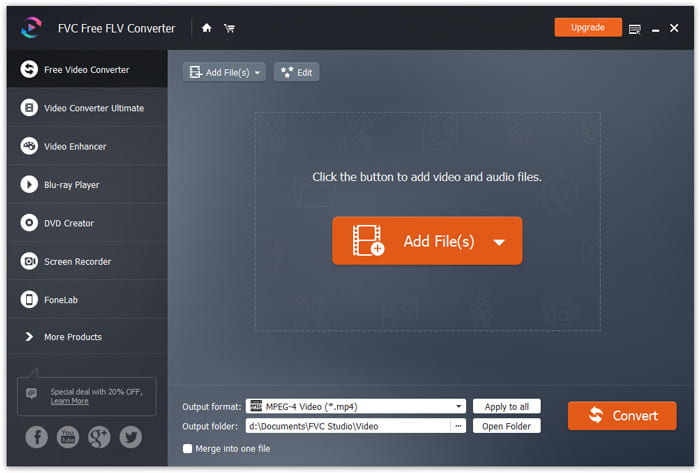
Passaggio 1: Aggiungi file FLV
Una volta installato il miglior convertitore FLV gratuito sul tuo computer, avvialo. È compatibile sia con PC che con Mac. Fai clic sul menu Add File(s) nell’angolo in alto a sinistra per aprire la finestra di selezione file. Quindi trova e seleziona i video FLV sul tuo computer e fai clic sul pulsante Open per aggiungerli.
Passaggio 2: Modifica il video e imposta il formato
Se desideri modificare i tuoi file video, seleziona il file FLV e fai clic sul menu Edit. Verrai quindi indirizzato alla finestra dell’editor video. Segui le istruzioni sullo schermo per modificarlo e poi torna all’interfaccia principale.
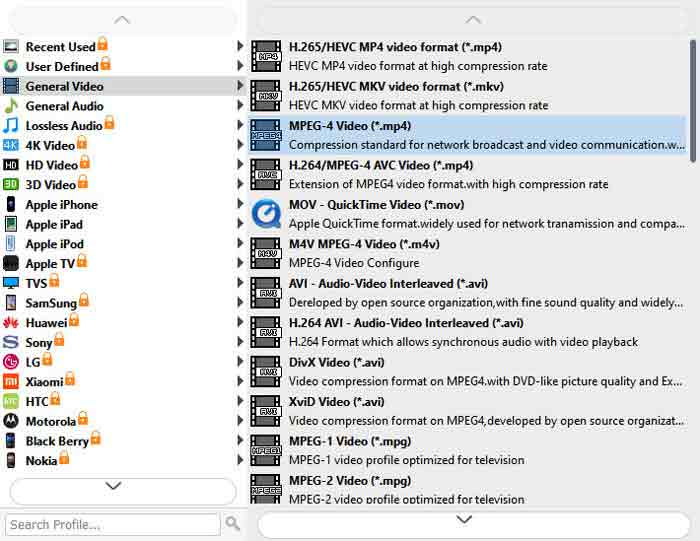
Fare clic sul menu a discesa Formato di output nella parte inferiore dell'interfaccia principale per aprire la finestra di dialogo del profilo. Quindi cerca AVI e selezionalo nella scheda Video generale.
Passaggio 3: Converti FLV in AVI
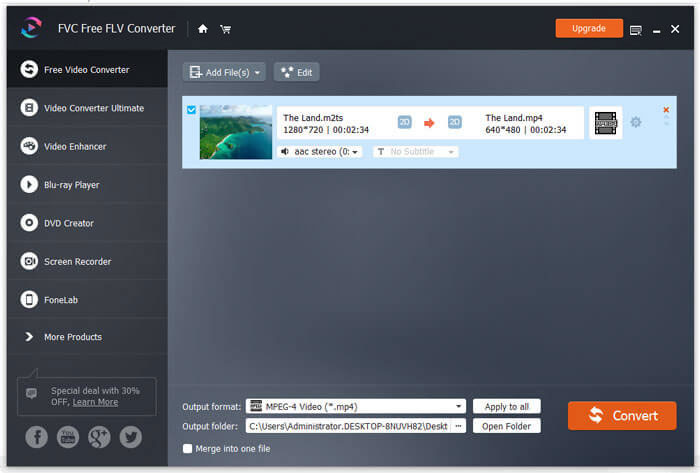
Fai clic sull’icona con i tre puntini accanto al campo Output folder e seleziona una cartella specifica in cui salvare i file AVI. Infine, fai clic sul pulsante Convert per iniziare subito a convertire FLV in AVI.
Metodo 2: Come convertire FLV in AVI con VLC
VLC è molto più di un semplice lettore multimediale. Puoi trovare molte funzioni utili, inclusa la conversione video. Come progetto open source, VLC ti consente di convertire gratuitamente FLV in AVI. Inoltre, VLC è in grado di riparare video AVI corrotti.
Passaggio 1: Apri il convertitore FLV gratuito. Se non hai VLC, scaricalo gratuitamente dal sito ufficiale.
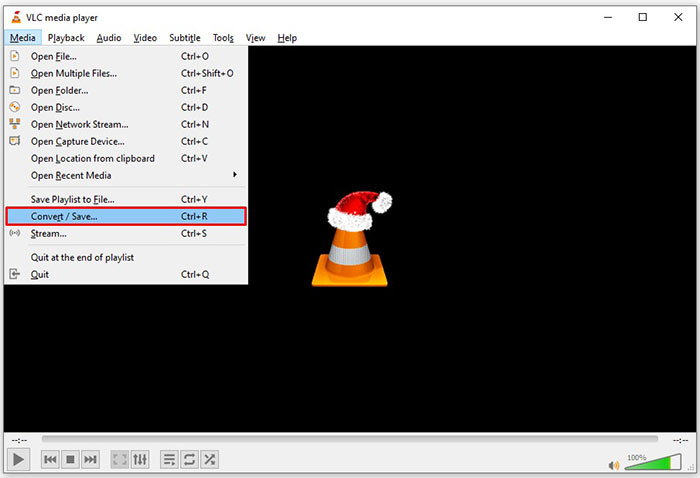
Passaggio 2: Vai al menu Media dalla barra superiore e scegli Convert/Save. Su Mac, scegli Convert/Stream dal menu File.
Passaggio 3: Fai clic sul pulsante Add nella finestra di apertura dei media e aggiungi il file FLV che vuoi convertire.
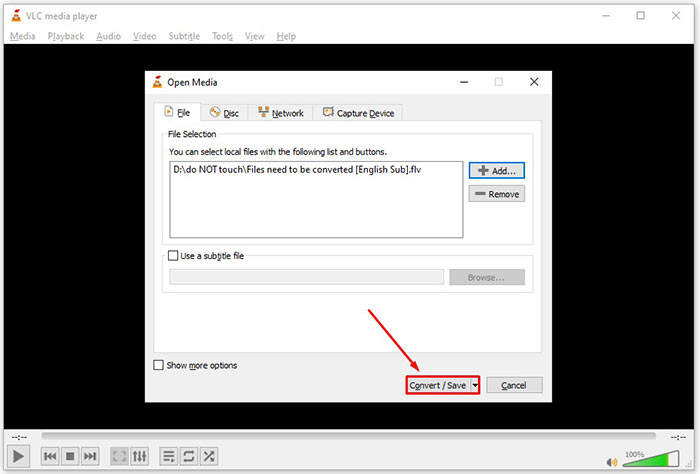
Passaggio 4: Quindi premi il pulsante Convert/Save per passare alla finestra successiva.
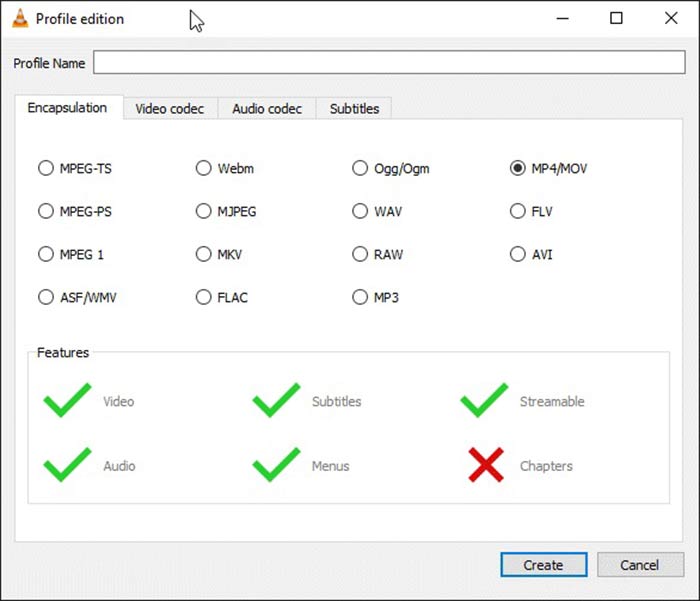
Passaggio 5: Apri l’elenco a discesa Profile e seleziona AVI. Se non lo trovi, fai clic sul terzo pulsante accanto a Profile. Si aprirà la finestra di Profile edition. Seleziona AVI e inserisci un Profile Name. Fai clic su Create per confermare. Quindi seleziona il nuovo elemento da Profile.
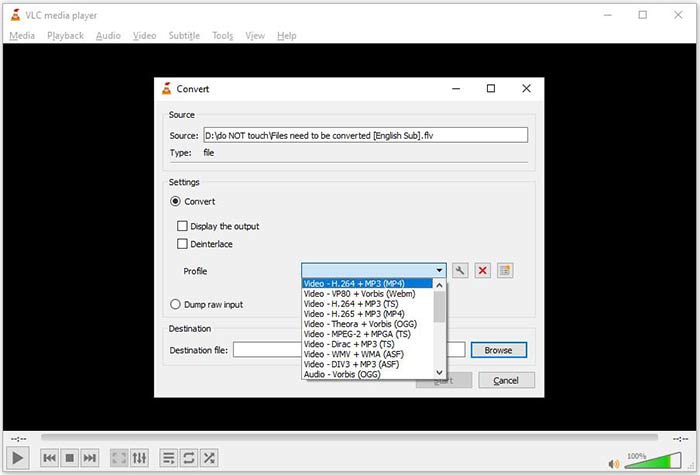
Passaggio 6: Imposta la cartella di destinazione facendo clic sul pulsante Browse. Fai clic sul pulsante Start e VLC convertirà il file FLV in AVI.
Da non perdere:
- • I 3 migliori modi per convertire FLV in MOV
- • Come convertire i tuoi video FLV in file audio MP3 sul desktop e online
Parte 2: Come convertire FLV in AVI online
A volte hai solo bisogno di convertire FLV in AVI online, occasionalmente. Inoltre, alcune persone non amano installare software. FVC Free Online Video Converter può soddisfare questa esigenza. Funziona online, ma è più che sufficiente per convertire alcuni file FLV in AVI. A differenza di altre app web, non impone limiti alla dimensione dei file, non aggiunge filigrane e così via.
Passaggio 1: Visita https://www.free-videoconverter.net/free-online-video-converter/ in un browser quando hai bisogno di convertire video. Fai clic sul pulsante Add Files to Convert e scarica il launcher.
Scarica la Versione Desktop per convertire i file in batch.
Passaggio 2: Dopo il download, il launcher si aprirà automaticamente. Fai clic sul pulsante Add File in alto a sinistra e carica i file FLV che desideri convertire. Quindi scegli AVI in basso.
Per modificare la risoluzione, il frame rate e altri parametri, fai clic sull’icona a forma di Gear per aprire la finestra del profilo.
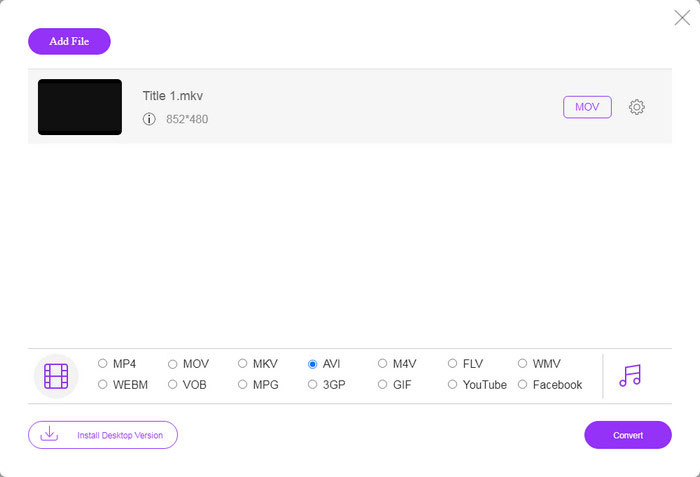
Passaggio 3: Una volta fatto clic sul pulsante Convert, l’applicazione web funzionerà come desideri. Quando richiesto, scarica i file video AVI sul tuo hard disk.
Rispetto ad altri convertitori video web, Free Online Video Converter funziona velocemente, ma è necessaria anche una buona connessione Internet.
FLV contro AVI
Adobe Flash Player utilizzava FLV per fornire contenuti video come film e programmi TV. Al giorno d'oggi, Adobe non sviluppa più il lettore e consiglia agli utenti di disinstallarlo per motivi di sicurezza. Tuttavia, puoi ancora utilizzare il formato FLV su molti programmi non Adobe/Macromedia.
Basato sul Resource Interchange File Format (RIFF), il formato AVI è stato introdotto da Microsoft nel 1992. Può salvare video/audio di alta qualità poiché utilizza meno compressione. Ma ciò causa anche la grande dimensione del file di un file AVI, che potrebbe essere un problema quando lo spazio è limitato.
Parte 3: Domande frequenti su FLV in AVI
Quanto tempo devo aspettare per convertire FLV in AVI?
Dipende dalla tua situazione. In generale, è molto veloce convertire i video sul desktop. Per gli strumenti online, la tua connessione Internet determinerà l'efficienza.
È sicuro convertire FLV in AVI online?
La maggior parte delle app di conversione FLV online promettono di eliminare i tuoi video dopo la conversione. Tuttavia, non dovresti caricare video privati online a meno che tu non sia sicuro che l'app Web sia 100% sicura da usare.
AVI è migliore di FLV?
FLV è un formato video con perdita mentre AVI è un formato video non compresso. Significa che il file FLV è più piccolo di AVI nelle stesse condizioni. Tuttavia, AVI offre una qualità video migliore. FLV viene utilizzato per condividere video online, mentre AVI è una buona scelta per modificare i video.
Conclusione
Questa guida ha condiviso tre modi per convertire i file video FLV in formato AVI con software desktop e app web. VLC è sia un lettore multimediale gratuito che un convertitore video, sebbene sia difficile da usare. Inoltre, puoi svolgere il lavoro online senza installare alcun software. Tuttavia, ti consigliamo di provare FVC Free FLV Converter poiché la qualità dell'output è sorprendente. Inoltre, è abbastanza facile da usare e navigare. Se hai altre domande relative alla conversione da FLV a AVI, lascia un messaggio sotto questo post.
-
 3 modi gratuiti per convertire FLV in WAV
 Come posso convertire un file FLV? VLC può convertire FLV in WAV? Questo post dice 3 modi gratuiti per convertire FLV in WAV senza perdita di qualità.
-
 3 modi gratuiti per convertire FLV in MPG
 Come convertire FLV in MPEG? Posso convertire FLV in MPG gratuitamente? Questo post condivide 3 convertitori video gratuiti per aiutarti a convertire FLV in MPG senza perdita di qualità.
-
 3 modi gratuiti per convertire FLV per giocare su Xbox
 Non riesci a riprodurre file FLV su Xbox One o Xbox 360? Hai bisogno di convertire FLV in un formato supportato da Xbox come MP4, AVI, MOV o WMV? Questo post elenca 3 convertitori gratuiti da FLV a Xbox per riprodurre FLV su Xbox.

